Contents
- memory layout
- hash collisions and delete
- resize
- variable size indices
- free list
- delete
- end
- read more
- cpython/Objects/dictobject.c (File URL)
- cpython/Objects/clinic/dictobject.c.h (File URL)
- cpython/Include/dictobject.h (File URL)
Evolvement and Implementation
Before we dive into the memory layout of a Python dictionary, let’s imagine what a normal dictionary object looks like. Usually, we implement a dictionary as a hash table. It takes O(1) time to look up an element, and that’s exactly how CPython does it. This is an entry, which points to a hash table inside the Python dictionary object before Python 3.6
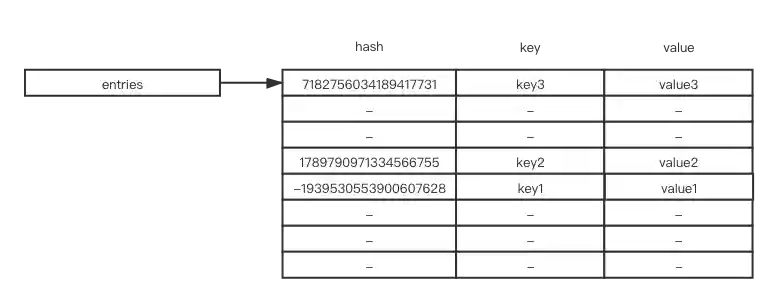
If you have many large sparse hash tables, it will waste lots of memory. To represent the hash table more compactly, you can split indices and real key-value objects inside the hash table (after Python 3.6)

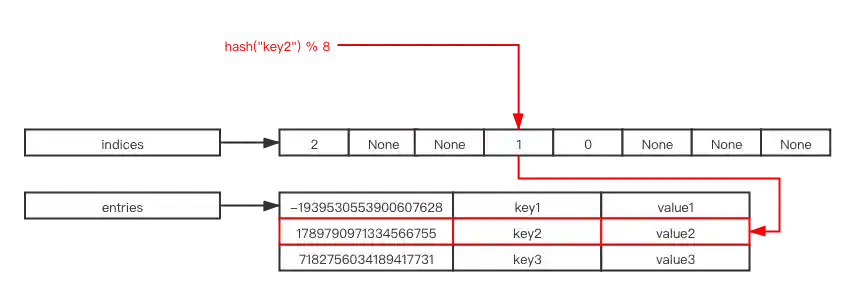
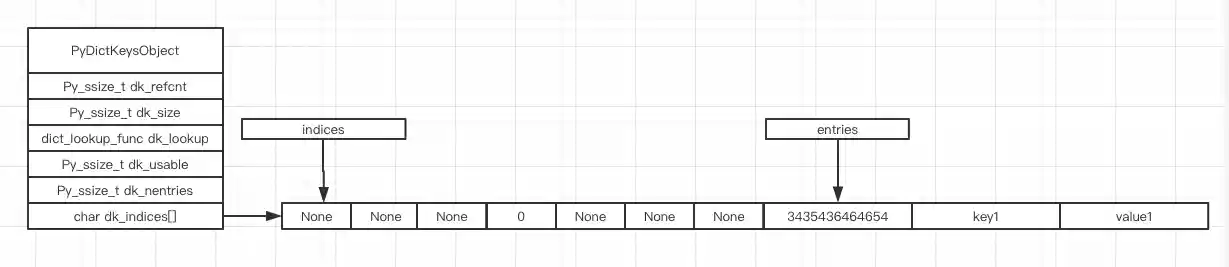
Indices points to an array of indices, entries points to where the original content is stored
You can think of indices as a simpler version of a hash table, and entries as an array that stores each original hash value, key, and value as an element
Whenever you search for an element or insert a new element, you take the hash result mod the size of indices to get an index in the indices array, then get the result you want from entries according to that index. For example, the result of hash("key2") % 8 is 3, and the value in indices[3] is 1, so we can go to entries and find what we need in entries[1]
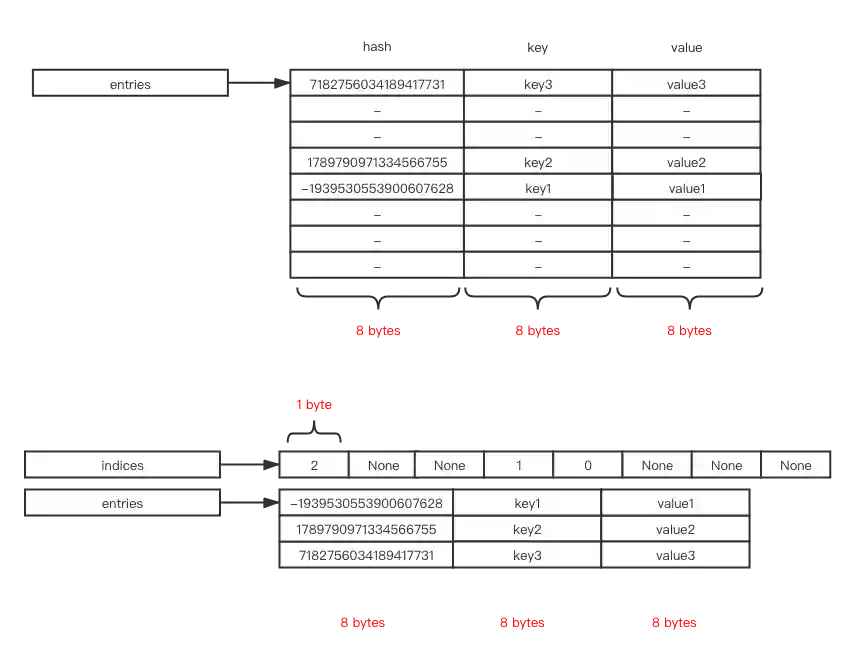
We can benefit from more compact space with the above approach. For example, in a 64-bit operating system, every pointer takes 8 bytes. We need 8 * 3 * 8 which is 192 originally, while we only need 8 * 3 * 3 + 1 * 8 which is 80. This saves about 58% of memory usage.
Because entries stores elements in the insertion order, we can traverse the hash table in the same order as we insert items. In the old implementation, the hash table stored elements in the order of the hash key, so it appeared unordered when you traversed the hash table. That’s why dict before Python 3.6 is unordered and after Python 3.6 is ordered.
PyPy implemented the compact and ordered dict first, and CPython implemented it in PEP 468 and released it in Python 3.6.
memory layout
Now, let’s see the memory layout.
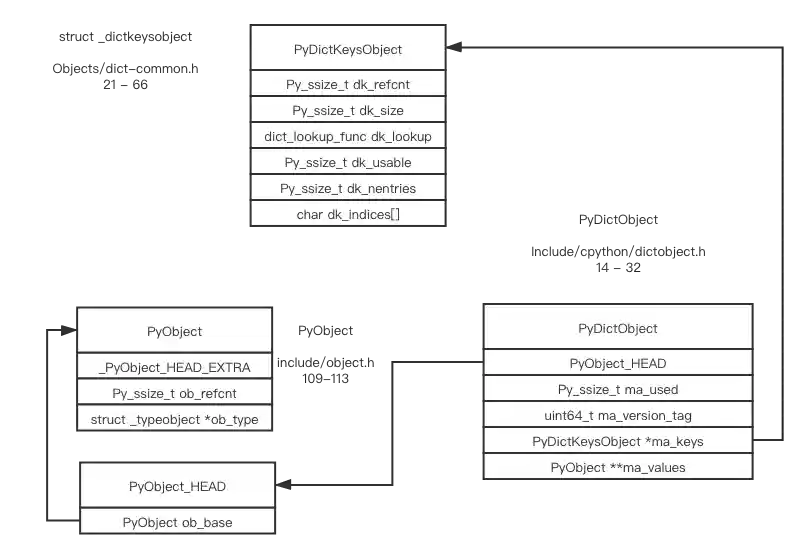
combined table and split table
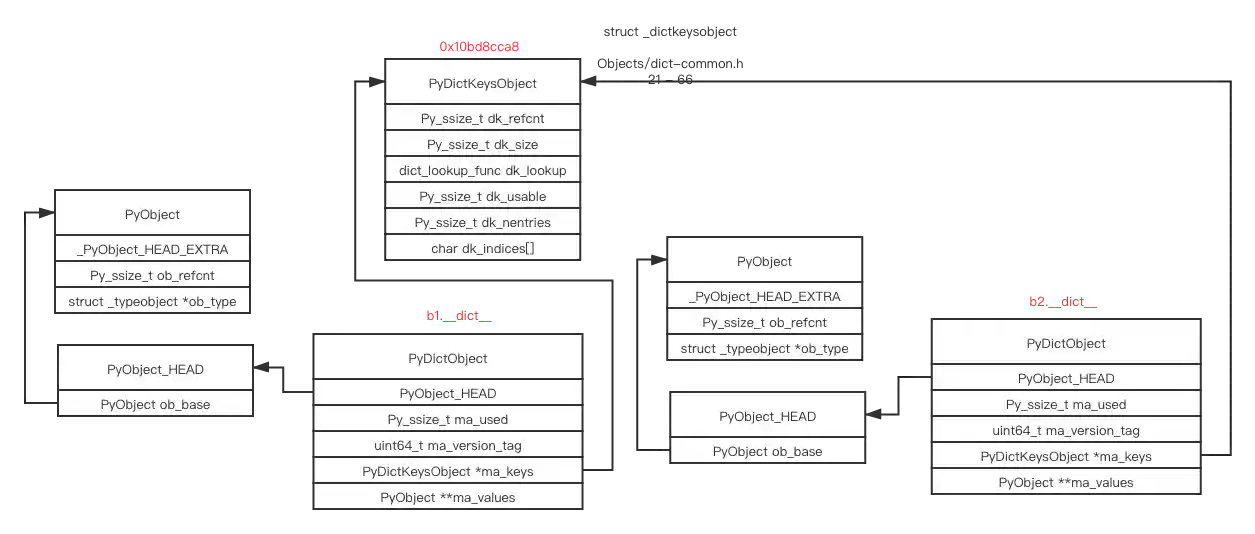
I was confused when I first looked at the definition of PyDictObject. What’s ma_values? Why does PyDictKeysObject look different from the indices/entries structure above?
The source code says
/*
The DictObject can be in one of two forms.

Either:
  A combined table:
    ma_values == NULL, dk_refcnt == 1.
    Values are stored in the me_value field of the PyDictKeysObject.
Or:
  A split table:
    ma_values != NULL, dk_refcnt >= 1
    Values are stored in the ma_values array.
    Only string (unicode) keys are allowed.
    All dicts sharing same key must have same insertion order.
*/
In what situation will different dict objects share the same keys but different values, only contain Unicode keys and no dummy keys (no deleted objects), and preserve the same insertion order? Let’s try.
# I've altered the source code to print some state information

class B(object):
    b = 1

b1 = B()
b2 = B()

# the __dict__ object hasn't generated yet
>>> b1.b
1
>>> b2.b
1

# __dict__ object appears, b1.__dict__ and b2.__dict__ are both split tables, they share the same PyDictKeysObject
>>> b1.b = 3
in lookdict_split, address of PyDictObject: 0x10bc0eb40, address of PyDictKeysObject: 0x10bd8cca8, key_str: b
>>> b2.b = 4
in lookdict_split, address of PyDictObject: 0x10bdbbc00, address of PyDictKeysObject: 0x10bd8cca8, key_str: b
>>> b1.b
in lookdict_split, address of PyDictObject: 0x10bc0eb40, address of PyDictKeysObject: 0x10bd8cca8, key_str: b
3
>>> b2.b
in lookdict_split, address of PyDictObject: 0x10bdbbc00, address of PyDictKeysObject: 0x10bd8cca8, key_str: b
4
# after delete a key from split table, it becomes combined table
>>> b2.x = 3
in lookdict_split, address of PyDictObject: 0x10bdbbc00, address of PyDictKeysObject: 0x10bd8cca8, key_str: x
>>> del b2.x
in lookdict_split, address of PyDictObject: 0x10bdbbc00, address of PyDictKeysObject: 0x10bd8cca8, key_str: x
# now, no more lookdict_split
>>> b2.b
4
The splittable implementation can save lots of memory if you have many instances of the same class. For more detail, please refer to PEP 412 – Key-Sharing Dictionary
indices and entries
Let’s analyze some source code to understand how indices/entries are implemented in PyDictKeysObject. What does char dk_indices[] mean in PyDictKeysObject? (It took me some time to figure out)
/*
dk_indices is actual hashtable.  It holds index in entries, or DKIX_EMPTY(-1)
or DKIX_DUMMY(-2).
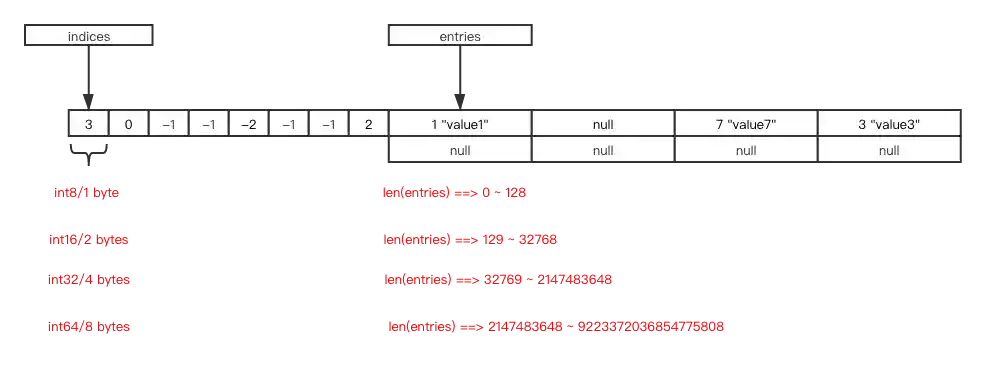
Size of indices is dk_size.  Type of each index in indices is vary on dk_size:

* int8  for          dk_size <= 128
* int16 for 256   <= dk_size <= 2**15
* int32 for 2**16 <= dk_size <= 2**31
* int64 for 2**32 <= dk_size

dk_entries is array of PyDictKeyEntry.  It's size is USABLE_FRACTION(dk_size).
DK_ENTRIES(dk) can be used to get a pointer to entries.

NOTE: Since negative value is used for DKIX_EMPTY and DKIX_DUMMY, type of
dk_indices entry is signed integer and int16 is used for a table which
dk_size == 256.
*/

#define DK_SIZE(dk) ((dk)->dk_size)
#if SIZEOF_VOID_P > 4
#define DK_IXSIZE(dk)                          \
    (DK_SIZE(dk) <= 0xff ?                     \
        1 : DK_SIZE(dk) <= 0xffff ?            \
            2 : DK_SIZE(dk) <= 0xffffffff ?    \
                4 : sizeof(int64_t))
#else
#define DK_IXSIZE(dk)                          \
    (DK_SIZE(dk) <= 0xff ?                     \
        1 : DK_SIZE(dk) <= 0xffff ?            \
            2 : sizeof(int32_t))
#endif
#define DK_ENTRIES(dk) \
    ((PyDictKeyEntry*)(&((int8_t*)((dk)->dk_indices))[DK_SIZE(dk) * DK_IXSIZE(dk)]))
Let’s rewrite the macro
#define DK_ENTRIES(dk) \
    ((PyDictKeyEntry*)(&((int8_t*)((dk)->dk_indices))[DK_SIZE(dk) * DK_IXSIZE(dk)]))
to
// assume int8_t can fit into the indices array
size_t indices_offset = DK_SIZE(dk) * DK_IXSIZE(dk);
int8_t *pointer_to_indices = (int8_t *)(dk->dk_indices);
int8_t *pointer_to_entries = pointer_to_indices + indices_offset;
PyDictKeyEntry *entries = (PyDictKeyEntry *) pointer_to_entries;
now, the overview is clear
hash collisions and delete
How does CPython handle hash collisions in dict objects? Instead of depending on a good hash function, Python uses the “perturb” strategy. Let’s read some source code and try it out.
j = ((5*j) + 1) mod 2**i
0 -> 1 -> 6 -> 7 -> 4 -> 5 -> 2 -> 3 -> 0 [and here it's repeating]
perturb >>= PERTURB_SHIFT;
j = (5*j) + 1 + perturb;
use j % 2**i as the next table index;
I’ve altered the source code to print some information.
>>> d = dict()
>>> d[1] = 1
: 1, ix: -1, address of ep0: 0x10870d798, dk->dk_indices: 0x10870d790
ma_used: 0, ma_version_tag: 11313, PyDictKeyObject.dk_refcnt: 1, PyDictKeyObject.dk_size: 8, PyDictKeyObject.dk_usable: 5, PyDictKeyObject.dk_nentries: 0
DK_SIZE(dk): 8, DK_IXSIZE(dk): 1, DK_SIZE(dk) * DK_IXSIZE(dk): 8, &((int8_t *)((dk)->dk_indices))[DK_SIZE(dk) * DK_IXSIZE(dk)]): 0x10870d798

>>> repr(d)
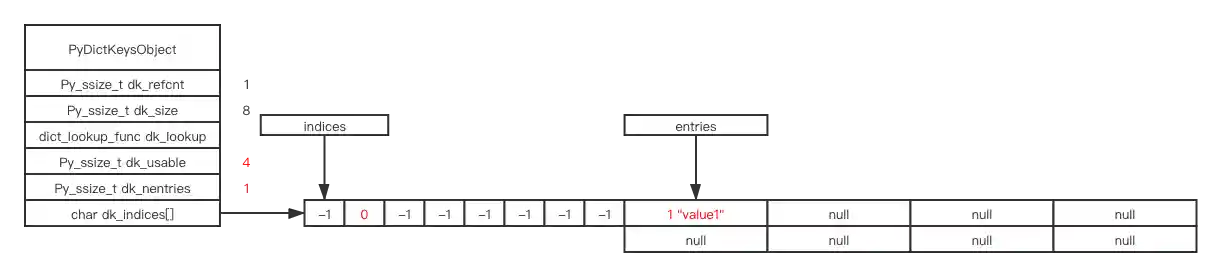
ma_used: 1, ma_version_tag: 11322, PyDictKeyObject.dk_refcnt: 1, PyDictKeyObject.dk_size: 8, PyDictKeyObject.dk_usable: 4, PyDictKeyObject.dk_nentries: 1
index: 0 ix: -1 DKIX_EMPTY
index: 1 ix: 0 me_hash: 1, me_key: 1, me_value: 1
index: 2 ix: -1 DKIX_EMPTY
index: 3 ix: -1 DKIX_EMPTY
index: 4 ix: -1 DKIX_EMPTY
index: 5 ix: -1 DKIX_EMPTY
index: 6 ix: -1 DKIX_EMPTY
index: 7 ix: -1 DKIX_EMPTY
'{1: 1}'
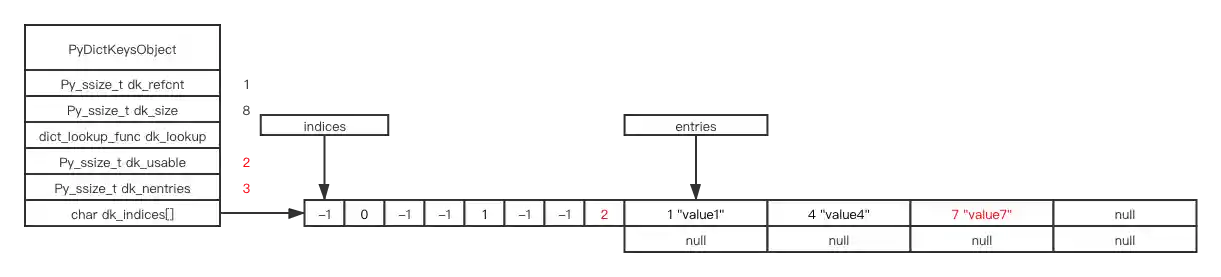
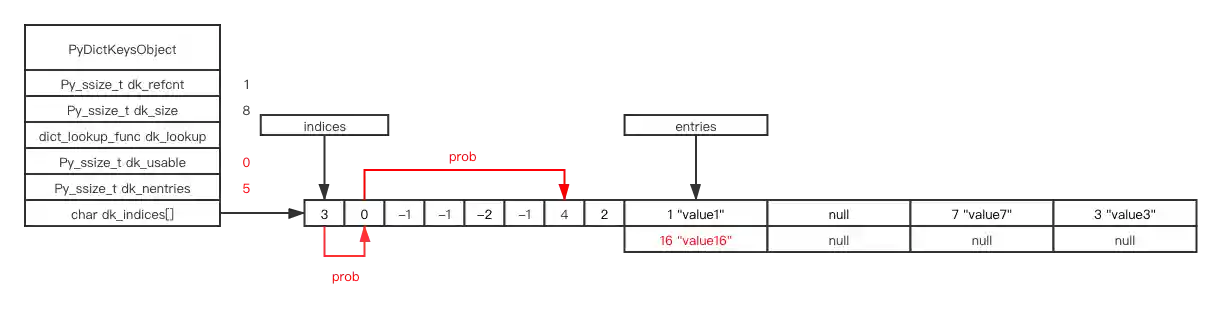
indices is the index, value -1(DKIX_EMPTY) means the current location is empty, now I set d[1] = "value1" in the code, hash(1) & mask == 1 will find the location 1 in the indices, it’s -1(DKIX_EMPTY) originally, means it’s free to use, we take the position and change -1 to the next free index in entries, which is 0, so we store 0 to indices[1].
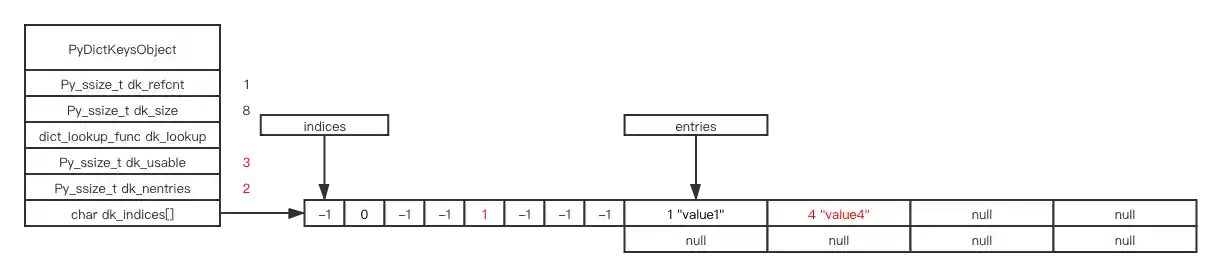
d[4] = "value4"
d[7] = "value7"
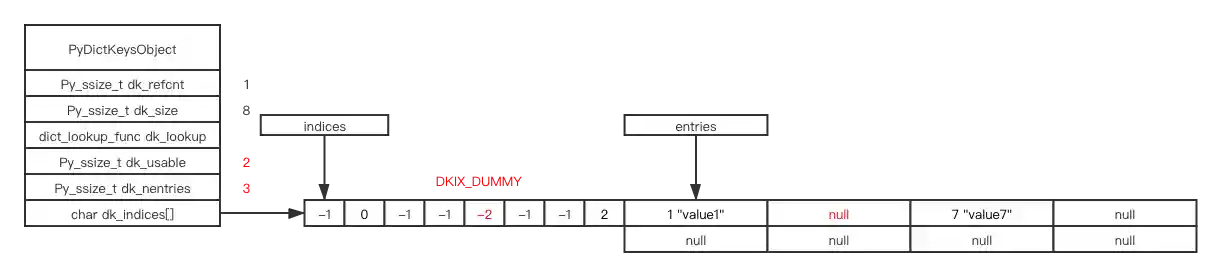
# delete, mark as DKIX_DUMMY
# notice, dk_usable and dk_nentries don't change
del d[4]
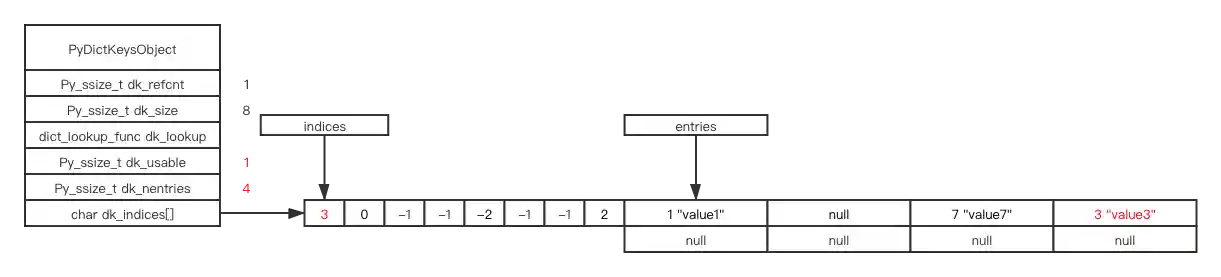
# notice, dk_usable and dk_nentries now change
d[0] = "value3"
If we insert an element with hash key result 16, hash (16) & mask == 0, but 0 is already taken, we encounter hash collision
There are various ways to handle hash collisions. Redis uses open hashing (linked list) to solve the problem. CPython dict object implements closed hashing with a more sporadic algorithm (read the source code if you’re interested).
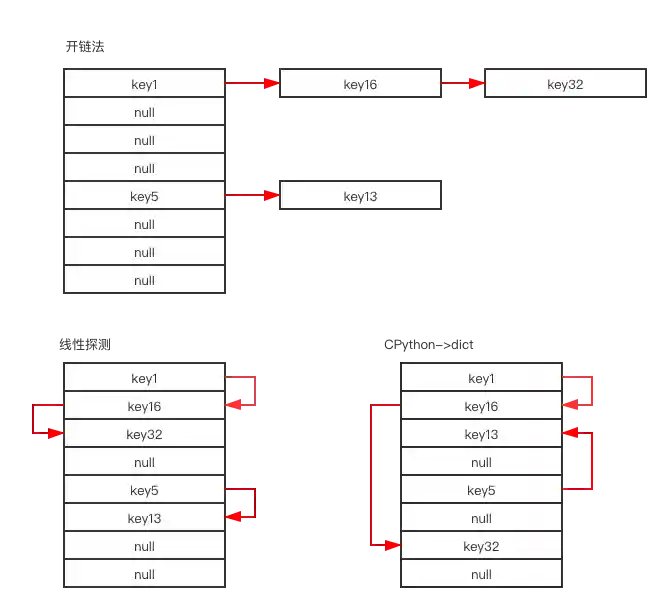
d[16] = "value16"
# hash (16) & mask == 0
# but position 0 already taken by key: 0, value: 0
# currently perturb = 16, PERTURB_SHIFT = 5, i = 0
# so, perturb >>= PERTURB_SHIFT ===> perturb == 0
# i = (i*5 + perturb + 1) & mask ===> i = 1
# now, position 1 already taken by key: 1, value: 1
# currently perturb = 0, PERTURB_SHIFT = 5, i = 1
# so, perturb >>= PERTURB_SHIFT ===> perturb == 0
# i = (i*5 + perturb + 1) & mask ===> i = 6
# position 6 is empty, so we take it
resize
# now, dk_usable is 0, dk_nentries is 5
# let's insert one more item
d[5] = 5
# step1: resize, when resizing, the deleted objects marked as DKIX_DUMMY in entries won't be copied
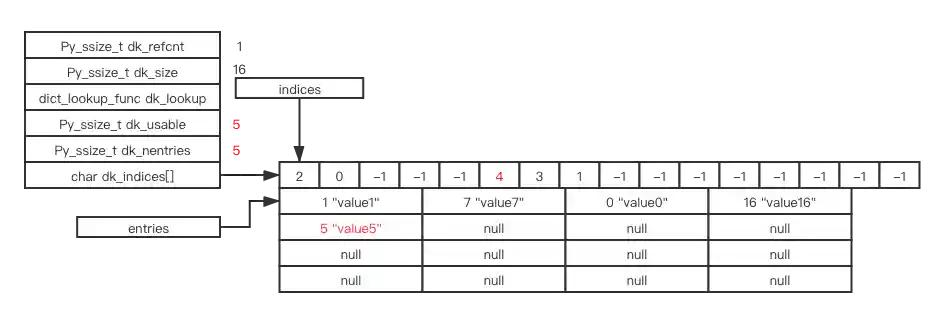
# step2: insert key: 5, value: 5
variable size indices
Notice that the indices array has variable size. When the size of your hash table is <= 128, the type of each item is int8. For larger tables, it uses int16, int32, or int64. The variable size of the indices array can save memory.
free list
#ifndef PyDict_MAXFREELIST
#define PyDict_MAXFREELIST 80
#endif
static PyDictObject *free_list[PyDict_MAXFREELIST];
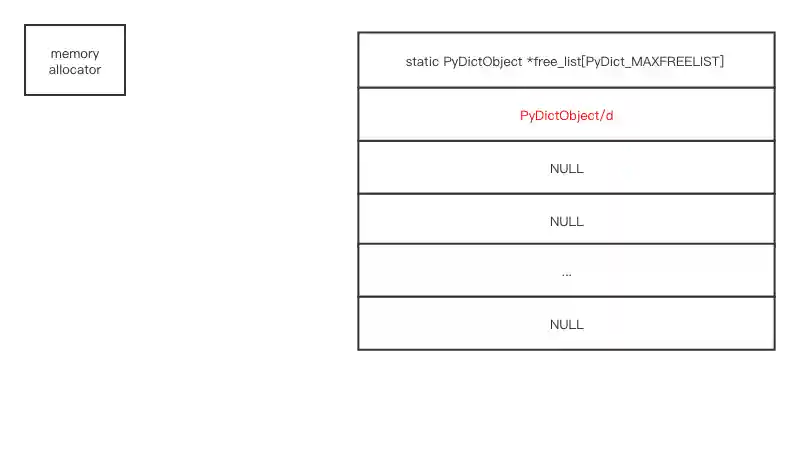
CPython also uses free_list to reuse deleted hash tables, to avoid memory fragmentation and improve performance.
There exists a per-process global variable named free_list.
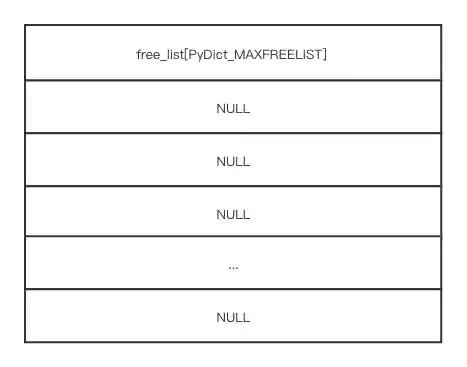
If we create a new dict object, the memory request is delegated to CPython’s memory management system
d = dict()
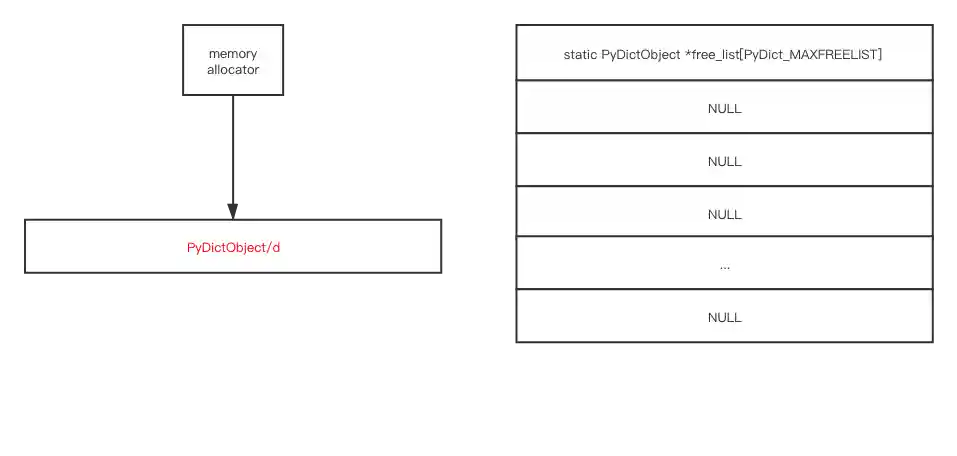
del a
The destructor of the dict type will store the current dict in free_list (if free_list is not full)
Next time you create a new dict object, free_list will be checked for available objects you can use directly. If available, allocate from free_list; if not, allocate from CPython’s memory management system
d = dict()
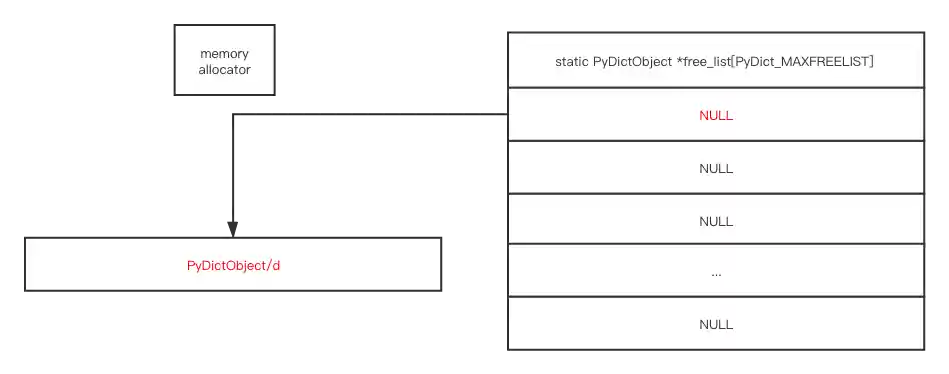
delete
The lazy deletion strategy is used for deletion in dict objects
why mark as DKIX_DUMMY
Why mark as DKIX_DUMMY in the indices?
There are three kinds of values for each slot in indices: DKIX_EMPTY(-1), DKIX_DUMMY(-2), and Active/Pending(>=0). If you mark a slot as DKIX_EMPTY instead of DKIX_DUMMY, the “perturb” strategy for inserting and finding key/values will fail. Imagine you have a hash table of size 8; these are the indices in the hash table.
indices: [0]  [1] [DKIX_EMPTY] [2] [DKIX_EMPTY] [DKIX_EMPTY]   [3]  [4]
index:    0    1         2      3        4           5          6    7
When you search for an item with hash value 0, and the real position is in entries[4], this is the searching process according to the “perturb” strategy.
0 -> 1 -> 6 -> 7(found, no need to go on)
if you delete the 6th indices and mark it as DKIX_EMPTY, when you search for the same item again
indices: [0]  [1] [DKIX_EMPTY] [2] [DKIX_EMPTY] [DKIX_EMPTY]   [DKIX_EMPTY]  [4]
index:    0    1         2      3        4           5               6        7
the searching process now becomes
0 -> 1 -> 6(it's DKIX_EMPTY, the last inserted item with same hash value must be inserted in indices[1], since no matched result, the item being searched is not in this table)
The item being searched is in indices[7], but the “perturb” strategy stopped before indices[7] due to the wrong DKIX_EMPTY in indices[6]. If we mark deleted as DKIX_DUMMY
indices: [0]  [1] [DKIX_EMPTY] [2] [DKIX_EMPTY] [DKIX_EMPTY]   [DKIX_DUMMY]  [4]
index:    0    1         2      3        4           5               6        7
the searching process becomes
0 -> 1 -> 6(DKIX_DUMMY, inserted before, but deleted, keep searching) -> 7(found, no need to go on)
Also, indices with DKIX_DUMMY can be used for new items
delete in entries
Dict objects need to guarantee insertion order, so the delete operation can’t shuffle objects in entries
Leaving entries[i] empty and packing these empty entries later in the resize operation keeps the time complexity of delete operations at amortized O(1)
Deleting entries from dictionaries is not very common, so being a little bit slower in some cases is acceptable (PyPy Status Blog)
end
Now you understand how Python dictionary objects work internally.