pub struct ArrayBase<S, D, A = <S as RawData>::Elem>where
S: RawData<Elem = A>,
{ /* private fields */ }Expand description
An n-dimensional array.
The array is a general container of elements. The array supports arithmetic operations by applying them elementwise, if the elements are numeric, but it supports non-numeric elements too.
The arrays rarely grow or shrink, since those operations can be costly. On the other hand there is a rich set of methods and operations for taking views, slices, and making traversals over one or more arrays.
In n-dimensional we include for example 1-dimensional rows or columns, 2-dimensional matrices, and higher dimensional arrays. If the array has n dimensions, then an element is accessed by using that many indices.
The ArrayBase<S, D> is parameterized by S for the data container and
D for the dimensionality.
Type aliases Array, ArcArray, CowArray, ArrayView, and
ArrayViewMut refer to ArrayBase with different types for the data
container: arrays with different kinds of ownership or different kinds of array views.
§Contents
- Array
- ArcArray
- CowArray
- Array Views
- Indexing and Dimension
- Loops, Producers and Iterators
- Slicing
- Subviews
- Arithmetic Operations
- Broadcasting
- Conversions
- Constructor Methods for Owned Arrays
- Methods For All Array Types
- Methods For 1-D Arrays
- Methods For 2-D Arrays
- Methods for Dynamic-Dimensional Arrays
- Numerical Methods for Arrays
§Array
Array is an owned array that owns the underlying array
elements directly (just like a Vec) and it is the default way to create and
store n-dimensional data. Array<A, D> has two type parameters: A for
the element type, and D for the dimensionality. A particular
dimensionality’s type alias like Array3<A> just has the type parameter
A for element type.
An example:
// Create a three-dimensional f64 array, initialized with zeros
use ndarray::Array3;
let mut temperature = Array3::<f64>::zeros((3, 4, 5));
// Increase the temperature in this location
temperature[[2, 2, 2]] += 0.5;§ArcArray
ArcArray is an owned array with reference counted
data (shared ownership).
Sharing requires that it uses copy-on-write for mutable operations.
Calling a method for mutating elements on ArcArray, for example
view_mut() or get_mut(),
will break sharing and require a clone of the data (if it is not uniquely held).
§CowArray
CowArray is analogous to std::borrow::Cow.
It can represent either an immutable view or a uniquely owned array. If a
CowArray instance is the immutable view variant, then calling a method
for mutating elements in the array will cause it to be converted into the
owned variant (by cloning all the elements) before the modification is
performed.
§Array Views
ArrayView and ArrayViewMut are read-only and read-write array views
respectively. They use dimensionality, indexing, and almost all other
methods the same way as the other array types.
Methods for ArrayBase apply to array views too, when the trait bounds
allow.
Please see the documentation for the respective array view for an overview
of methods specific to array views: ArrayView, ArrayViewMut.
A view is created from an array using .view(),
.view_mut(), using
slicing (.slice(), .slice_mut()) or from one of
the many iterators that yield array views.
You can also create an array view from a regular slice of data not
allocated with Array — see array view methods or their From impls.
Note that all ArrayBase variants can change their view (slicing) of the
data freely, even when their data can’t be mutated.
§Indexing and Dimension
The dimensionality of the array determines the number of axes, for example a 2D array has two axes. These are listed in “big endian” order, so that the greatest dimension is listed first, the lowest dimension with the most rapidly varying index is the last.
In a 2D array the index of each element is [row, column] as seen in this
4 × 3 example:
[[ [0, 0], [0, 1], [0, 2] ],  // row 0
 [ [1, 0], [1, 1], [1, 2] ],  // row 1
 [ [2, 0], [2, 1], [2, 2] ],  // row 2
 [ [3, 0], [3, 1], [3, 2] ]]  // row 3
//    \       \       \
//   column 0  \     column 2
//            column 1
The number of axes for an array is fixed by its D type parameter: Ix1
for a 1D array, Ix2 for a 2D array etc. The dimension type IxDyn allows
a dynamic number of axes.
A fixed size array ([usize; N]) of the corresponding dimensionality is
used to index the Array, making the syntax array[[ i, j, …]]
use ndarray::Array2;
let mut array = Array2::zeros((4, 3));
array[[1, 1]] = 7;
Important traits and types for dimension and indexing:
- A
Dimvalue represents a dimensionality or index. - Trait
Dimensionis implemented by all dimensionalities. It defines many operations for dimensions and indices. - Trait
IntoDimensionis used to convert into aDimvalue. - Trait
ShapeBuilderis an extension ofIntoDimensionand is used when constructing an array. A shape describes not just the extent of each axis but also their strides. - Trait
NdIndexis an extension ofDimensionand is for values that can be used with indexing syntax.
The default memory order of an array is row major order (a.k.a “c” order), where each row is contiguous in memory. A column major (a.k.a. “f” or fortran) memory order array has columns (or, in general, the outermost axis) with contiguous elements.
The logical order of any array’s elements is the row major order
(the rightmost index is varying the fastest).
The iterators .iter(), .iter_mut() always adhere to this order, for example.
§Loops, Producers and Iterators
Using Zip is the most general way to apply a procedure
across one or several arrays or producers.
NdProducer is like an iterable but for
multidimensional data. All producers have dimensions and axes, like an
array view, and they can be split and used with parallelization using Zip.
For example, ArrayView<A, D> is a producer, it has the same dimensions
as the array view and for each iteration it produces a reference to
the array element (&A in this case).
Another example, if we have a 10 × 10 array and use .exact_chunks((2, 2))
we get a producer of chunks which has the dimensions 5 × 5 (because
there are 10 / 2 = 5 chunks in either direction). The 5 × 5 chunks producer
can be paired with any other producers of the same dimension with Zip, for
example 5 × 5 arrays.
§.iter() and .iter_mut()
These are the element iterators of arrays and they produce an element sequence in the logical order of the array, that means that the elements will be visited in the sequence that corresponds to increasing the last index first: 0, …, 0, 0; 0, …, 0, 1; 0, …0, 2 and so on.
§.outer_iter() and .axis_iter()
These iterators produce array views of one smaller dimension.
For example, for a 2D array, .outer_iter() will produce the 1D rows.
For a 3D array, .outer_iter() produces 2D subviews.
.axis_iter() is like outer_iter() but allows you to pick which
axis to traverse.
The outer_iter and axis_iter are one dimensional producers.
§.rows(), .columns() and .lanes()
.rows() is a producer (and iterable) of all rows in an array.
use ndarray::Array;

// 1. Loop over the rows of a 2D array
let mut a = Array::zeros((10, 10));
for mut row in a.rows_mut() {
    row.fill(1.);
}

// 2. Use Zip to pair each row in 2D `a` with elements in 1D `b`
use ndarray::Zip;
let mut b = Array::zeros(a.nrows());

Zip::from(a.rows())
    .and(&mut b)
    .for_each(|a_row, b_elt| {
        *b_elt = a_row[a.ncols() - 1] - a_row[0];
    });
The lanes of an array are 1D segments along an axis and when pointed along the last axis they are rows, when pointed along the first axis they are columns.
A m × n array has m rows each of length n and conversely n columns each of length m.
To generalize this, we say that an array of dimension a × m × n has a m rows. It’s composed of a times the previous array, so it has a times as many rows.
All methods: .rows(), .rows_mut(),
.columns(), .columns_mut(),
.lanes(axis), .lanes_mut(axis).
Yes, for 2D arrays .rows() and .outer_iter() have about the same
effect:
rows()is a producer with n - 1 dimensions of 1 dimensional itemsouter_iter()is a producer with 1 dimension of n - 1 dimensional items
§Slicing
You can use slicing to create a view of a subset of the data in
the array. Slicing methods include .slice(), .slice_mut(),
.slice_move(), and .slice_collapse().
The slicing argument can be passed using the macro s![],
which will be used in all examples. (The explicit form is an instance of
SliceInfo or another type which implements SliceArg; see their docs
for more information.)
If a range is used, the axis is preserved. If an index is used, that index
is selected and the axis is removed; this selects a subview. See
Subviews for more information about subviews. If a
NewAxis instance is used, a new axis is inserted. Note that
.slice_collapse() panics on NewAxis elements and behaves like
.collapse_axis() by preserving the number of dimensions.
When slicing arrays with generic dimensionality, creating an instance of
SliceInfo to pass to the multi-axis slicing methods like .slice()
is awkward. In these cases, it’s usually more convenient to use
.slice_each_axis()/.slice_each_axis_mut()/.slice_each_axis_inplace()
or to create a view and then slice individual axes of the view using
methods such as .slice_axis_inplace() and .collapse_axis().
It’s possible to take multiple simultaneous mutable slices with
.multi_slice_mut() or (for ArrayViewMut only)
.multi_slice_move().
use ndarray::{arr2, arr3, s, ArrayBase, DataMut, Dimension, NewAxis, Slice};

// 2 submatrices of 2 rows with 3 elements per row, means a shape of `[2, 2, 3]`.

let a = arr3(&[[[ 1,  2,  3],     // -- 2 rows  \_
                [ 4,  5,  6]],    // --         /
               [[ 7,  8,  9],     //            \_ 2 submatrices
                [10, 11, 12]]]);  //            /
//  3 columns ..../.../.../

assert_eq!(a.shape(), &[2, 2, 3]);

// Let’s create a slice with
//
// - Both of the submatrices of the greatest dimension: `..`
// - Only the first row in each submatrix: `0..1`
// - Every element in each row: `..`

let b = a.slice(s![.., 0..1, ..]);
let c = arr3(&[[[ 1,  2,  3]],
               [[ 7,  8,  9]]]);
assert_eq!(b, c);
assert_eq!(b.shape(), &[2, 1, 3]);

// Let’s create a slice with
//
// - Both submatrices of the greatest dimension: `..`
// - The last row in each submatrix: `-1..`
// - Row elements in reverse order: `..;-1`
let d = a.slice(s![.., -1.., ..;-1]);
let e = arr3(&[[[ 6,  5,  4]],
               [[12, 11, 10]]]);
assert_eq!(d, e);
assert_eq!(d.shape(), &[2, 1, 3]);

// Let’s create a slice while selecting a subview and inserting a new axis with
//
// - Both submatrices of the greatest dimension: `..`
// - The last row in each submatrix, removing that axis: `-1`
// - Row elements in reverse order: `..;-1`
// - A new axis at the end.
let f = a.slice(s![.., -1, ..;-1, NewAxis]);
let g = arr3(&[[ [6],  [5],  [4]],
               [[12], [11], [10]]]);
assert_eq!(f, g);
assert_eq!(f.shape(), &[2, 3, 1]);

// Let's take two disjoint, mutable slices of a matrix with
//
// - One containing all the even-index columns in the matrix
// - One containing all the odd-index columns in the matrix
let mut h = arr2(&[[0, 1, 2, 3],
                   [4, 5, 6, 7]]);
let (s0, s1) = h.multi_slice_mut((s![.., ..;2], s![.., 1..;2]));
let i = arr2(&[[0, 2],
               [4, 6]]);
let j = arr2(&[[1, 3],
               [5, 7]]);
assert_eq!(s0, i);
assert_eq!(s1, j);

// Generic function which assigns the specified value to the elements which
// have indices in the lower half along all axes.
fn fill_lower<S, D>(arr: &mut ArrayBase<S, D>, x: S::Elem)
where
    S: DataMut,
    S::Elem: Clone,
    D: Dimension,
{
    arr.slice_each_axis_mut(|ax| Slice::from(0..ax.len / 2)).fill(x);
}
fill_lower(&mut h, 9);
let k = arr2(&[[9, 9, 2, 3],
               [4, 5, 6, 7]]);
assert_eq!(h, k);§Subviews
Subview methods allow you to restrict the array view while removing one
axis from the array. Methods for selecting individual subviews include
.index_axis(), .index_axis_mut(), .index_axis_move(), and
.index_axis_inplace(). You can also select a subview by using a single
index instead of a range when slicing. Some other methods, such as
.fold_axis(), .axis_iter(), .axis_iter_mut(),
.outer_iter(), and .outer_iter_mut() operate on all the subviews
along an axis.
A related method is .collapse_axis(), which modifies the view in the
same way as .index_axis() except for removing the collapsed axis, since
it operates in place. The length of the axis becomes 1.
Methods for selecting an individual subview take two arguments: axis and
index.
use ndarray::{arr3, aview1, aview2, s, Axis};


// 2 submatrices of 2 rows with 3 elements per row, means a shape of `[2, 2, 3]`.

let a = arr3(&[[[ 1,  2,  3],    // \ axis 0, submatrix 0
                [ 4,  5,  6]],   // /
               [[ 7,  8,  9],    // \ axis 0, submatrix 1
                [10, 11, 12]]]); // /
        //        \
        //         axis 2, column 0

assert_eq!(a.shape(), &[2, 2, 3]);

// Let’s take a subview along the greatest dimension (axis 0),
// taking submatrix 0, then submatrix 1

let sub_0 = a.index_axis(Axis(0), 0);
let sub_1 = a.index_axis(Axis(0), 1);

assert_eq!(sub_0, aview2(&[[ 1,  2,  3],
                           [ 4,  5,  6]]));
assert_eq!(sub_1, aview2(&[[ 7,  8,  9],
                           [10, 11, 12]]));
assert_eq!(sub_0.shape(), &[2, 3]);

// This is the subview picking only axis 2, column 0
let sub_col = a.index_axis(Axis(2), 0);

assert_eq!(sub_col, aview2(&[[ 1,  4],
                             [ 7, 10]]));

// You can take multiple subviews at once (and slice at the same time)
let double_sub = a.slice(s![1, .., 0]);
assert_eq!(double_sub, aview1(&[7, 10]));§Arithmetic Operations
Arrays support all arithmetic operations the same way: they apply elementwise.
Since the trait implementations are hard to overview, here is a summary.
§Binary Operators with Two Arrays
Let A be an array or view of any kind. Let B be an array
with owned storage (either Array or ArcArray).
Let C be an array with mutable data (either Array, ArcArray
or ArrayViewMut).
The following combinations of operands
are supported for an arbitrary binary operator denoted by @ (it can be
+, -, *, / and so on).
&A @ &Awhich produces a newArrayB @ Awhich consumesB, updates it with the result, and returns itB @ &Awhich consumesB, updates it with the result, and returns itC @= &Awhich performs an arithmetic operation in place
Note that the element type needs to implement the operator trait and the
Clone trait.
use ndarray::{array, ArrayView1};

let owned1 = array![1, 2];
let owned2 = array![3, 4];
let view1 = ArrayView1::from(&[5, 6]);
let view2 = ArrayView1::from(&[7, 8]);
let mut mutable = array![9, 10];

let sum1 = &view1 + &view2;   // Allocates a new array. Note the explicit `&`.
// let sum2 = view1 + &view2; // This doesn't work because `view1` is not an owned array.
let sum3 = owned1 + view1;    // Consumes `owned1`, updates it, and returns it.
let sum4 = owned2 + &view2;   // Consumes `owned2`, updates it, and returns it.
mutable += &view2; // Updates `mutable` in-place.§Binary Operators with Array and Scalar
The trait ScalarOperand marks types that can be used in arithmetic
with arrays directly. For a scalar K the following combinations of operands
are supported (scalar can be on either the left or right side, but
ScalarOperand docs has the detailed conditions).
&A @ KorK @ &Awhich produces a newArrayB @ KorK @ Bwhich consumesB, updates it with the result and returns itC @= Kwhich performs an arithmetic operation in place
§Unary Operators
Let A be an array or view of any kind. Let B be an array with owned
storage (either Array or ArcArray). The following operands are supported
for an arbitrary unary operator denoted by @ (it can be - or !).
@&Awhich produces a newArray@Bwhich consumesB, updates it with the result, and returns it
§Broadcasting
Arrays support limited broadcasting, where arithmetic operations with
array operands of different sizes can be carried out by repeating the
elements of the smaller dimension array. See
.broadcast() for a more detailed
description.
use ndarray::arr2;

let a = arr2(&[[1., 1.],
               [1., 2.],
               [0., 3.],
               [0., 4.]]);

let b = arr2(&[[0., 1.]]);

let c = arr2(&[[1., 2.],
               [1., 3.],
               [0., 4.],
               [0., 5.]]);
// We can add because the shapes are compatible even if not equal.
// The `b` array is shape 1 × 2 but acts like a 4 × 2 array.
assert!(
    c == a + b
);§Conversions
§Conversions Between Array Types
This table is a summary of the conversions between arrays of different ownership, dimensionality, and element type. All of the conversions in this table preserve the shape of the array.
| Output | Input | ||||
|---|---|---|---|---|---|
|
|
|
|
|
|
|
|
|
no-op |
||||
|
|
no-op |
||||
|
|
no-op |
||||
|
|
|||||
|
|
illegal |
||||
|
equivalent with dim |
|||||
|
equivalent with dim |
|||||
|
|
|||||
§Conversions Between Arrays and Vecs/Slices/Scalars
This is a table of the safe conversions between arrays and
Vecs/slices/scalars. Note that some of the return values are actually
Result/Option wrappers around the indicated output types.
| Input | Output | Methods |
|---|---|---|
Vec<A> | ArrayBase<S: DataOwned, Ix1> | ::from_vec() |
Vec<A> | ArrayBase<S: DataOwned, D> | ::from_shape_vec() |
&[A] | ArrayView1<A> | ::from() |
&[A] | ArrayView<A, D> | ::from_shape() |
&mut [A] | ArrayViewMut1<A> | ::from() |
&mut [A] | ArrayViewMut<A, D> | ::from_shape() |
&ArrayBase<S, Ix1> | Vec<A> | .to_vec() |
Array<A, D> | Vec<A> | .into_raw_vec()1 |
&ArrayBase<S, D> | &[A] | .as_slice()2, .as_slice_memory_order()3 |
&mut ArrayBase<S: DataMut, D> | &mut [A] | .as_slice_mut()2, .as_slice_memory_order_mut()3 |
ArrayView<A, D> | &[A] | .to_slice()2 |
ArrayViewMut<A, D> | &mut [A] | .into_slice()2 |
Array0<A> | A | .into_scalar() |
1Returns the data in memory order.
2Works only if the array is contiguous and in standard order.
3Works only if the array is contiguous.
The table above does not include all the constructors; it only shows
conversions to/from Vecs/slices. See
below for more constructors.
§Conversions from Nested Vecs/Arrays
It’s generally a good idea to avoid nested Vec/Array types, such as
Vec<Vec<A>> or Vec<Array2<A>> because:
-
they require extra heap allocations compared to a single
Array, -
they can scatter data all over memory (because of multiple allocations),
-
they cause unnecessary indirection (traversing multiple pointers to reach the data),
-
they don’t enforce consistent shape within the nested
Vecs/ArrayBases, and -
they are generally more difficult to work with.
The most common case where users might consider using nested
Vecs/Arrays is when creating an array by appending rows/subviews in a
loop, where the rows/subviews are computed within the loop. However, there
are better ways than using nested Vecs/Arrays.
If you know ahead-of-time the shape of the final array, the cleanest solution is to allocate the final array before the loop, and then assign the data to it within the loop, like this:
use ndarray::{array, Array2, Axis};

let mut arr = Array2::zeros((2, 3));
for (i, mut row) in arr.axis_iter_mut(Axis(0)).enumerate() {
    // Perform calculations and assign to `row`; this is a trivial example:
    row.fill(i);
}
assert_eq!(arr, array![[0, 0, 0], [1, 1, 1]]);
If you don’t know ahead-of-time the shape of the final array, then the
cleanest solution is generally to append the data to a flat Vec, and then
convert it to an Array at the end with
::from_shape_vec(). You just have to be careful
that the layout of the data (the order of the elements in the flat Vec)
is correct.
use ndarray::{array, Array2};

let ncols = 3;
let mut data = Vec::new();
let mut nrows = 0;
for i in 0..2 {
    // Compute `row` and append it to `data`; this is a trivial example:
    let row = vec![i; ncols];
    data.extend_from_slice(&row);
    nrows += 1;
}
let arr = Array2::from_shape_vec((nrows, ncols), data)?;
assert_eq!(arr, array![[0, 0, 0], [1, 1, 1]]);
If neither of these options works for you, and you really need to convert
nested Vec/Array instances to an Array, the cleanest solution is
generally to use Iterator::flatten()
to get a flat Vec, and then convert the Vec to an Array with
::from_shape_vec(), like this:
use ndarray::{array, Array2, Array3};

let nested: Vec<Array2<i32>> = vec![
    array![[1, 2, 3], [4, 5, 6]],
    array![[7, 8, 9], [10, 11, 12]],
];
let inner_shape = nested[0].dim();
let shape = (nested.len(), inner_shape.0, inner_shape.1);
let flat: Vec<i32> = nested.iter().flatten().cloned().collect();
let arr = Array3::from_shape_vec(shape, flat)?;
assert_eq!(arr, array![
    [[1, 2, 3], [4, 5, 6]],
    [[7, 8, 9], [10, 11, 12]],
]);
Note that this implementation assumes that the nested Vecs are all the
same shape and that the Vec is non-empty. Depending on your application,
it may be a good idea to add checks for these assumptions and possibly
choose a different way to handle the empty case.
Source§§Constructor Methods for Owned Arrays
Note that the constructor methods apply to Array and ArcArray,
the two array types that have owned storage.
§Constructor Methods for Owned Arrays
Note that the constructor methods apply to Array and ArcArray,
the two array types that have owned storage.
§Constructor methods for one-dimensional arrays.
Source
Create a one-dimensional array from a vector (no copying needed).
Panics if the length is greater than isize::MAX.
use ndarray::Array;

let array = Array::from_vec(vec![1., 2., 3., 4.]);
Source
Create a one-dimensional array from an iterator or iterable.
Panics if the length is greater than isize::MAX.
use ndarray::Array;

let array = Array::from_iter(0..10);
Source Available on crate feature std only.
std only.Create a one-dimensional array with n evenly spaced elements from
start to end (inclusive). A must be a floating point type.
Note that if start > end, the first element will still be start,
and the following elements will be decreasing. This is different from
the behavior of std::ops::RangeInclusive, which interprets start > end to mean that the range is empty.
Panics if n is greater than isize::MAX or if converting n - 1
to type A fails.
use ndarray::{Array, arr1};

let array = Array::linspace(0., 1., 5);
assert!(array == arr1(&[0.0, 0.25, 0.5, 0.75, 1.0]))
Source Available on crate feature std only.
std only.Create a one-dimensional array with elements from start to end
(exclusive), incrementing by step. A must be a floating point type.
Panics if the length is greater than isize::MAX.
use ndarray::{Array, arr1};

let array = Array::range(0., 5., 1.);
assert!(array == arr1(&[0., 1., 2., 3., 4.]))
Source Available on crate feature std only.
std only.Create a one-dimensional array with n logarithmically spaced
elements, with the starting value being base.powf(start) and the
final one being base.powf(end). A must be a floating point type.
If base is negative, all values will be negative.
Panics if n is greater than isize::MAX or if converting n - 1
to type A fails.
use approx::assert_abs_diff_eq;
use ndarray::{Array, arr1};

let array = Array::logspace(10.0, 0.0, 3.0, 4);
assert_abs_diff_eq!(array, arr1(&[1e0, 1e1, 1e2, 1e3]), epsilon = 1e-12);

let array = Array::logspace(-10.0, 3.0, 0.0, 4);
assert_abs_diff_eq!(array, arr1(&[-1e3, -1e2, -1e1, -1e0]), epsilon = 1e-12);
Source Available on crate feature std only.
std only.Create a one-dimensional array with n geometrically spaced elements
from start to end (inclusive). A must be a floating point type.
Returns None if start and end have different signs or if either
one is zero. Conceptually, this means that in order to obtain a Some
result, end / start must be positive.
Panics if n is greater than isize::MAX or if converting n - 1
to type A fails.
use approx::assert_abs_diff_eq;
use ndarray::{Array, arr1};

let array = Array::geomspace(1e0, 1e3, 4)?;
assert_abs_diff_eq!(array, arr1(&[1e0, 1e1, 1e2, 1e3]), epsilon = 1e-11);

let array = Array::geomspace(-1e3, -1e0, 4)?;
assert_abs_diff_eq!(array, arr1(&[-1e3, -1e2, -1e1, -1e0]), epsilon = 1e-11);Source§§Constructor methods for two-dimensional arrays.
§Constructor methods for two-dimensional arrays.
Source
Create an identity matrix of size n (square 2D array).
Panics if n * n would overflow isize.
Source
Create a 2D matrix from its diagonal
Panics if diag.len() * diag.len() would overflow isize.
use ndarray::{Array2, arr1, arr2};

let diag = arr1(&[1, 2]);
let array = Array2::from_diag(&diag);
assert_eq!(array, arr2(&[[1, 0], [0, 2]]));
Source
Create a square 2D matrix of the specified size, with the specified element along the diagonal and zeros elsewhere.
Panics if n * n would overflow isize.
use ndarray::{array, Array2};

let array = Array2::from_diag_elem(2, 5.);
assert_eq!(array, array![[5., 0.], [0., 5.]]);Source§§Constructor methods for n-dimensional arrays.
The shape argument can be an integer or a tuple of integers to specify
a static size. For example 10 makes a length 10 one-dimensional array
(dimension type Ix1) and (5, 6) a 5 × 6 array (dimension type Ix2).
§Constructor methods for n-dimensional arrays.
The shape argument can be an integer or a tuple of integers to specify
a static size. For example 10 makes a length 10 one-dimensional array
(dimension type Ix1) and (5, 6) a 5 × 6 array (dimension type Ix2).
With the trait ShapeBuilder in scope, there is the method .f() to select
column major (“f” order) memory layout instead of the default row major.
For example Array::zeros((5, 6).f()) makes a column major 5 × 6 array.
Use IxDyn for the shape to create an array with dynamic
number of axes.
Finally, the few constructors that take a completely general
Into<StrideShape> argument optionally support custom strides, for
example a shape given like (10, 2, 2).strides((1, 10, 20)) is valid.
Source
Create an array with copies of elem, shape shape.
Panics if the product of non-zero axis lengths overflows isize.
use ndarray::{Array, arr3, ShapeBuilder};

let a = Array::from_elem((2, 2, 2), 1.);

assert!(
    a == arr3(&[[[1., 1.],
                 [1., 1.]],
                [[1., 1.],
                 [1., 1.]]])
);
assert!(a.strides() == &[4, 2, 1]);

let b = Array::from_elem((2, 2, 2).f(), 1.);
assert!(b.strides() == &[1, 2, 4]);
Source
Create an array with zeros, shape shape.
The element type is inferred; to control it, you can either specify type of the returned array or use turbofish syntax in the function call:
use ndarray::{Array1, arr1};

// Specify f32
let arr_f32: Array1<f32> = Array1::zeros(3);
assert_eq!(arr_f32, arr1(&[0_f32, 0.0, 0.0]));

// Specify i64
let arr_i64 = Array1::<i64>::zeros(3);
assert_eq!(arr_i64, arr1(&[0_i64, 0, 0]));
Panics if the product of non-zero axis lengths overflows isize.
Source
Create an array with ones, shape shape.
Panics if the product of non-zero axis lengths overflows isize.
Source
Create an array with default values, shape shape
Panics if the product of non-zero axis lengths overflows isize.
Source
Create an array with values created by the function f.
f is called with no argument, and it should return the element to
create. If the precise index of the element to create is needed,
use from_shape_fn instead.
This constructor can be useful if the element order is not important, for example if they are identical or random.
Panics if the product of non-zero axis lengths overflows isize.
Source
Create an array with values created by the function f.
f is called with the index of the element to create; the elements are
visited in arbitrary order.
Panics if the product of non-zero axis lengths overflows isize.
use ndarray::{Array, arr2};

// Create a table of i × j (with i and j from 1 to 3)
let ij_table = Array::from_shape_fn((3, 3), |(i, j)| (1 + i) * (1 + j));

assert_eq!(
    ij_table,
    arr2(&[[1, 2, 3],
           [2, 4, 6],
           [3, 6, 9]])
);
Source
Create an array with the given shape from a vector. (No cloning of elements needed.)
For a contiguous c- or f-order shape, the following applies:
Errors if shape does not correspond to the number of elements in
v or if the shape/strides would result in overflowing isize.
For custom strides, the following applies:
Errors if strides and dimensions can point out of bounds of v, if
strides allow multiple indices to point to the same element, or if the
shape/strides would result in overflowing isize.
use ndarray::Array;
use ndarray::ShapeBuilder; // Needed for .strides() method
use ndarray::arr2;

let a = Array::from_shape_vec((2, 2), vec![1., 2., 3., 4.]);
assert!(a.is_ok());

let b = Array::from_shape_vec((2, 2).strides((1, 2)),
                              vec![1., 2., 3., 4.]).unwrap();
assert!(
    b == arr2(&[[1., 3.],
                [2., 4.]])
);
Source
Creates an array from a vector and interpret it according to the provided shape and strides. (No cloning of elements needed.)
§Safety
The caller must ensure that the following conditions are met:
-
The ndim of
dimandstridesmust be the same. -
The product of non-zero axis lengths must not exceed
isize::MAX. -
For axes with length > 1, the pointer cannot move outside the slice.
-
If the array will be empty (any axes are zero-length), the difference between the least address and greatest address accessible by moving along all axes must be ≤
v.len().If the array will not be empty, the difference between the least address and greatest address accessible by moving along all axes must be <
v.len(). -
The strides must not allow any element to be referenced by two different indices.
Source
Create an array with uninitialized elements, shape shape.
The uninitialized elements of type A are represented by the type MaybeUninit<A>,
an easier way to handle uninit values correctly.
Only when the array is completely initialized with valid elements, can it be
converted to an array of A elements using .assume_init().
Panics if the number of elements in shape would overflow isize.
§Safety
The whole of the array must be initialized before it is converted
using .assume_init() or otherwise traversed/read with the element type A.
§Examples
It is possible to assign individual values through *elt = MaybeUninit::new(value)
and so on.
use ndarray::{s, Array2};

// Example Task: Let's create a column shifted copy of the input

fn shift_by_two(a: &Array2<f32>) -> Array2<f32> {
    // create an uninitialized array
    let mut b = Array2::uninit(a.dim());

    // two first columns in b are two last in a
    // rest of columns in b are the initial columns in a

    a.slice(s![.., -2..]).assign_to(b.slice_mut(s![.., ..2]));
    a.slice(s![.., 2..]).assign_to(b.slice_mut(s![.., ..-2]));

    // Now we can promise that `b` is safe to use with all operations
    unsafe {
        b.assume_init()
    }
}
Source
Create an array with uninitialized elements, shape shape.
The uninitialized elements of type A are represented by the type MaybeUninit<A>,
an easier way to handle uninit values correctly.
The builder closure gets unshared access to the array through a view and can use it to
modify the array before it is returned. This allows initializing the array for any owned
array type (avoiding clone requirements for copy-on-write, because the array is unshared
when initially created).
Only when the array is completely initialized with valid elements, can it be
converted to an array of A elements using .assume_init().
Panics if the number of elements in shape would overflow isize.
§Safety
The whole of the array must be initialized before it is converted
using .assume_init() or otherwise traversed/read with the element type A.
Source§
Source
Return an uniquely owned copy of the array.
If the input array is contiguous, then the output array will have the same
memory layout. Otherwise, the layout of the output array is unspecified.
If you need a particular layout, you can allocate a new array with the
desired memory layout and .assign() the data.
Alternatively, you can collectan iterator, like this for a result in
standard layout:
Array::from_shape_vec(arr.raw_dim(), arr.iter().cloned().collect()).unwrap()or this for a result in column-major (Fortran) layout:
Array::from_shape_vec(arr.raw_dim().f(), arr.t().iter().cloned().collect()).unwrap()Return a shared ownership (copy on write) array, cloning the array elements if necessary.
Source
Turn the array into a uniquely owned array, cloning the array elements if necessary.
Source
Converts the array into Array<A, D> if this is possible without
cloning the array elements. Otherwise, returns self unchanged.
use ndarray::{array, rcarr2, ArcArray2, Array2};

// Reference-counted, clone-on-write `ArcArray`.
let a: ArcArray2<_> = rcarr2(&[[1., 2.], [3., 4.]]);
{
    // Another reference to the same data.
    let b: ArcArray2<_> = a.clone();
    // Since there are two references to the same data, `.into_owned()`
    // would require cloning the data, so `.try_into_owned_nocopy()`
    // returns `Err`.
    assert!(b.try_into_owned_nocopy().is_err());
}
// Here, since the second reference has been dropped, the `ArcArray`
// can be converted into an `Array` without cloning the data.
let unique: Array2<_> = a.try_into_owned_nocopy().unwrap();
assert_eq!(unique, array![[1., 2.], [3., 4.]]);Turn the array into a shared ownership (copy on write) array, cloning the array elements if necessary.
If you want to generalize over Array and ArcArray inputs but avoid
an A: Clone bound, use Into::<ArcArray<A, D>>::into instead of this
method.
Source§
Source
Slice the array in place along the specified axis, then return the sliced array.
Panics if an index is out of bounds or step size is zero.
Panics if axis is out of bounds.
Source§
Source
Collapses the array to index along the axis and removes the axis.
See .index_axis() and Subviews for full documentation.
Panics if axis or index is out of bounds.
Source§
Source
Return a mutable pointer to the first element in the array.
This method attempts to unshare the data. If S: DataMut, then the
data is guaranteed to be uniquely held on return.
§Warning
When accessing elements through this pointer, make sure to use strides obtained after calling this method, since the process of unsharing the data may change the strides.
Source§
Source
Return a raw mutable view of the array.
This method attempts to unshare the data. If S: DataMut, then the
data is guaranteed to be uniquely held on return.
Source
Return the array’s data as a slice, if it is contiguous and in standard order.
Return None otherwise.
Source
Return the array’s data as a slice if it is contiguous,
return None otherwise.
In the contiguous case, in order to return a unique reference, this method unshares the data if necessary, but it preserves the existing strides.
Source§
Source
Transform the array into shape; any shape with the same number of
elements is accepted, but the source array must be contiguous.
If an index ordering is not specified, the default is RowMajor.
The operation will only succeed if the array’s memory layout is compatible with
the index ordering, so that the array elements can be rearranged in place.
If required use .to_shape() or .into_shape_clone instead for more flexible reshaping of
arrays, which allows copying elements if required.
Errors if the shapes don’t have the same number of elements.
Errors if order RowMajor is given but input is not c-contiguous.
Errors if order ColumnMajor is given but input is not f-contiguous.
If shape is not given: use memory layout of incoming array. Row major arrays are reshaped using row major index ordering, column major arrays with column major index ordering.
The new_shape parameter should be a dimension and an optional order like these examples:
(3, 4)                          // Shape 3 x 4 with default order (RowMajor)
((3, 4), Order::RowMajor))      // use specific order
((3, 4), Order::ColumnMajor))   // use specific order
((3, 4), Order::C)) // use shorthand for order - shorthands C and F§Example
use ndarray::{aview1, aview2};
use ndarray::Order;

assert!(
    aview1(&[1., 2., 3., 4.]).into_shape_with_order((2, 2)).unwrap()
    == aview2(&[[1., 2.],
                [3., 4.]])
);

assert!(
    aview1(&[1., 2., 3., 4.]).into_shape_with_order(((2, 2), Order::ColumnMajor)).unwrap()
    == aview2(&[[1., 3.],
                [2., 4.]])
);
Source 👎Deprecated since 0.16.0: Use .into_shape_with_order() or .to_shape()
.into_shape_with_order() or .to_shape()Transform the array into shape; any shape with the same number of
elements is accepted, but the source array or view must be in standard
or column-major (Fortran) layout.
Note that .into_shape() “moves” elements differently depending on if the input array
is C-contig or F-contig, it follows the index order that corresponds to the memory order.
Prefer to use .to_shape() or .into_shape_with_order().
Because of this, the method is deprecated. That reshapes depend on memory order is not intuitive.
Errors if the shapes don’t have the same number of elements.
Errors if the input array is not c- or f-contiguous.
use ndarray::{aview1, aview2};

assert!(
    aview1(&[1., 2., 3., 4.]).into_shape((2, 2)).unwrap()
    == aview2(&[[1., 2.],
                [3., 4.]])
);
Source
Transform the array into shape; any shape with the same number of
elements is accepted. Array elements are reordered in place if
possible, otherwise they are copied to create a new array.
If an index ordering is not specified, the default is RowMajor.
§.to_shape vs .into_shape_clone
to_shapesupports views and outputting viewsto_shapeborrows the original array,into_shape_cloneconsumes the originalinto_shape_clonepreserves array type (Array vs ArcArray), but does not support views.
Errors if the shapes don’t have the same number of elements.
Source 👎Deprecated since 0.16.0: Use .into_shape_with_order() or .to_shape()
.into_shape_with_order() or .to_shape()Note: Reshape is for ArcArray only. Use .into_shape_with_order() for
other arrays and array views.
Transform the array into shape; any shape with the same number of
elements is accepted.
May clone all elements if needed to arrange elements in standard layout (and break sharing).
Panics if shapes are incompatible.
This method is obsolete, because it is inflexible in how logical order
of the array is handled. See ArrayRef::to_shape().
use ndarray::{rcarr1, rcarr2};

assert!(
    rcarr1(&[1., 2., 3., 4.]).reshape((2, 2))
    == rcarr2(&[[1., 2.],
                [3., 4.]])
);Source§
Source
Flatten the array to a one-dimensional array, consuming the array.
If possible, no copy is made, and the new array use the same memory as the original array. Otherwise, a new array is allocated and the elements are copied.
use ndarray::{arr1, arr3};

let array = arr3(&[[[1, 2], [3, 4]], [[5, 6], [7, 8]]]);
let flattened = array.into_flat();
assert_eq!(flattened, arr1(&[1, 2, 3, 4, 5, 6, 7, 8]));
Source
Convert any array or array view to a dynamic dimensional array or array view (respectively).
use ndarray::{arr2, ArrayD};

let array: ArrayD<i32> = arr2(&[[1, 2],
                                [3, 4]]).into_dyn();
Source
Convert an array or array view to another with the same type, but different dimensionality type. Errors if the dimensions don’t agree (the number of axes must match).
Note that conversion to a dynamic dimensional array will never fail (and is equivalent to
the into_dyn method).
use ndarray::{ArrayD, Ix2, IxDyn};

// Create a dynamic dimensionality array and convert it to an Array2
// (Ix2 dimension type).

let array = ArrayD::<f64>::zeros(IxDyn(&[10, 10]));

assert!(array.into_dimensionality::<Ix2>().is_ok());Source§
Source
Permute the axes.
This does not move any data, it just adjusts the array’s dimensions and strides.
i in the j-th place in the axes sequence means self’s i-th axis
becomes self.permuted_axes()’s j-th axis
Panics if any of the axes are out of bounds, if an axis is missing, or if an axis is repeated more than once.
§Examples
use ndarray::{arr2, Array3};

let a = arr2(&[[0, 1], [2, 3]]);
assert_eq!(a.view().permuted_axes([1, 0]), a.t());

let b = Array3::<u8>::zeros((1, 2, 3));
assert_eq!(b.permuted_axes([1, 0, 2]).shape(), &[2, 1, 3]);
Source
Permute the axes in-place.
This does not move any data, it just adjusts the array’s dimensions and strides.
i in the j-th place in the axes sequence means self’s i-th axis
becomes self’s j-th axis
Panics if any of the axes are out of bounds, if an axis is missing, or if an axis is repeated more than once.
§Example
use ndarray::{arr2, Array3};

let mut a = arr2(&[[0, 1], [2, 3]]);
a.permute_axes([1, 0]);
assert_eq!(a, arr2(&[[0, 2], [1, 3]]));

let mut b = Array3::<u8>::zeros((1, 2, 3));
b.permute_axes([1, 0, 2]);
assert_eq!(b.shape(), &[2, 1, 3]);
Source
Transpose the array by reversing axes.
Transposition reverses the order of the axes (dimensions and strides) while retaining the same data.
Source
Reverse the axes of the array in-place.
This does not move any data, it just adjusts the array’s dimensions and strides.
Source§
Source
Insert new array axis at axis and return the result.
use ndarray::{Array3, Axis, arr1, arr2};

// Convert a 1-D array into a row vector (2-D).
let a = arr1(&[1, 2, 3]);
let row = a.insert_axis(Axis(0));
assert_eq!(row, arr2(&[[1, 2, 3]]));

// Convert a 1-D array into a column vector (2-D).
let b = arr1(&[1, 2, 3]);
let col = b.insert_axis(Axis(1));
assert_eq!(col, arr2(&[[1], [2], [3]]));

// The new axis always has length 1.
let b = Array3::<f64>::zeros((3, 4, 5));
assert_eq!(b.insert_axis(Axis(2)).shape(), &[3, 4, 1, 5]);
Panics if the axis is out of bounds.
Source
Remove array axis axis and return the result.
This is equivalent to .index_axis_move(axis, 0) and makes most sense to use if the
axis to remove is of length 1.
Panics if the axis is out of bounds or its length is zero.
Source§
Source
Call f by value on each element, update the array with the new values
and return it.
Elements are visited in arbitrary order.
Source
Consume the array, call f by value on each element, and return an
owned array with the new values. Works for any F: FnMut(A)->B.
If A and B are the same type then the map is performed by delegating
to mapv_into and then converting into an owned array. This avoids
unnecessary memory allocations in mapv.
If A and B are different types then a new array is allocated and the
map is performed as in mapv.
Elements are visited in arbitrary order.
Source§Functions coming from RawRef
Functions coming from RawRef
Source
Return a raw pointer to the element at index, or return None
if the index is out of bounds.
use ndarray::arr2;

let a = arr2(&[[1., 2.], [3., 4.]]);

let v = a.raw_view();
let p = a.get_ptr((0, 1)).unwrap();

assert_eq!(unsafe { *p }, 2.);
Source
Return a raw pointer to the element at index, or return None
if the index is out of bounds.
use ndarray::arr2;

let mut a = arr2(&[[1., 2.], [3., 4.]]);

let v = a.raw_view_mut();
let p = a.get_mut_ptr((0, 1)).unwrap();

unsafe {
    *p = 5.;
}

assert_eq!(a.get((0, 1)), Some(&5.));
Source
Return a pointer to the first element in the array.
Raw access to array elements needs to follow the strided indexing scheme: an element at multi-index I in an array with strides S is located at offset
Σ0 ≤ k < d Ik × Sk
where d is self.ndim().
Source
Return a raw view of the array.
Source§Functions coming from LayoutRef
Functions coming from LayoutRef
Source
Slice the array in place without changing the number of dimensions.
In particular, if an axis is sliced with an index, the axis is
collapsed, as in .collapse_axis(), rather than removed, as in
.slice_move() or .index_axis_move().
See Slicing for full documentation.
See also s!, SliceArg, and SliceInfo.
Panics in the following cases:
Source
Slice the array in place along the specified axis.
Panics if an index is out of bounds or step size is zero.
Panics if axis is out of bounds.
Source
Slice the array in place, with a closure specifying the slice for each axis.
This is especially useful for code which is generic over the dimensionality of the array.
Panics if an index is out of bounds or step size is zero.
Source
Selects index along the axis, collapsing the axis into length one.
Panics if axis or index is out of bounds.
Source
Return true if the array data is laid out in contiguous “C order” in
memory (where the last index is the most rapidly varying).
Return false otherwise, i.e. the array is possibly not
contiguous in memory, it has custom strides, etc.
Source
Return an iterator over the length and stride of each axis.
Source
Return the axis with the greatest stride (by absolute value), preferring axes with len > 1.
Source
Reverse the stride of axis.
Panics if the axis is out of bounds.
Source
Swap axes ax and bx.
This does not move any data, it just adjusts the array’s dimensions and strides.
Panics if the axes are out of bounds.
use ndarray::arr2;

let mut a = arr2(&[[1., 2., 3.]]);
a.swap_axes(0, 1);
assert!(
    a == arr2(&[[1.], [2.], [3.]])
);
Source
If possible, merge in the axis take to into.
Returns true iff the axes are now merged.
This method merges the axes if movement along the two original axes
(moving fastest along the into axis) can be equivalently represented
as movement along one (merged) axis. Merging the axes preserves this
order in the merged axis. If take and into are the same axis, then
the axis is “merged” if its length is ≤ 1.
If the return value is true, then the following hold:
-
The new length of the
intoaxis is the product of the original lengths of the two axes. -
The new length of the
takeaxis is 0 if the product of the original lengths of the two axes is 0, and 1 otherwise.
If the return value is false, then merging is not possible, and the
original shape and strides have been preserved.
Note that the ordering constraint means that if it’s possible to merge
take into into, it’s usually not possible to merge into into
take, and vice versa.
use ndarray::Array3;
use ndarray::Axis;

let mut a = Array3::<f64>::zeros((2, 3, 4));
assert!(a.merge_axes(Axis(1), Axis(2)));
assert_eq!(a.shape(), &[2, 1, 12]);
Panics if an axis is out of bounds.
Source
Return the total number of elements in the array.
Source
Return the length of axis.
The axis should be in the range Axis( 0 .. n ) where n is the
number of dimensions (axes) of the array.
Panics if the axis is out of bounds.
Source
Return whether the array has any elements
Source
Return the number of dimensions (axes) in the array
Source
Return the shape of the array in its “pattern” form, an integer in the one-dimensional case, tuple in the n-dimensional cases and so on.
Source
Return the shape of the array as it’s stored in the array.
This is primarily useful for passing to other ArrayBase
functions, such as when creating another array of the same
shape and dimensionality.
use ndarray::Array;

let a = Array::from_elem((2, 3), 5.);

// Create an array of zeros that's the same shape and dimensionality as `a`.
let b = Array::<f64, _>::zeros(a.raw_dim());
Source
Return the shape of the array as a slice.
Note that you probably don’t want to use this to create an array of the
same shape as another array because creating an array with e.g.
Array::zeros() using a shape of type &[usize]
results in a dynamic-dimensional array. If you want to create an array
that has the same shape and dimensionality as another array, use
.raw_dim() instead:
use ndarray::{Array, Array2};

let a = Array2::<i32>::zeros((3, 4));
let shape = a.shape();
assert_eq!(shape, &[3, 4]);

// Since `a.shape()` returned `&[usize]`, we get an `ArrayD` instance:
let b = Array::zeros(shape);
assert_eq!(a.clone().into_dyn(), b);

// To get the same dimension type, use `.raw_dim()` instead:
let c = Array::zeros(a.raw_dim());
assert_eq!(a, c);
Source
Return the strides of the array as a slice.
Source
Return the stride of axis.
The axis should be in the range Axis( 0 .. n ) where n is the
number of dimensions (axes) of the array.
Panics if the axis is out of bounds.
Source§Methods specific to Array0.
Methods specific to Array0.
Source
Returns the single element in the array without cloning it.
use ndarray::{arr0, Array0};

// `Foo` doesn't implement `Clone`.
#[derive(Debug, Eq, PartialEq)]
struct Foo;

let array: Array0<Foo> = arr0(Foo);
let scalar: Foo = array.into_scalar();
assert_eq!(scalar, Foo);Source§Methods specific to Array.
Methods specific to Array.
Source
Return a vector of the elements in the array, in the way they are stored internally, and the index in the vector corresponding to the logically first element of the array (or None if the array is empty).
If the array is in standard memory layout, the logical element order
of the array (.iter() order) and of the returned vector will be the same.
use ndarray::{array, Array2, Axis};

let mut arr: Array2<f64> = array![[1., 2.], [3., 4.], [5., 6.]];
arr.slice_axis_inplace(Axis(0), (1..).into());
assert_eq!(arr[[0, 0]], 3.);
let copy = arr.clone();

let shape = arr.shape().to_owned();
let strides = arr.strides().to_owned();
let (v, offset) = arr.into_raw_vec_and_offset();

assert_eq!(v, &[1., 2., 3., 4., 5., 6.]);
assert_eq!(offset, Some(2));
assert_eq!(v[offset.unwrap()], 3.);
for row in 0..shape[0] {
    for col in 0..shape[1] {
        let index = (
            offset.unwrap() as isize
            + row as isize * strides[0]
            + col as isize * strides[1]
        ) as usize;
        assert_eq!(v[index], copy[[row, col]]);
    }
}
In the case of zero-sized elements, the offset to the logically first
element is somewhat meaningless. For convenience, an offset will be
returned such that all indices computed using the offset, shape, and
strides will be in-bounds for the Vec<A>. Note that this offset won’t
necessarily be the same as the offset for an array of nonzero-sized
elements sliced in the same way.
use ndarray::{array, Array2, Axis};

let mut arr: Array2<()> = array![[(), ()], [(), ()], [(), ()]];
arr.slice_axis_inplace(Axis(0), (1..).into());

let shape = arr.shape().to_owned();
let strides = arr.strides().to_owned();
let (v, offset) = arr.into_raw_vec_and_offset();

assert_eq!(v, &[(), (), (), (), (), ()]);
for row in 0..shape[0] {
    for col in 0..shape[1] {
        let index = (
            offset.unwrap() as isize
            + row as isize * strides[0]
            + col as isize * strides[1]
        ) as usize;
        assert_eq!(v[index], ());
    }
}
Source 👎Deprecated since 0.16.0: Use .into_raw_vec_and_offset() instead
Return a vector of the elements in the array, in the way they are stored internally.
Depending on slicing and strides, the logically first element of the
array can be located at an offset. Because of this, prefer to use
.into_raw_vec_and_offset() instead.
Source§Methods specific to Array2.
Methods specific to Array2.
Source
Append a row to an array
The elements from row are cloned and added as a new row in the array.
Errors with a shape error if the length of the row does not match the length of the rows in the array.
The memory layout of the self array matters for ensuring that the append is efficient.
Appending automatically changes memory layout of the array so that it is appended to
along the “growing axis”. However, if the memory layout needs adjusting, the array must
reallocate and move memory.
The operation leaves the existing data in place and is most efficient if one of these is true:
- The axis being appended to is the longest stride axis, i.e the array is in row major (“C”) layout.
- The array has 0 or 1 rows (It is converted to row major)
Ensure appending is efficient by, for example, appending to an empty array and then always pushing/appending along the same axis. For pushing rows, ndarray’s default layout (C order) is efficient.
When repeatedly appending to a single axis, the amortized average complexity of each append is O(m), where m is the length of the row.
use ndarray::{Array, ArrayView, array};

// create an empty array and append
let mut a = Array::zeros((0, 4));
a.push_row(ArrayView::from(&[ 1.,  2.,  3.,  4.])).unwrap();
a.push_row(ArrayView::from(&[-1., -2., -3., -4.])).unwrap();

assert_eq!(
    a,
    array![[ 1.,  2.,  3.,  4.],
           [-1., -2., -3., -4.]]);
Source
Append a column to an array
The elements from column are cloned and added as a new column in the array.
Errors with a shape error if the length of the column does not match the length of the columns in the array.
The memory layout of the self array matters for ensuring that the append is efficient.
Appending automatically changes memory layout of the array so that it is appended to
along the “growing axis”. However, if the memory layout needs adjusting, the array must
reallocate and move memory.
The operation leaves the existing data in place and is most efficient if one of these is true:
- The axis being appended to is the longest stride axis, i.e the array is in column major (“F”) layout.
- The array has 0 or 1 columns (It is converted to column major)
Ensure appending is efficient by, for example, appending to an empty array and then always pushing/appending along the same axis. For pushing columns, column major layout (F order) is efficient.
When repeatedly appending to a single axis, the amortized average complexity of each append is O(m), where m is the length of the column.
use ndarray::{Array, ArrayView, array};

// create an empty array and append
let mut a = Array::zeros((2, 0));
a.push_column(ArrayView::from(&[1., 2.])).unwrap();
a.push_column(ArrayView::from(&[-1., -2.])).unwrap();

assert_eq!(
    a,
    array![[1., -1.],
           [2., -2.]]);
Source
Reserve capacity to grow array by at least additional rows.
Existing elements of array are untouched and the backing storage is grown by
calling the underlying reserve method of the OwnedRepr.
This is useful when pushing or appending repeatedly to an array to avoid multiple allocations.
Errors with a shape error if the resultant capacity is larger than the addressable
bounds; that is, the product of non-zero axis lengths once axis has been extended by
additional exceeds isize::MAX.
use ndarray::Array2;
let mut a = Array2::<i32>::zeros((2,4));
a.reserve_rows(1000).unwrap();
assert!(a.into_raw_vec().capacity() >= 4*1002);
Source
Reserve capacity to grow array by at least additional columns.
Existing elements of array are untouched and the backing storage is grown by
calling the underlying reserve method of the OwnedRepr.
This is useful when pushing or appending repeatedly to an array to avoid multiple allocations.
Errors with a shape error if the resultant capacity is larger than the addressable
bounds; that is, the product of non-zero axis lengths once axis has been extended by
additional exceeds isize::MAX.
use ndarray::Array2;
let mut a = Array2::<i32>::zeros((2,4));
a.reserve_columns(1000).unwrap();
assert!(a.into_raw_vec().capacity() >= 2*1002);Source§
Source
Move all elements from self into new_array, which must be of the same shape but
can have a different memory layout. The destination is overwritten completely.
The destination should be a mut reference to an array or an ArrayViewMut with
A elements.
Panics if the shapes don’t agree.
§Example
use ndarray::Array;

// Usage example of move_into in safe code
let mut a = Array::default((10, 10));
let b = Array::from_shape_fn((10, 10), |(i, j)| (i + j).to_string());
b.move_into(&mut a);
Source
Move all elements from self into new_array, which must be of the same shape but
can have a different memory layout. The destination is overwritten completely.
The destination should be a mut reference to an array or an ArrayViewMut with
MaybeUninit<A> elements (which are overwritten without dropping any existing value).
Minor implementation note: Owned arrays like self may be sliced in place and own elements
that are not part of their active view; these are dropped at the end of this function,
after all elements in the “active view” are moved into new_array. If there is a panic in
drop of any such element, other elements may be leaked.
Panics if the shapes don’t agree.
§Example
use ndarray::Array;

let a = Array::from_iter(0..100).into_shape_with_order((10, 10)).unwrap();
let mut b = Array::uninit((10, 10));
a.move_into_uninit(&mut b);
unsafe {
    // we can now promise we have fully initialized `b`.
    let b = b.assume_init();
}
Source
Append an array to the array along an axis.
The elements of array are cloned and extend the axis axis in the present array;
self will grow in size by 1 along axis.
Append to the array, where the array being pushed to the array has one dimension less than
the self array. This method is equivalent to append in this way:
self.append(axis, array.insert_axis(axis)).
Errors with a shape error if the shape of self does not match the array-to-append;
all axes except the axis along which it being appended matter for this check:
the shape of self with axis removed must be the same as the shape of array.
The memory layout of the self array matters for ensuring that the append is efficient.
Appending automatically changes memory layout of the array so that it is appended to
along the “growing axis”. However, if the memory layout needs adjusting, the array must
reallocate and move memory.
The operation leaves the existing data in place and is most efficient if axis is a
“growing axis” for the array, i.e. one of these is true:
- The axis is the longest stride axis, for example the 0th axis in a C-layout or the n-1th axis in an F-layout array.
- The axis has length 0 or 1 (It is converted to the new growing axis)
Ensure appending is efficient by for example starting from an empty array and/or always appending to an array along the same axis.
The amortized average complexity of the append, when appending along its growing axis, is O(m) where m is the number of individual elements to append.
The memory layout of the argument array does not matter to the same extent.
use ndarray::{Array, ArrayView, array, Axis};

// create an empty array and push rows to it
let mut a = Array::zeros((0, 4));
let ones  = ArrayView::from(&[1.; 4]);
let zeros = ArrayView::from(&[0.; 4]);
a.push(Axis(0), ones).unwrap();
a.push(Axis(0), zeros).unwrap();
a.push(Axis(0), ones).unwrap();

assert_eq!(
    a,
    array![[1., 1., 1., 1.],
           [0., 0., 0., 0.],
           [1., 1., 1., 1.]]);
Source
Append an array to the array along an axis.
The elements of array are cloned and extend the axis axis in the present array;
self will grow in size by array.len_of(axis) along axis.
Errors with a shape error if the shape of self does not match the array-to-append;
all axes except the axis along which it being appended matter for this check:
the shape of self with axis removed must be the same as the shape of array with
axis removed.
The memory layout of the self array matters for ensuring that the append is efficient.
Appending automatically changes memory layout of the array so that it is appended to
along the “growing axis”. However, if the memory layout needs adjusting, the array must
reallocate and move memory.
The operation leaves the existing data in place and is most efficient if axis is a
“growing axis” for the array, i.e. one of these is true:
- The axis is the longest stride axis, for example the 0th axis in a C-layout or the n-1th axis in an F-layout array.
- The axis has length 0 or 1 (It is converted to the new growing axis)
Ensure appending is efficient by for example starting from an empty array and/or always appending to an array along the same axis.
The amortized average complexity of the append, when appending along its growing axis, is O(m) where m is the number of individual elements to append.
The memory layout of the argument array does not matter to the same extent.
use ndarray::{Array, ArrayView, array, Axis};

// create an empty array and append two rows at a time
let mut a = Array::zeros((0, 4));
let ones  = ArrayView::from(&[1.; 8]).into_shape_with_order((2, 4)).unwrap();
let zeros = ArrayView::from(&[0.; 8]).into_shape_with_order((2, 4)).unwrap();
a.append(Axis(0), ones).unwrap();
a.append(Axis(0), zeros).unwrap();
a.append(Axis(0), ones).unwrap();

assert_eq!(
    a,
    array![[1., 1., 1., 1.],
           [1., 1., 1., 1.],
           [0., 0., 0., 0.],
           [0., 0., 0., 0.],
           [1., 1., 1., 1.],
           [1., 1., 1., 1.]]);
Source
Reserve capacity to grow array along axis by at least additional elements.
The axis should be in the range Axis( 0 .. n ) where n is the
number of dimensions (axes) of the array.
Existing elements of array are untouched and the backing storage is grown by
calling the underlying reserve method of the OwnedRepr.
This is useful when pushing or appending repeatedly to an array to avoid multiple allocations.
Panics if the axis is out of bounds.
Errors with a shape error if the resultant capacity is larger than the addressable
bounds; that is, the product of non-zero axis lengths once axis has been extended by
additional exceeds isize::MAX.
use ndarray::{Array3, Axis};
let mut a = Array3::<i32>::zeros((0,2,4));
a.reserve(Axis(0), 1000).unwrap();
assert!(a.into_raw_vec().capacity() >= 2*4*1000);Source§Methods specific to arrays with MaybeUninit elements.
Methods specific to arrays with MaybeUninit elements.
Source
Promise that the array’s elements are all fully initialized, and convert
the array from element type MaybeUninit<A> to A.
For example, it can convert an Array<MaybeUninit<f64>, D> to Array<f64, D>.
§Safety
Safe to use if all the array’s elements have been initialized.
Note that for owned and shared ownership arrays, the promise must include all of the array’s storage; it is for example possible to slice these in place, but that must only be done after all elements have been initialized.
Source§
Source
Return the number of rows (length of Axis(0)) in the two-dimensional array.
use ndarray::{array, Axis};

let array = array![[1., 2.],
                   [3., 4.],
                   [5., 6.]];
assert_eq!(array.nrows(), 3);

// equivalent ways of getting the dimensions
// get nrows, ncols by using dim:
let (m, n) = array.dim();
assert_eq!(m, array.nrows());
// get length of any particular axis with .len_of()
assert_eq!(m, array.len_of(Axis(0)));
Source
Return the number of columns (length of Axis(1)) in the two-dimensional array.
use ndarray::{array, Axis};

let array = array![[1., 2.],
                   [3., 4.],
                   [5., 6.]];
assert_eq!(array.ncols(), 2);

// equivalent ways of getting the dimensions
// get nrows, ncols by using dim:
let (m, n) = array.dim();
assert_eq!(n, array.ncols());
// get length of any particular axis with .len_of()
assert_eq!(n, array.len_of(Axis(1)));Source§
Source
Insert new array axis of length 1 at axis, modifying the shape and
strides in-place.
Panics if the axis is out of bounds.
use ndarray::{Axis, arr2, arr3};
let mut a = arr2(&[[1, 2, 3], [4, 5, 6]]).into_dyn();
assert_eq!(a.shape(), &[2, 3]);
a.insert_axis_inplace(Axis(1));
assert_eq!(a, arr3(&[[[1, 2, 3]], [[4, 5, 6]]]).into_dyn());
assert_eq!(a.shape(), &[2, 1, 3]);Source
Collapses the array to index along the axis and removes the axis,
modifying the shape and strides in-place.
Panics if axis or index is out of bounds.
use ndarray::{Axis, arr1, arr2};
let mut a = arr2(&[[1, 2, 3], [4, 5, 6]]).into_dyn();
assert_eq!(a.shape(), &[2, 3]);
a.index_axis_inplace(Axis(1), 1);
assert_eq!(a, arr1(&[2, 5]).into_dyn());
assert_eq!(a.shape(), &[2]);Source§
Source
Remove axes of length 1 and return the modified array.
If the array has more the one dimension, the result array will always have at least one dimension, even if it has a length of 1.
use ndarray::{arr1, arr2, arr3};
let a = arr3(&[[[1, 2, 3]], [[4, 5, 6]]]).into_dyn();
assert_eq!(a.shape(), &[2, 1, 3]);
let b = a.squeeze();
assert_eq!(b, arr2(&[[1, 2, 3], [4, 5, 6]]).into_dyn());
assert_eq!(b.shape(), &[2, 3]);
let c = arr2(&[[1]]).into_dyn();
assert_eq!(c.shape(), &[1, 1]);
let d = c.squeeze();
assert_eq!(d, arr1(&[1]).into_dyn());
assert_eq!(d.shape(), &[1]);Source§Methods for read-only array views.
Methods for read-only array views.
Source
Create a read-only array view borrowing its data from a slice.
Checks whether shape are compatible with the slice’s
length, returning an Err if not compatible.
use ndarray::ArrayView;
use ndarray::arr3;
use ndarray::ShapeBuilder;
// advanced example where we are even specifying exact strides to use (which is optional).
let s = [0, 1, 2, 3, 4, 5, 6, 7, 8, 9, 10, 11, 12];
let a = ArrayView::from_shape((2, 3, 2).strides((1, 4, 2)),
&s).unwrap();
assert!(
a == arr3(&[[[0, 2],
[4, 6],
[8, 10]],
[[1, 3],
[5, 7],
[9, 11]]])
);
assert!(a.strides() == &[1, 4, 2]);Source
Create an ArrayView<A, D> from shape information and a raw pointer to
the elements.
§Safety
The caller is responsible for ensuring all of the following:
-
The elements seen by moving
ptraccording to the shape and strides must live at least as long as'aand must not be not mutably aliased for the duration of'a. -
ptrmust be non-null and aligned, and it must be safe to.offset()ptrby zero. -
It must be safe to
.offset()the pointer repeatedly along all axes and calculate thecounts for the.offset()calls without overflow, even if the array is empty or the elements are zero-sized.In other words,
-
All possible pointers generated by moving along all axes must be in bounds or one byte past the end of a single allocation with element type
A. The only exceptions are if the array is empty or the element type is zero-sized. In these cases,ptrmay be dangling, but it must still be safe to.offset()the pointer along the axes. -
The offset in units of bytes between the least address and greatest address by moving along all axes must not exceed
isize::MAX. This constraint prevents the computed offset, in bytes, from overflowingisizeregardless of the starting point due to past offsets. -
The offset in units of
Abetween the least address and greatest address by moving along all axes must not exceedisize::MAX. This constraint prevents overflow when calculating thecountparameter to.offset()regardless of the starting point due to past offsets.
-
-
The product of non-zero axis lengths must not exceed
isize::MAX. -
Strides must be non-negative.
This function can use debug assertions to check some of these requirements, but it’s not a complete check.
Source§Methods for read-write array views.
Methods for read-write array views.
Source
Create a read-write array view borrowing its data from a slice.
Checks whether dim and strides are compatible with the slice’s
length, returning an Err if not compatible.
use ndarray::ArrayViewMut;
use ndarray::arr3;
use ndarray::ShapeBuilder;
let mut s = [0, 1, 2, 3, 4, 5, 6, 7, 8, 9, 10, 11, 12];
let mut a = ArrayViewMut::from_shape((2, 3, 2).strides((1, 4, 2)),
&mut s).unwrap();
a[[0, 0, 0]] = 1;
assert!(
a == arr3(&[[[1, 2],
[4, 6],
[8, 10]],
[[1, 3],
[5, 7],
[9, 11]]])
);
assert!(a.strides() == &[1, 4, 2]);Source
Create an ArrayViewMut<A, D> from shape information and a
raw pointer to the elements.
§Safety
The caller is responsible for ensuring all of the following:
-
The elements seen by moving
ptraccording to the shape and strides must live at least as long as'aand must not be aliased for the duration of'a. -
ptrmust be non-null and aligned, and it must be safe to.offset()ptrby zero. -
It must be safe to
.offset()the pointer repeatedly along all axes and calculate thecounts for the.offset()calls without overflow, even if the array is empty or the elements are zero-sized.In other words,
-
All possible pointers generated by moving along all axes must be in bounds or one byte past the end of a single allocation with element type
A. The only exceptions are if the array is empty or the element type is zero-sized. In these cases,ptrmay be dangling, but it must still be safe to.offset()the pointer along the axes. -
The offset in units of bytes between the least address and greatest address by moving along all axes must not exceed
isize::MAX. This constraint prevents the computed offset, in bytes, from overflowingisizeregardless of the starting point due to past offsets. -
The offset in units of
Abetween the least address and greatest address by moving along all axes must not exceedisize::MAX. This constraint prevents overflow when calculating thecountparameter to.offset()regardless of the starting point due to past offsets.
-
-
The product of non-zero axis lengths must not exceed
isize::MAX. -
Strides must be non-negative.
This function can use debug assertions to check some of these requirements, but it’s not a complete check.
Source
Convert the view into an ArrayViewMut<'b, A, D> where 'b is a lifetime
outlived by 'a'.
Source§Methods for read-only array views.
Methods for read-only array views.
Source
Convert the view into an ArrayView<'b, A, D> where 'b is a lifetime
outlived by 'a'.
Source
Return the array’s data as a slice, if it is contiguous and in standard order.
Return None otherwise.
Note that while the method is similar to ArrayRef::as_slice(), this method transfers
the view’s lifetime to the slice, so it is a bit more powerful.
Source
Return the array’s data as a slice, if it is contiguous.
Return None otherwise.
Note that while the method is similar to
ArrayRef::as_slice_memory_order(), this method transfers the view’s
lifetime to the slice, so it is a bit more powerful.
Source§Methods specific to ArrayView0.
Methods specific to ArrayView0.
Source
Consume the view and return a reference to the single element in the array.
The lifetime of the returned reference matches the lifetime of the data the array view was pointing to.
use ndarray::{arr0, Array0};
// `Foo` doesn't implement `Clone`.
#[derive(Debug, Eq, PartialEq)]
struct Foo;
let array: Array0<Foo> = arr0(Foo);
let view = array.view();
let scalar: &Foo = view.into_scalar();
assert_eq!(scalar, &Foo);Source§Methods specific to ArrayViewMut0.
Methods specific to ArrayViewMut0.
Source
Consume the mutable view and return a mutable reference to the single element in the array.
The lifetime of the returned reference matches the lifetime of the data the array view was pointing to.
use ndarray::{arr0, Array0};
let mut array: Array0<f64> = arr0(5.);
let view = array.view_mut();
let scalar = view.into_scalar();
*scalar = 7.;
assert_eq!(scalar, &7.);
assert_eq!(array[()], 7.);Source§Methods for read-write array views.
Methods for read-write array views.
Source
Return the array’s data as a slice, if it is contiguous and in standard order.
Return None otherwise.
Note that while this is similar to ArrayBase::as_slice_mut(), this method transfers the
view’s lifetime to the slice.
Source
Return the array’s data as a slice, if it is contiguous.
Return None otherwise.
Note that while this is similar to
ArrayBase::as_slice_memory_order_mut(), this method transfers the
view’s lifetime to the slice.
Source
Return a shared view of the array with elements as if they were embedded in cells.
The cell view itself can be copied and accessed without exclusivity.
The view acts “as if” the elements are temporarily in cells, and elements can be changed through shared references using the regular cell methods.
Source§Methods for iterating over array views.
Methods for iterating over array views.
Source
Convert into an outer iterator for this view.
Unlike ArrayRef::outer_iter, this methods preserves the lifetime of the data, not the view itself.
Source
Convert into an indexed iterator.
Unlike ArrayRef::indexed_iter, this methods preserves the lifetime of the data, not the view itself.
Source
Convert into an iterator over an axis.
Unlike ArrayRef::axis_iter, this methods preserves the lifetime of the data, not the view itself.
Source
Convert into an iterator over an axis by chunks.
Unlike ArrayRef::axis_chunks_iter, this methods preserves the lifetime of the data,
not the view itself.
Source§Methods for iterating over mutable array views.
Methods for iterating over mutable array views.
Source
Convert into an outer iterator for this view.
Unlike ArrayRef::outer_iter, this methods preserves the lifetime of the data, not the view itself.
Source
Convert into an indexed iterator.
Unlike ArrayRef::indexed_iter, this methods preserves the lifetime of the data, not the view itself.
Source
Convert into an iterator over an axis.
Unlike ArrayRef::axis_iter, this methods preserves the lifetime of the data, not the view itself.
Source
Convert into an iterator over an axis by chunks.
Unlike ArrayRef::axis_chunks_iter, this methods preserves the lifetime of the data,
not the view itself.
Source
Convert into an outer iterator for this view.
Unlike ArrayRef::outer_iter_mut, this methods preserves the lifetime of the data, not the view itself.
Source
Convert into an indexed iterator.
Unlike ArrayRef::indexed_iter_mut, this methods preserves the lifetime of the data, not the view itself.
Source
Convert into an iterator over an axis.
Unlike ArrayRef::axis_iter_mut, this methods preserves the lifetime of the data, not the view itself.
Source
Convert into an iterator over an axis by chunks.
Unlike ArrayRef::axis_chunks_iter_mut, this methods preserves the lifetime of the data,
not the view itself.
Source§Methods for read-only array views.
Methods for read-only array views.
Source
Split the array view along axis and return one view strictly before the
split and one view after the split.
Panics if axis or index is out of bounds.
Examples:
let a = aview2(&[[0, 1, 2, 3],
[4, 5, 6, 7],
[8, 9, 0, 1]]);
The array view a has two axes and shape 3 × 4:
──▶ Axis(1)
┌─────┬─────┬─────┬─────┐ 0
│ │ a₀₀ │ a₀₁ │ a₀₂ │ a₀₃ │
▼ ├─────┼─────┼─────┼─────┤ 1
Axis(0)│ a₁₀ │ a₁₁ │ a₁₂ │ a₁₃ │
├─────┼─────┼─────┼─────┤ 2
│ a₂₀ │ a₂₁ │ a₂₂ │ a₂₃ │
└─────┴─────┴─────┴─────┘ 3 ↑
0 1 2 3 4 ← possible split_at indices.Row indices increase along Axis(0), and column indices increase along
Axis(1). Note that we split “before” an element index, and that
both 0 and the endpoint are valid split indices.
Example 1: Split a along the first axis, in this case the rows, at
index 2.
This produces views v1 and v2 of shapes 2 × 4 and 1 × 4:
let (v1, v2) = a.split_at(Axis(0), 2); ┌─────┬─────┬─────┬─────┐ 0 ↓ indices
│ a₀₀ │ a₀₁ │ a₀₂ │ a₀₃ │ along Axis(0)
├─────┼─────┼─────┼─────┤ v1 1
│ a₁₀ │ a₁₁ │ a₁₂ │ a₁₃ │
└─────┴─────┴─────┴─────┘
┄┄┄┄┄┄┄┄┄┄┄┄┄┄┄┄┄┄┄┄┄┄┄┄┄ 2
┌─────┬─────┬─────┬─────┐
│ a₂₀ │ a₂₁ │ a₂₂ │ a₂₃ │ v2
└─────┴─────┴─────┴─────┘ 3Example 2: Split a along the second axis, in this case the
columns, at index 2.
This produces views u1 and u2 of shapes 3 × 2 and 3 × 2:
let (u1, u2) = a.split_at(Axis(1), 2);
u1 u2
┌─────┬─────┐┊┌─────┬─────┐
│ a₀₀ │ a₀₁ │┊│ a₀₂ │ a₀₃ │
├─────┼─────┤┊├─────┼─────┤
│ a₁₀ │ a₁₁ │┊│ a₁₂ │ a₁₃ │
├─────┼─────┤┊├─────┼─────┤
│ a₂₀ │ a₂₁ │┊│ a₂₂ │ a₂₃ │
└─────┴─────┘┊└─────┴─────┘
0 1 2 3 4 indices →
along Axis(1)Source§
Source
Splits the view into views of the real and imaginary components of the elements.
use ndarray::prelude::*;
use num_complex::{Complex, Complex64};
let arr = array![
[Complex64::new(1., 2.), Complex64::new(3., 4.)],
[Complex64::new(5., 6.), Complex64::new(7., 8.)],
[Complex64::new(9., 10.), Complex64::new(11., 12.)],
];
let Complex { re, im } = arr.view().split_complex();
assert_eq!(re, array![[1., 3.], [5., 7.], [9., 11.]]);
assert_eq!(im, array![[2., 4.], [6., 8.], [10., 12.]]);Source§Methods for read-write array views.
Methods for read-write array views.
Source
Split the array view along axis and return one mutable view strictly
before the split and one mutable view after the split.
Panics if axis or index is out of bounds.
Source
Split the view into multiple disjoint slices.
This is similar to .multi_slice_mut(), but .multi_slice_move()
consumes self and produces views with lifetimes matching that of
self.
See Slicing for full documentation. See also
MultiSliceArg, s!, SliceArg, and
SliceInfo.
Panics if any of the following occur:
- if any of the views would intersect (i.e. if any element would appear in multiple slices)
- if an index is out of bounds or step size is zero
- if
DisIxDynandinfodoes not match the number of array axes
Source§
Source
Splits the view into views of the real and imaginary components of the elements.
use ndarray::prelude::*;
use num_complex::{Complex, Complex64};
let mut arr = array![
[Complex64::new(1., 2.), Complex64::new(3., 4.)],
[Complex64::new(5., 6.), Complex64::new(7., 8.)],
[Complex64::new(9., 10.), Complex64::new(11., 12.)],
];
let Complex { mut re, mut im } = arr.view_mut().split_complex();
assert_eq!(re, array![[1., 3.], [5., 7.], [9., 11.]]);
assert_eq!(im, array![[2., 4.], [6., 8.], [10., 12.]]);
re[[0, 1]] = 13.;
im[[2, 0]] = 14.;
assert_eq!(arr[[0, 1]], Complex64::new(13., 4.));
assert_eq!(arr[[2, 0]], Complex64::new(9., 14.));Source§
Source
Create an RawArrayView<A, D> from shape information and a raw pointer
to the elements.
§Safety
The caller is responsible for ensuring all of the following:
-
ptrmust be non-null, and it must be safe to.offset()ptrby zero. -
It must be safe to
.offset()the pointer repeatedly along all axes and calculate thecounts for the.offset()calls without overflow, even if the array is empty or the elements are zero-sized.In other words,
-
All possible pointers generated by moving along all axes must be in bounds or one byte past the end of a single allocation with element type
A. The only exceptions are if the array is empty or the element type is zero-sized. In these cases,ptrmay be dangling, but it must still be safe to.offset()the pointer along the axes. -
The offset in units of bytes between the least address and greatest address by moving along all axes must not exceed
isize::MAX. This constraint prevents the computed offset, in bytes, from overflowingisizeregardless of the starting point due to past offsets. -
The offset in units of
Abetween the least address and greatest address by moving along all axes must not exceedisize::MAX. This constraint prevents overflow when calculating thecountparameter to.offset()regardless of the starting point due to past offsets.
-
-
The product of non-zero axis lengths must not exceed
isize::MAX. -
Strides must be non-negative.
This function can use debug assertions to check some of these requirements, but it’s not a complete check.
Source
Converts to a read-only view of the array.
§Safety
From a safety standpoint, this is equivalent to dereferencing a raw pointer for every element in the array. You must ensure that all of the data is valid, ensure that the pointer is aligned, and choose the correct lifetime.
Source
Split the array view along axis and return one array pointer strictly
before the split and one array pointer after the split.
Panics if axis or index is out of bounds.
Source
Cast the raw pointer of the raw array view to a different type
Panics if element size is not compatible.
Lack of panic does not imply it is a valid cast. The cast works the same way as regular raw pointer casts.
While this method is safe, for the same reason as regular raw pointer casts are safe, access through the produced raw view is only possible in an unsafe block or function.
Source§
Source
Create an RawArrayViewMut<A, D> from shape information and a raw
pointer to the elements.
§Safety
The caller is responsible for ensuring all of the following:
-
ptrmust be non-null, and it must be safe to.offset()ptrby zero. -
It must be safe to
.offset()the pointer repeatedly along all axes and calculate thecounts for the.offset()calls without overflow, even if the array is empty or the elements are zero-sized.In other words,
-
All possible pointers generated by moving along all axes must be in bounds or one byte past the end of a single allocation with element type
A. The only exceptions are if the array is empty or the element type is zero-sized. In these cases,ptrmay be dangling, but it must still be safe to.offset()the pointer along the axes. -
The offset in units of bytes between the least address and greatest address by moving along all axes must not exceed
isize::MAX. This constraint prevents the computed offset, in bytes, from overflowingisizeregardless of the starting point due to past offsets. -
The offset in units of
Abetween the least address and greatest address by moving along all axes must not exceedisize::MAX. This constraint prevents overflow when calculating thecountparameter to.offset()regardless of the starting point due to past offsets.
-
-
The product of non-zero axis lengths must not exceed
isize::MAX. -
Strides must be non-negative.
This function can use debug assertions to check some of these requirements, but it’s not a complete check.
Source
Converts to a read-only view of the array.
§Safety
From a safety standpoint, this is equivalent to dereferencing a raw pointer for every element in the array. You must ensure that all of the data is valid, ensure that the pointer is aligned, and choose the correct lifetime.
Source
Converts to a mutable view of the array.
§Safety
From a safety standpoint, this is equivalent to dereferencing a raw pointer for every element in the array. You must ensure that all of the data is valid, ensure that the pointer is aligned, and choose the correct lifetime.
Source
Split the array view along axis and return one array pointer strictly
before the split and one array pointer after the split.
Panics if axis or index is out of bounds.
Source
Cast the raw pointer of the raw array view to a different type
Panics if element size is not compatible.
Lack of panic does not imply it is a valid cast. The cast works the same way as regular raw pointer casts.
While this method is safe, for the same reason as regular raw pointer casts are safe, access through the produced raw view is only possible in an unsafe block or function.
Source
Return a read-only view of the array
Source
Return a read-write view of the array
Source
Return a shared view of the array with elements as if they were embedded in cells.
The cell view requires a mutable borrow of the array. Once borrowed the cell view itself can be copied and accessed without exclusivity.
The view acts “as if” the elements are temporarily in cells, and elements can be changed through shared references using the regular cell methods.
Source
Return an uniquely owned copy of the array.
If the input array is contiguous, then the output array will have the same
memory layout. Otherwise, the layout of the output array is unspecified.
If you need a particular layout, you can allocate a new array with the
desired memory layout and .assign() the data.
Alternatively, you can collect an iterator, like this for a result in
standard layout:
Array::from_shape_vec(arr.raw_dim(), arr.iter().cloned().collect()).unwrap()or this for a result in column-major (Fortran) layout:
Array::from_shape_vec(arr.raw_dim().f(), arr.t().iter().cloned().collect()).unwrap()Source
Returns a reference to the first element of the array, or None if it
is empty.
§Example
use ndarray::Array3;
let mut a = Array3::<f64>::zeros([3, 4, 2]);
a[[0, 0, 0]] = 42.;
assert_eq!(a.first(), Some(&42.));
let b = Array3::<f64>::zeros([3, 0, 5]);
assert_eq!(b.first(), None);Source
Returns a mutable reference to the first element of the array, or
None if it is empty.
§Example
use ndarray::Array3;
let mut a = Array3::<f64>::zeros([3, 4, 2]);
*a.first_mut().unwrap() = 42.;
assert_eq!(a[[0, 0, 0]], 42.);
let mut b = Array3::<f64>::zeros([3, 0, 5]);
assert_eq!(b.first_mut(), None);Source
Returns a reference to the last element of the array, or None if it
is empty.
§Example
use ndarray::Array3;
let mut a = Array3::<f64>::zeros([3, 4, 2]);
a[[2, 3, 1]] = 42.;
assert_eq!(a.last(), Some(&42.));
let b = Array3::<f64>::zeros([3, 0, 5]);
assert_eq!(b.last(), None);Source
Returns a mutable reference to the last element of the array, or None
if it is empty.
§Example
use ndarray::Array3;
let mut a = Array3::<f64>::zeros([3, 4, 2]);
*a.last_mut().unwrap() = 42.;
assert_eq!(a[[2, 3, 1]], 42.);
let mut b = Array3::<f64>::zeros([3, 0, 5]);
assert_eq!(b.last_mut(), None);Source
Return an iterator of references to the elements of the array.
Elements are visited in the logical order of the array, which is where the rightmost index is varying the fastest.
Iterator element type is &A.
Source
Return an iterator of mutable references to the elements of the array.
Elements are visited in the logical order of the array, which is where the rightmost index is varying the fastest.
Iterator element type is &mut A.
Source
Return an iterator of indexes and references to the elements of the array.
Elements are visited in the logical order of the array, which is where the rightmost index is varying the fastest.
Iterator element type is (D::Pattern, &A).
See also Zip::indexed
Source
Return an iterator of indexes and mutable references to the elements of the array.
Elements are visited in the logical order of the array, which is where the rightmost index is varying the fastest.
Iterator element type is (D::Pattern, &mut A).
Source
Return multiple disjoint, sliced, mutable views of the array.
See Slicing for full documentation. See also
MultiSliceArg, s!, SliceArg, and
SliceInfo.
Panics if any of the following occur:
- if any of the views would intersect (i.e. if any element would appear in multiple slices)
- if an index is out of bounds or step size is zero
- if
DisIxDynandinfodoes not match the number of array axes
§Example
use ndarray::{arr2, s};
let mut a = arr2(&[[1, 2, 3], [4, 5, 6]]);
let (mut edges, mut middle) = a.multi_slice_mut((s![.., ..;2], s![.., 1]));
edges.fill(1);
middle.fill(0);
assert_eq!(a, arr2(&[[1, 0, 1], [1, 0, 1]]));Source
Return a view of the array, sliced along the specified axis.
Panics if an index is out of bounds or step size is zero.
Panics if axis is out of bounds.
Source
Return a mutable view of the array, sliced along the specified axis.
Panics if an index is out of bounds or step size is zero.
Panics if axis is out of bounds.
Source
Return a view of a slice of the array, with a closure specifying the slice for each axis.
This is especially useful for code which is generic over the dimensionality of the array.
Panics if an index is out of bounds or step size is zero.
Source
Return a mutable view of a slice of the array, with a closure specifying the slice for each axis.
This is especially useful for code which is generic over the dimensionality of the array.
Panics if an index is out of bounds or step size is zero.
Source
Return a reference to the element at index, or return None
if the index is out of bounds.
Arrays also support indexing syntax: array[index].
use ndarray::arr2;
let a = arr2(&[[1., 2.],
[3., 4.]]);
assert!(
a.get((0, 1)) == Some(&2.) &&
a.get((0, 2)) == None &&
a[(0, 1)] == 2. &&
a[[0, 1]] == 2.
);Source
Return a mutable reference to the element at index, or return None
if the index is out of bounds.
Source
Perform unchecked array indexing.
Return a reference to the element at index.
Note: only unchecked for non-debug builds of ndarray.
§Safety
The caller must ensure that the index is in-bounds.
Source
Perform unchecked array indexing.
Return a mutable reference to the element at index.
Note: Only unchecked for non-debug builds of ndarray.
§Safety
The caller must ensure that:
-
the index is in-bounds and
-
the data is uniquely held by the array. (This property is guaranteed for
ArrayandArrayViewMut, but not forArcArrayorCowArray.)
Source
Swap elements at indices index1 and index2.
Indices may be equal.
Panics if an index is out of bounds.
Source
Swap elements unchecked at indices index1 and index2.
Indices may be equal.
Note: only unchecked for non-debug builds of ndarray.
§Safety
The caller must ensure that:
-
both
index1andindex2are in-bounds and -
the data is uniquely held by the array. (This property is guaranteed for
ArrayandArrayViewMut, but not forArcArrayorCowArray.)
Source
Returns a view restricted to index along the axis, with the axis
removed.
See Subviews for full documentation.
Panics if axis or index is out of bounds.
use ndarray::{arr2, ArrayView, Axis};
let a = arr2(&[[1., 2. ], // ... axis 0, row 0
[3., 4. ], // --- axis 0, row 1
[5., 6. ]]); // ... axis 0, row 2
// . \
// . axis 1, column 1
// axis 1, column 0
assert!(
a.index_axis(Axis(0), 1) == ArrayView::from(&[3., 4.]) &&
a.index_axis(Axis(1), 1) == ArrayView::from(&[2., 4., 6.])
);Source
Returns a mutable view restricted to index along the axis, with the
axis removed.
Panics if axis or index is out of bounds.
use ndarray::{arr2, aview2, Axis};
let mut a = arr2(&[[1., 2. ],
[3., 4. ]]);
// . \
// . axis 1, column 1
// axis 1, column 0
{
let mut column1 = a.index_axis_mut(Axis(1), 1);
column1 += 10.;
}
assert!(
a == aview2(&[[1., 12.],
[3., 14.]])
);Source
Along axis, select arbitrary subviews corresponding to indices
and copy them into a new array.
Panics if axis or an element of indices is out of bounds.
use ndarray::{arr2, Axis};
let x = arr2(&[[0., 1.],
[2., 3.],
[4., 5.],
[6., 7.],
[8., 9.]]);
let r = x.select(Axis(0), &[0, 4, 3]);
assert!(
r == arr2(&[[0., 1.],
[8., 9.],
[6., 7.]])
);Source
Return a producer and iterable that traverses over the generalized rows of the array. For a 2D array these are the regular rows.
This is equivalent to .lanes(Axis(n - 1)) where n is self.ndim().
For an array of dimensions a × b × c × … × l × m it has a × b × c × … × l rows each of length m.
For example, in a 2 × 2 × 3 array, each row is 3 elements long and there are 2 × 2 = 4 rows in total.
Iterator element is ArrayView1<A> (1D array view).
use ndarray::arr3;
let a = arr3(&[[[ 0, 1, 2], // -- row 0, 0
[ 3, 4, 5]], // -- row 0, 1
[[ 6, 7, 8], // -- row 1, 0
[ 9, 10, 11]]]); // -- row 1, 1
// `rows` will yield the four generalized rows of the array.
for row in a.rows() {
/* loop body */
}Source
Return a producer and iterable that traverses over the generalized rows of the array and yields mutable array views.
Iterator element is ArrayView1<A> (1D read-write array view).
Source
Return a producer and iterable that traverses over the generalized columns of the array. For a 2D array these are the regular columns.
This is equivalent to .lanes(Axis(0)).
For an array of dimensions a × b × c × … × l × m it has b × c × … × l × m columns each of length a.
For example, in a 2 × 2 × 3 array, each column is 2 elements long and there are 2 × 3 = 6 columns in total.
Iterator element is ArrayView1<A> (1D array view).
use ndarray::arr3;
// The generalized columns of a 3D array:
// are directed along the 0th axis: 0 and 6, 1 and 7 and so on...
let a = arr3(&[[[ 0, 1, 2], [ 3, 4, 5]],
[[ 6, 7, 8], [ 9, 10, 11]]]);
// Here `columns` will yield the six generalized columns of the array.
for column in a.columns() {
/* loop body */
}Source
Return a producer and iterable that traverses over the generalized columns of the array and yields mutable array views.
Iterator element is ArrayView1<A> (1D read-write array view).
Source
Return a producer and iterable that traverses over all 1D lanes
pointing in the direction of axis.
When pointing in the direction of the first axis, they are columns, in the direction of the last axis rows; in general they are all lanes and are one dimensional.
Iterator element is ArrayView1<A> (1D array view).
use ndarray::{arr3, aview1, Axis};
let a = arr3(&[[[ 0, 1, 2],
[ 3, 4, 5]],
[[ 6, 7, 8],
[ 9, 10, 11]]]);
let inner0 = a.lanes(Axis(0));
let inner1 = a.lanes(Axis(1));
let inner2 = a.lanes(Axis(2));
// The first lane for axis 0 is [0, 6]
assert_eq!(inner0.into_iter().next().unwrap(), aview1(&[0, 6]));
// The first lane for axis 1 is [0, 3]
assert_eq!(inner1.into_iter().next().unwrap(), aview1(&[0, 3]));
// The first lane for axis 2 is [0, 1, 2]
assert_eq!(inner2.into_iter().next().unwrap(), aview1(&[0, 1, 2]));Source
Return a producer and iterable that traverses over all 1D lanes
pointing in the direction of axis.
Iterator element is ArrayViewMut1<A> (1D read-write array view).
Source
Return an iterator that traverses over the outermost dimension and yields each subview.
This is equivalent to .axis_iter(Axis(0)).
Iterator element is ArrayView<A, D::Smaller> (read-only array view).
Source
Return an iterator that traverses over the outermost dimension and yields each subview.
This is equivalent to .axis_iter_mut(Axis(0)).
Iterator element is ArrayViewMut<A, D::Smaller> (read-write array view).
Source
Return an iterator that traverses over axis
and yields each subview along it.
For example, in a 3 × 4 × 5 array, with axis equal to Axis(2),
the iterator element
is a 3 × 4 subview (and there are 5 in total), as shown
in the picture below.
Iterator element is ArrayView<A, D::Smaller> (read-only array view).
See Subviews for full documentation.
Panics if axis is out of bounds.
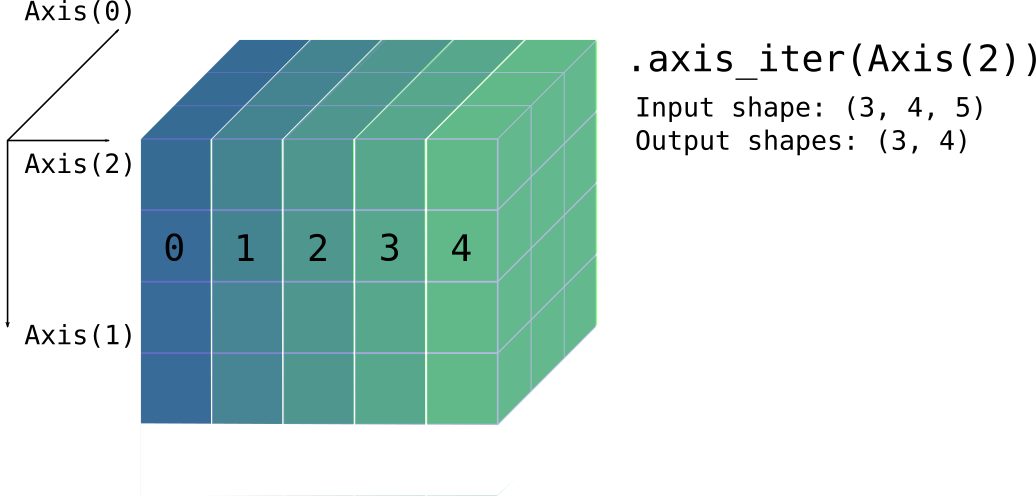
Source
Return an iterator that traverses over axis
and yields each mutable subview along it.
Iterator element is ArrayViewMut<A, D::Smaller>
(read-write array view).
Panics if axis is out of bounds.
Source
Return an iterator that traverses over axis by chunks of size,
yielding non-overlapping views along that axis.
Iterator element is ArrayView<A, D>
The last view may have less elements if size does not divide
the axis’ dimension.
Panics if axis is out of bounds or if size is zero.
use ndarray::Array;
use ndarray::{arr3, Axis};
let a = Array::from_iter(0..28).into_shape_with_order((2, 7, 2)).unwrap();
let mut iter = a.axis_chunks_iter(Axis(1), 2);
// first iteration yields a 2 × 2 × 2 view
assert_eq!(iter.next().unwrap(),
arr3(&[[[ 0, 1], [ 2, 3]],
[[14, 15], [16, 17]]]));
// however the last element is a 2 × 1 × 2 view since 7 % 2 == 1
assert_eq!(iter.next_back().unwrap(), arr3(&[[[12, 13]],
[[26, 27]]]));Source
Return an iterator that traverses over axis by chunks of size,
yielding non-overlapping read-write views along that axis.
Iterator element is ArrayViewMut<A, D>
Panics if axis is out of bounds or if size is zero.
Source
Return an exact chunks producer (and iterable).
It produces the whole chunks of a given n-dimensional chunk size, skipping the remainder along each dimension that doesn’t fit evenly.
The produced element is a ArrayView<A, D> with exactly the dimension
chunk_size.
Panics if any dimension of chunk_size is zero
(Panics if D is IxDyn and chunk_size does not match the
number of array axes.)
Source
Return an exact chunks producer (and iterable).
It produces the whole chunks of a given n-dimensional chunk size, skipping the remainder along each dimension that doesn’t fit evenly.
The produced element is a ArrayViewMut<A, D> with exactly
the dimension chunk_size.
Panics if any dimension of chunk_size is zero
(Panics if D is IxDyn and chunk_size does not match the
number of array axes.)
use ndarray::Array;
use ndarray::arr2;
let mut a = Array::zeros((6, 7));
// Fill each 2 × 2 chunk with the index of where it appeared in iteration
for (i, mut chunk) in a.exact_chunks_mut((2, 2)).into_iter().enumerate() {
chunk.fill(i);
}
// The resulting array is:
assert_eq!(
a,
arr2(&[[0, 0, 1, 1, 2, 2, 0],
[0, 0, 1, 1, 2, 2, 0],
[3, 3, 4, 4, 5, 5, 0],
[3, 3, 4, 4, 5, 5, 0],
[6, 6, 7, 7, 8, 8, 0],
[6, 6, 7, 7, 8, 8, 0]]));Source
Return a window producer and iterable.
The windows are all distinct overlapping views of size window_size
that fit into the array’s shape.
This is essentially equivalent to ArrayRef::windows_with_stride() with unit stride.
Source
Return a window producer and iterable.
The windows are all distinct views of size window_size
that fit into the array’s shape.
The stride is ordered by the outermost axis.
Hence, a (x₀, x₁, …, xₙ) stride will be applied to
(A₀, A₁, …, Aₙ) where Aₓ stands for Axis(x).
This produces all windows that fit within the array for the given stride, assuming the window size is not larger than the array size.
The produced element is an ArrayView<A, D> with exactly the dimension
window_size.
Note that passing a stride of only ones is similar to
calling ArrayRef::windows().
Panics if any dimension of window_size or stride is zero.
(Panics if D is IxDyn and window_size or stride does not match the
number of array axes.)
This is the same illustration found in ArrayRef::windows(),
2×2 windows in a 3×4 array, but now with a (1, 2) stride:
──▶ Axis(1)
│ ┏━━━━━┳━━━━━┱─────┬─────┐ ┌─────┬─────┲━━━━━┳━━━━━┓
▼ ┃ a₀₀ ┃ a₀₁ ┃ │ │ │ │ ┃ a₀₂ ┃ a₀₃ ┃
Axis(0) ┣━━━━━╋━━━━━╉─────┼─────┤ ├─────┼─────╊━━━━━╋━━━━━┫
┃ a₁₀ ┃ a₁₁ ┃ │ │ │ │ ┃ a₁₂ ┃ a₁₃ ┃
┡━━━━━╇━━━━━╃─────┼─────┤ ├─────┼─────╄━━━━━╇━━━━━┩
│ │ │ │ │ │ │ │ │ │
└─────┴─────┴─────┴─────┘ └─────┴─────┴─────┴─────┘
┌─────┬─────┬─────┬─────┐ ┌─────┬─────┬─────┬─────┐
│ │ │ │ │ │ │ │ │ │
┢━━━━━╈━━━━━╅─────┼─────┤ ├─────┼─────╆━━━━━╈━━━━━┪
┃ a₁₀ ┃ a₁₁ ┃ │ │ │ │ ┃ a₁₂ ┃ a₁₃ ┃
┣━━━━━╋━━━━━╉─────┼─────┤ ├─────┼─────╊━━━━━╋━━━━━┫
┃ a₂₀ ┃ a₂₁ ┃ │ │ │ │ ┃ a₂₂ ┃ a₂₃ ┃
┗━━━━━┻━━━━━┹─────┴─────┘ └─────┴─────┺━━━━━┻━━━━━┛Source
Returns a producer which traverses over all windows of a given length along an axis.
The windows are all distinct, possibly-overlapping views. The shape of each window
is the shape of self, with the length of axis replaced with window_size.
Panics if axis is out-of-bounds or if window_size is zero.
use ndarray::{Array3, Axis, s};
let arr = Array3::from_shape_fn([4, 5, 2], |(i, j, k)| i * 100 + j * 10 + k);
let correct = vec![
arr.slice(s![.., 0..3, ..]),
arr.slice(s![.., 1..4, ..]),
arr.slice(s![.., 2..5, ..]),
];
for (window, correct) in arr.axis_windows(Axis(1), 3).into_iter().zip(&correct) {
assert_eq!(window, correct);
assert_eq!(window.shape(), &[4, 3, 2]);
}Source
Returns a producer which traverses over windows of a given length and stride along an axis.
Note that a calling this method with a stride of 1 is equivalent to
calling ArrayRef::axis_windows().
Source
Return a view of the diagonal elements of the array.
The diagonal is simply the sequence indexed by (0, 0, .., 0), (1, 1, …, 1) etc as long as all axes have elements.
Source
Return a read-write view over the diagonal elements of the array.
Source
Return a standard-layout array containing the data, cloning if necessary.
If self is in standard layout, a COW view of the data is returned
without cloning. Otherwise, the data is cloned, and the returned array
owns the cloned data.
use ndarray::Array2;
let standard = Array2::<f64>::zeros((3, 4));
assert!(standard.is_standard_layout());
let cow_view = standard.as_standard_layout();
assert!(cow_view.is_view());
assert!(cow_view.is_standard_layout());
let fortran = standard.reversed_axes();
assert!(!fortran.is_standard_layout());
let cow_owned = fortran.as_standard_layout();
assert!(cow_owned.is_owned());
assert!(cow_owned.is_standard_layout());Source
Return the array’s data as a slice, if it is contiguous and in standard order.
Return None otherwise.
If this function returns Some(_), then the element order in the slice
corresponds to the logical order of the array’s elements.
Source
Return the array’s data as a slice, if it is contiguous and in standard order.
Return None otherwise.
Source
Return the array’s data as a slice if it is contiguous,
return None otherwise.
If this function returns Some(_), then the elements in the slice
have whatever order the elements have in memory.
Source
Return the array’s data as a slice if it is contiguous,
return None otherwise.
In the contiguous case, in order to return a unique reference, this method unshares the data if necessary, but it preserves the existing strides.
Source
Transform the array into new_shape; any shape with the same number of elements is
accepted.
order specifies the logical order in which the array is to be read and reshaped.
The array is returned as a CowArray; a view if possible, otherwise an owned array.
For example, when starting from the one-dimensional sequence 1 2 3 4 5 6, it would be understood as a 2 x 3 array in row major (“C”) order this way:
and as 2 x 3 in column major (“F”) order this way:
This example should show that any time we “reflow” the elements in the array to a different
number of rows and columns (or more axes if applicable), it is important to pick an index
ordering, and that’s the reason for the function parameter for order.
The new_shape parameter should be a dimension and an optional order like these examples:
(3, 4) // Shape 3 x 4 with default order (RowMajor)
((3, 4), Order::RowMajor)) // use specific order
((3, 4), Order::ColumnMajor)) // use specific order
((3, 4), Order::C)) // use shorthand for order - shorthands C and FErrors if the new shape doesn’t have the same number of elements as the array’s current shape.
§Example
use ndarray::array;
use ndarray::Order;
assert!(
array![1., 2., 3., 4., 5., 6.].to_shape(((2, 3), Order::RowMajor)).unwrap()
== array![[1., 2., 3.],
[4., 5., 6.]]
);
assert!(
array![1., 2., 3., 4., 5., 6.].to_shape(((2, 3), Order::ColumnMajor)).unwrap()
== array![[1., 3., 5.],
[2., 4., 6.]]
);Source
Flatten the array to a one-dimensional array.
The array is returned as a CowArray; a view if possible, otherwise an owned array.
use ndarray::{arr1, arr3};
let array = arr3(&[[[1, 2], [3, 4]], [[5, 6], [7, 8]]]);
let flattened = array.flatten();
assert_eq!(flattened, arr1(&[1, 2, 3, 4, 5, 6, 7, 8]));Source
Flatten the array to a one-dimensional array.
order specifies the logical order in which the array is to be read and reshaped.
The array is returned as a CowArray; a view if possible, otherwise an owned array.
use ndarray::{arr1, arr2};
use ndarray::Order;
let array = arr2(&[[1, 2], [3, 4], [5, 6], [7, 8]]);
let flattened = array.flatten_with_order(Order::RowMajor);
assert_eq!(flattened, arr1(&[1, 2, 3, 4, 5, 6, 7, 8]));
let flattened = array.flatten_with_order(Order::ColumnMajor);
assert_eq!(flattened, arr1(&[1, 3, 5, 7, 2, 4, 6, 8]));Source
Act like a larger size and/or shape array by broadcasting into a larger shape, if possible.
Return None if shapes can not be broadcast together.
Background
- Two axes are compatible if they are equal, or one of them is 1.
- In this instance, only the axes of the smaller side (self) can be 1.
Compare axes beginning with the last axis of each shape.
For example (1, 2, 4) can be broadcast into (7, 6, 2, 4) because its axes are either equal or 1 (or missing); while (2, 2) can not be broadcast into (2, 4).
The implementation creates a view with strides set to zero for the axes that are to be repeated.
The broadcasting documentation for NumPy has more information.
use ndarray::{aview1, aview2};
assert!(
aview1(&[1., 0.]).broadcast((10, 2)).unwrap()
== aview2(&[[1., 0.]; 10])
);Source
Return a transposed view of the array.
This is a shorthand for self.view().reversed_axes().
See also the more general methods .reversed_axes() and .swap_axes().
Source
Perform an elementwise assignment to self from rhs.
If their shapes disagree, rhs is broadcast to the shape of self.
Panics if broadcasting isn’t possible.
Source
Perform an elementwise assignment of values cloned from self into array or producer to.
The destination to can be another array or a producer of assignable elements.
AssignElem determines how elements are assigned.
Panics if shapes disagree.
Source
Perform an elementwise assignment to self from element x.
Source
Traverse two arrays in unspecified order, in lock step,
calling the closure f on each element pair.
If their shapes disagree, rhs is broadcast to the shape of self.
Panics if broadcasting isn’t possible.
Source
Traverse the array elements and apply a fold, returning the resulting value.
Elements are visited in arbitrary order.
Source
Call f by reference on each element and create a new array
with the new values.
Elements are visited in arbitrary order.
Return an array with the same shape as self.
use ndarray::arr2;
let a = arr2(&[[ 0., 1.],
[-1., 2.]]);
assert!(
a.map(|x| *x >= 1.0)
== arr2(&[[false, true],
[false, true]])
);Source
Call f on a mutable reference of each element and create a new array
with the new values.
Elements are visited in arbitrary order.
Return an array with the same shape as self.
Source
Call f by value on each element and create a new array
with the new values.
Elements are visited in arbitrary order.
Return an array with the same shape as self.
use ndarray::arr2;
let a = arr2(&[[ 0., 1.],
[-1., 2.]]);
assert!(
a.mapv(f32::abs) == arr2(&[[0., 1.],
[1., 2.]])
);Source
Modify the array in place by calling f by mutable reference on each element.
Elements are visited in arbitrary order.
Source
Modify the array in place by calling f by value on each element.
The array is updated with the new values.
Elements are visited in arbitrary order.
use approx::assert_abs_diff_eq;
use ndarray::arr2;
let mut a = arr2(&[[ 0., 1.],
[-1., 2.]]);
a.mapv_inplace(f32::exp);
assert_abs_diff_eq!(
a,
arr2(&[[1.00000, 2.71828],
[0.36788, 7.38906]]),
epsilon = 1e-5,
);Source
Call f for each element in the array.
Elements are visited in arbitrary order.
Source
Fold along an axis.
Combine the elements of each subview with the previous using the fold
function and initial value init.
Return the result as an Array.
Panics if axis is out of bounds.
Source
Reduce the values along an axis into just one value, producing a new array with one less dimension.
Elements are visited in arbitrary order.
Return the result as an Array.
Panics if axis is out of bounds.
Source
Reduce the values along an axis into just one value, producing a new array with one less dimension. 1-dimensional lanes are passed as mutable references to the reducer, allowing for side-effects.
Elements are visited in arbitrary order.
Return the result as an Array.
Panics if axis is out of bounds.
Source
Remove the indexth elements along axis and shift down elements from higher indexes.
Note that this “removes” the elements by swapping them around to the end of the axis and shortening the length of the axis; the elements are not deinitialized or dropped by this, just moved out of view (this only matters for elements with ownership semantics). It’s similar to slicing an owned array in place.
Decreases the length of axis by one.
Panics if axis is out of bounds
Panics if not index < self.len_of(axis).
Source
Iterates over pairs of consecutive elements along the axis.
The first argument to the closure is an element, and the second argument is the next element along the axis. Iteration is guaranteed to proceed in order along the specified axis, but in all other respects the iteration order is unspecified.
§Example
For example, this can be used to compute the cumulative sum along an axis:
use ndarray::{array, Axis};
let mut arr = array![
[[1, 2], [3, 4], [5, 6]],
[[7, 8], [9, 10], [11, 12]],
];
arr.accumulate_axis_inplace(Axis(1), |&prev, curr| *curr += prev);
assert_eq!(
arr,
array![
[[1, 2], [4, 6], [9, 12]],
[[7, 8], [16, 18], [27, 30]],
],
);Source
Return a partitioned copy of the array.
Creates a copy of the array and partially sorts it around the k-th element along the given axis. The k-th element will be in its sorted position, with:
- All elements smaller than the k-th element to its left
- All elements equal or greater than the k-th element to its right
- The ordering within each partition is undefined
Empty arrays (i.e., those with any zero-length axes) are considered partitioned already, and will be returned unchanged.
Panics if k is out of bounds for a non-zero axis length.
§Parameters
kth- Index to partition by. The k-th element will be in its sorted position.axis- Axis along which to partition.
§Examples
use ndarray::prelude::*;
let a = array![7, 1, 5, 2, 6, 0, 3, 4];
let p = a.partition(3, Axis(0));
// The element at position 3 is now 3, with smaller elements to the left
// and greater elements to the right
assert_eq!(p[3], 3);
assert!(p.slice(s![..3]).iter().all(|&x| x <= 3));
assert!(p.slice(s![4..]).iter().all(|&x| x >= 3));Source Available on crate feature rayon only.
rayon only.Parallel version of map_inplace.
Modify the array in place by calling f by mutable reference on each element.
Elements are visited in arbitrary order.
Source Available on crate feature rayon only.
rayon only.Parallel version of mapv_inplace.
Modify the array in place by calling f by value on each element.
The array is updated with the new values.
Elements are visited in arbitrary order.
Source
Return an vector with the elements of the one-dimensional array.
Source
Return an array view of row index.
Panics if index is out of bounds.
use ndarray::array;
let array = array![[1., 2.], [3., 4.]];
assert_eq!(array.row(0), array![1., 2.]);Source
Return a mutable array view of row index.
Panics if index is out of bounds.
use ndarray::array;
let mut array = array![[1., 2.], [3., 4.]];
array.row_mut(0)[1] = 5.;
assert_eq!(array, array![[1., 5.], [3., 4.]]);Source
Return an array view of column index.
Panics if index is out of bounds.
use ndarray::array;
let array = array![[1., 2.], [3., 4.]];
assert_eq!(array.column(0), array![1., 3.]);Source
Return a mutable array view of column index.
Panics if index is out of bounds.
use ndarray::array;
let mut array = array![[1., 2.], [3., 4.]];
array.column_mut(0)[1] = 5.;
assert_eq!(array, array![[1., 2.], [5., 4.]]);Source
Return the sum of all elements in the array.
use ndarray::arr2;
let a = arr2(&[[1., 2.],
[3., 4.]]);
assert_eq!(a.sum(), 10.);Source
Returns the arithmetic mean x̅ of all elements in the array:
If the array is empty, None is returned.
Panics if A::from_usize() fails to convert the number of elements in the array.
Source
Return the product of all elements in the array.
use ndarray::arr2;
let a = arr2(&[[1., 2.],
[3., 4.]]);
assert_eq!(a.product(), 24.);Source
Return the cumulative product of elements along a given axis.
use ndarray::{arr2, Axis};
let a = arr2(&[[1., 2., 3.],
[4., 5., 6.]]);
// Cumulative product along rows (axis 0)
assert_eq!(
a.cumprod(Axis(0)),
arr2(&[[1., 2., 3.],
[4., 10., 18.]])
);
// Cumulative product along columns (axis 1)
assert_eq!(
a.cumprod(Axis(1)),
arr2(&[[1., 2., 6.],
[4., 20., 120.]])
);Panics if axis is out of bounds.
Source Available on crate feature std only.
std only.Return variance of elements in the array.
The variance is computed using the Welford one-pass algorithm.
The parameter ddof specifies the “delta degrees of freedom”. For
example, to calculate the population variance, use ddof = 0, or to
calculate the sample variance, use ddof = 1.
The variance is defined as:
1 n
variance = ―――――――― ∑ (xᵢ - x̅)²
n - ddof i=1where
and n is the length of the array.
Panics if ddof is less than zero or greater than n
§Example
use ndarray::array;
use approx::assert_abs_diff_eq;
let a = array![1., -4.32, 1.14, 0.32];
let var = a.var(1.);
assert_abs_diff_eq!(var, 6.7331, epsilon = 1e-4);Source Available on crate feature std only.
std only.Return standard deviation of elements in the array.
The standard deviation is computed from the variance using the Welford one-pass algorithm.
The parameter ddof specifies the “delta degrees of freedom”. For
example, to calculate the population standard deviation, use ddof = 0,
or to calculate the sample standard deviation, use ddof = 1.
The standard deviation is defined as:
⎛ 1 n ⎞
stddev = sqrt ⎜ ―――――――― ∑ (xᵢ - x̅)²⎟
⎝ n - ddof i=1 ⎠where
and n is the length of the array.
Panics if ddof is less than zero or greater than n
§Example
use ndarray::array;
use approx::assert_abs_diff_eq;
let a = array![1., -4.32, 1.14, 0.32];
let stddev = a.std(1.);
assert_abs_diff_eq!(stddev, 2.59483, epsilon = 1e-4);Source
Return sum along axis.
use ndarray::{aview0, aview1, arr2, Axis};
let a = arr2(&[[1., 2., 3.],
[4., 5., 6.]]);
assert!(
a.sum_axis(Axis(0)) == aview1(&[5., 7., 9.]) &&
a.sum_axis(Axis(1)) == aview1(&[6., 15.]) &&
a.sum_axis(Axis(0)).sum_axis(Axis(0)) == aview0(&21.)
);Panics if axis is out of bounds.
Source
Return product along axis.
The product of an empty array is 1.
use ndarray::{aview0, aview1, arr2, Axis};
let a = arr2(&[[1., 2., 3.],
[4., 5., 6.]]);
assert!(
a.product_axis(Axis(0)) == aview1(&[4., 10., 18.]) &&
a.product_axis(Axis(1)) == aview1(&[6., 120.]) &&
a.product_axis(Axis(0)).product_axis(Axis(0)) == aview0(&720.)
);Panics if axis is out of bounds.
Source
Return mean along axis.
Return None if the length of the axis is zero.
Panics if axis is out of bounds or if A::from_usize()
fails for the axis length.
use ndarray::{aview0, aview1, arr2, Axis};
let a = arr2(&[[1., 2., 3.],
[4., 5., 6.]]);
assert!(
a.mean_axis(Axis(0)).unwrap() == aview1(&[2.5, 3.5, 4.5]) &&
a.mean_axis(Axis(1)).unwrap() == aview1(&[2., 5.]) &&
a.mean_axis(Axis(0)).unwrap().mean_axis(Axis(0)).unwrap() == aview0(&3.5)
);Source Available on crate feature std only.
std only.Return variance along axis.
The variance is computed using the Welford one-pass algorithm.
The parameter ddof specifies the “delta degrees of freedom”. For
example, to calculate the population variance, use ddof = 0, or to
calculate the sample variance, use ddof = 1.
The variance is defined as:
1 n
variance = ―――――――― ∑ (xᵢ - x̅)²
n - ddof i=1where
and n is the length of the axis.
Panics if ddof is less than zero or greater than n, if axis
is out of bounds, or if A::from_usize() fails for any any of the
numbers in the range 0..=n.
§Example
use ndarray::{aview1, arr2, Axis};
let a = arr2(&[[1., 2.],
[3., 4.],
[5., 6.]]);
let var = a.var_axis(Axis(0), 1.);
assert_eq!(var, aview1(&[4., 4.]));Source Available on crate feature std only.
std only.Return standard deviation along axis.
The standard deviation is computed from the variance using the Welford one-pass algorithm.
The parameter ddof specifies the “delta degrees of freedom”. For
example, to calculate the population standard deviation, use ddof = 0,
or to calculate the sample standard deviation, use ddof = 1.
The standard deviation is defined as:
⎛ 1 n ⎞
stddev = sqrt ⎜ ―――――――― ∑ (xᵢ - x̅)²⎟
⎝ n - ddof i=1 ⎠where
and n is the length of the axis.
Panics if ddof is less than zero or greater than n, if axis
is out of bounds, or if A::from_usize() fails for any any of the
numbers in the range 0..=n.
§Example
use ndarray::{aview1, arr2, Axis};
let a = arr2(&[[1., 2.],
[3., 4.],
[5., 6.]]);
let stddev = a.std_axis(Axis(0), 1.);
assert_eq!(stddev, aview1(&[2., 2.]));Source
Calculates the (forward) finite differences of order n, along the axis.
For the 1D-case, n==1, this means: diff[i] == arr[i+1] - arr[i]
For n>=2, the process is iterated:
use ndarray::{array, Axis};
let arr = array![1.0, 2.0, 5.0];
assert_eq!(arr.diff(2, Axis(0)), arr.diff(1, Axis(0)).diff(1, Axis(0)))Panics if axis is out of bounds
Panics if n is too big / the array is to short:
use ndarray::{array, Axis};
array![1.0, 2.0, 3.0].diff(10, Axis(0));Source Available on crate feature std only.
std only.If the number is NaN (not a number), then true is returned for each element.
Source Available on crate feature std only.
std only.Return true if all elements are NaN (not a number).
Source Available on crate feature std only.
std only.Return true if any element is NaN (not a number).
Source Available on crate feature std only.
std only.If the number is infinity, then true is returned for each element.
Source Available on crate feature std only.
std only.Return true if all elements are infinity.
Source Available on crate feature std only.
std only.Return true if any element is infinity.
Source Available on crate feature std only.
std only.The largest integer less than or equal to each element.
Source Available on crate feature std only.
std only.The smallest integer less than or equal to each element.
Source Available on crate feature std only.
std only.The nearest integer of each element.
Source Available on crate feature std only.
std only.The integer part of each element.
Source Available on crate feature std only.
std only.The fractional part of each element.
Source Available on crate feature std only.
std only.Absolute of each element.
Source Available on crate feature std only.
std only.Sign number of each element.
1.0for all positive numbers.-1.0for all negative numbers.NaNfor allNaN(not a number).
Source Available on crate feature std only.
std only.The reciprocal (inverse) of each element, 1/x.
Source Available on crate feature std only.
std only.Square root of each element.
Source Available on crate feature std only.
std only.e^x of each element (exponential function).
Source Available on crate feature std only.
std only.2^x of each element.
Source Available on crate feature std only.
std only.e^x - 1 of each element.
Source Available on crate feature std only.
std only.Natural logarithm of each element.
Source Available on crate feature std only.
std only.Base 2 logarithm of each element.
Source Available on crate feature std only.
std only.Base 10 logarithm of each element.
Source Available on crate feature std only.
std only.ln(1 + x) of each element.
Source Available on crate feature std only.
std only.Cubic root of each element.
Source Available on crate feature std only.
std only.Sine of each element (in radians).
Source Available on crate feature std only.
std only.Cosine of each element (in radians).
Source Available on crate feature std only.
std only.Tangent of each element (in radians).
Source Available on crate feature std only.
std only.Arcsine of each element (return in radians).
Source Available on crate feature std only.
std only.Arccosine of each element (return in radians).
Source Available on crate feature std only.
std only.Arctangent of each element (return in radians).
Source Available on crate feature std only.
std only.Hyperbolic sine of each element.
Source Available on crate feature std only.
std only.Hyperbolic cosine of each element.
Source Available on crate feature std only.
std only.Hyperbolic tangent of each element.
Source Available on crate feature std only.
std only.Inverse hyperbolic sine of each element.
Source Available on crate feature std only.
std only.Inverse hyperbolic cosine of each element.
Source Available on crate feature std only.
std only.Inverse hyperbolic tangent of each element.
Source Available on crate feature std only.
std only.Converts radians to degrees for each element.
Source Available on crate feature std only.
std only.Converts degrees to radians for each element.
Source Available on crate feature std only.
std only.Integer power of each element.
This function is generally faster than using float power.
Source Available on crate feature std only.
std only.Float power of each element.
Source Available on crate feature std only.
std only.Logarithm of each element with respect to an arbitrary base.
Source Available on crate feature std only.
std only.The positive difference between given number and each element.
Source Available on crate feature std only.
std only.Length of the hypotenuse of a right-angle triangle of each element
Source Available on crate feature std only.
std only.Square (two powers) of each element.
Source
Limit the values for each element, similar to NumPy’s clip function.
use ndarray::array;
let a = array![0., 1., 2., 3., 4., 5., 6., 7., 8., 9.];
assert_eq!(a.clamp(1., 8.), array![1., 1., 2., 3., 4., 5., 6., 7., 8., 8.]);
assert_eq!(a.clamp(3., 6.), array![3., 3., 3., 3., 4., 5., 6., 6., 6., 6.]);§Panics
Panics if !(min <= max).
Source
Perform dot product or matrix multiplication of arrays self and rhs.
Rhs may be either a one-dimensional or a two-dimensional array.
If Rhs is one-dimensional, then the operation is a vector dot
product, which is the sum of the elementwise products (no conjugation
of complex operands, and thus not their inner product). In this case,
self and rhs must be the same length.
If Rhs is two-dimensional, then the operation is matrix
multiplication, where self is treated as a row vector. In this case,
if self is shape M, then rhs is shape M × N and the result is
shape N.
Panics if the array shapes are incompatible.
Note: If enabled, uses blas dot for elements of f32, f64 when memory
layout allows.
Source
Perform matrix multiplication of rectangular arrays self and rhs.
Rhs may be either a one-dimensional or a two-dimensional array.
If Rhs is two-dimensional, they array shapes must agree in the way that
if self is M × N, then rhs is N × K.
Return a result array with shape M × K.
Panics if shapes are incompatible or the number of elements in the
result would overflow isize.
Note: If enabled, uses blas gemv/gemm for elements of f32, f64
when memory layout allows. The default matrixmultiply backend
is otherwise used for f32, f64 for all memory layouts.
use ndarray::arr2;
let a = arr2(&[[1., 2.],
[0., 1.]]);
let b = arr2(&[[1., 2.],
[2., 3.]]);
assert!(
a.dot(&b) == arr2(&[[5., 8.],
[2., 3.]])
);Source
Perform the operation self += alpha * rhs efficiently, where
alpha is a scalar and rhs is another array. This operation is
also known as axpy in BLAS.
If their shapes disagree, rhs is broadcast to the shape of self.
Panics if broadcasting isn’t possible.
Source Available on crate feature approx only.
approx only.A test for equality that uses the elementwise absolute difference to compute the approximate equality of two arrays.
Source Available on crate feature approx only.
approx only.A test for equality that uses an elementwise relative comparison if the values are far apart; and the absolute difference otherwise.
Source
Upper triangular of an array.
Return a copy of the array with elements below the k-th diagonal zeroed.
For arrays with ndim exceeding 2, triu will apply to the final two axes.
For 0D and 1D arrays, triu will return an unchanged clone.
See also ArrayRef::tril
use ndarray::array;
let arr = array![
[1, 2, 3],
[4, 5, 6],
[7, 8, 9]
];
assert_eq!(
arr.triu(0),
array![
[1, 2, 3],
[0, 5, 6],
[0, 0, 9]
]
);Source
Lower triangular of an array.
Return a copy of the array with elements above the k-th diagonal zeroed.
For arrays with ndim exceeding 2, tril will apply to the final two axes.
For 0D and 1D arrays, tril will return an unchanged clone.
See also ArrayRef::triu
use ndarray::array;
let arr = array![
[1, 2, 3],
[4, 5, 6],
[7, 8, 9]
];
assert_eq!(
arr.tril(0),
array![
[1, 0, 0],
[4, 5, 0],
[7, 8, 9]
]
);Source
Return a raw pointer to the element at index, or return None
if the index is out of bounds.
use ndarray::arr2;
let a = arr2(&[[1., 2.], [3., 4.]]);
let v = a.raw_view();
let p = a.get_ptr((0, 1)).unwrap();
assert_eq!(unsafe { *p }, 2.);Source
Return a raw pointer to the element at index, or return None
if the index is out of bounds.
use ndarray::arr2;
let mut a = arr2(&[[1., 2.], [3., 4.]]);
let v = a.raw_view_mut();
let p = a.get_mut_ptr((0, 1)).unwrap();
unsafe {
*p = 5.;
}
assert_eq!(a.get((0, 1)), Some(&5.));Source
Return a pointer to the first element in the array.
Raw access to array elements needs to follow the strided indexing scheme: an element at multi-index I in an array with strides S is located at offset
Σ0 ≤ k < d Ik × Sk
where d is self.ndim().
Source
Return a mutable pointer to the first element in the array reference.
Source
Return a raw view of the array.
Source
Return a raw mutable view of the array.
Source
Return the total number of elements in the array.
Source
Return the length of axis.
The axis should be in the range Axis( 0 .. n ) where n is the
number of dimensions (axes) of the array.
Panics if the axis is out of bounds.
Source
Return whether the array has any elements
Source
Return the number of dimensions (axes) in the array
Source
Return the shape of the array in its “pattern” form, an integer in the one-dimensional case, tuple in the n-dimensional cases and so on.
Source
Return the shape of the array as it’s stored in the array.
This is primarily useful for passing to other ArrayBase
functions, such as when creating another array of the same
shape and dimensionality.
use ndarray::Array;
let a = Array::from_elem((2, 3), 5.);
// Create an array of zeros that's the same shape and dimensionality as `a`.
let b = Array::<f64, _>::zeros(a.raw_dim());Source
Return the shape of the array as a slice.
Note that you probably don’t want to use this to create an array of the
same shape as another array because creating an array with e.g.
Array::zeros() using a shape of type &[usize]
results in a dynamic-dimensional array. If you want to create an array
that has the same shape and dimensionality as another array, use
.raw_dim() instead:
use ndarray::{Array, Array2};
let a = Array2::<i32>::zeros((3, 4));
let shape = a.shape();
assert_eq!(shape, &[3, 4]);
// Since `a.shape()` returned `&[usize]`, we get an `ArrayD` instance:
let b = Array::zeros(shape);
assert_eq!(a.clone().into_dyn(), b);
// To get the same dimension type, use `.raw_dim()` instead:
let c = Array::zeros(a.raw_dim());
assert_eq!(a, c);Source
Return the strides of the array as a slice.
Source
Return the stride of axis.
The axis should be in the range Axis( 0 .. n ) where n is the
number of dimensions (axes) of the array.
Panics if the axis is out of bounds.
Source
Slice the array in place without changing the number of dimensions.
In particular, if an axis is sliced with an index, the axis is
collapsed, as in .collapse_axis(), rather than removed, as in
.slice_move() or .index_axis_move().
See Slicing for full documentation.
See also s!, SliceArg, and SliceInfo.
Panics in the following cases:
- if an index is out of bounds
- if a step size is zero
- if
SliceInfoElem::NewAxisis ininfo, e.g. ifNewAxiswas used in thes!macro - if
DisIxDynandinfodoes not match the number of array axes
Source
Slice the array in place along the specified axis.
Panics if an index is out of bounds or step size is zero.
Panics if axis is out of bounds.
Source
Slice the array in place, with a closure specifying the slice for each axis.
This is especially useful for code which is generic over the dimensionality of the array.
Panics if an index is out of bounds or step size is zero.
Source
Selects index along the axis, collapsing the axis into length one.
Panics if axis or index is out of bounds.
Source
Return true if the array data is laid out in contiguous “C order” in
memory (where the last index is the most rapidly varying).
Return false otherwise, i.e. the array is possibly not
contiguous in memory, it has custom strides, etc.
Source
Swap axes ax and bx.
This does not move any data, it just adjusts the array’s dimensions and strides.
Panics if the axes are out of bounds.
use ndarray::arr2;
let mut a = arr2(&[[1., 2., 3.]]);
a.swap_axes(0, 1);
assert!(
a == arr2(&[[1.], [2.], [3.]])
);Source
Return an iterator over the length and stride of each axis.
Source
Return the axis with the greatest stride (by absolute value), preferring axes with len > 1.
Source
Reverse the stride of axis.
Panics if the axis is out of bounds.
Source
If possible, merge in the axis take to into.
Returns true iff the axes are now merged.
This method merges the axes if movement along the two original axes
(moving fastest along the into axis) can be equivalently represented
as movement along one (merged) axis. Merging the axes preserves this
order in the merged axis. If take and into are the same axis, then
the axis is “merged” if its length is ≤ 1.
If the return value is true, then the following hold:
-
The new length of the
intoaxis is the product of the original lengths of the two axes. -
The new length of the
takeaxis is 0 if the product of the original lengths of the two axes is 0, and 1 otherwise.
If the return value is false, then merging is not possible, and the
original shape and strides have been preserved.
Note that the ordering constraint means that if it’s possible to merge
take into into, it’s usually not possible to merge into into
take, and vice versa.
use ndarray::Array3;
use ndarray::Axis;
let mut a = Array3::<f64>::zeros((2, 3, 4));
assert!(a.merge_axes(Axis(1), Axis(2)));
assert_eq!(a.shape(), &[2, 1, 12]);Panics if an axis is out of bounds.
Source
Return the number of rows (length of Axis(0)) in the two-dimensional array.
use ndarray::{array, Axis};
let array = array![[1., 2.],
[3., 4.],
[5., 6.]];
assert_eq!(array.nrows(), 3);
// equivalent ways of getting the dimensions
// get nrows, ncols by using dim:
let (m, n) = array.dim();
assert_eq!(m, array.nrows());
// get length of any particular axis with .len_of()
assert_eq!(m, array.len_of(Axis(0)));Source
Return the number of columns (length of Axis(1)) in the two-dimensional array.
use ndarray::{array, Axis};
let array = array![[1., 2.],
[3., 4.],
[5., 6.]];
assert_eq!(array.ncols(), 2);
// equivalent ways of getting the dimensions
// get nrows, ncols by using dim:
let (m, n) = array.dim();
assert_eq!(n, array.ncols());
// get length of any particular axis with .len_of()
assert_eq!(n, array.len_of(Axis(1)));Source
Return true if the array is square, false otherwise.
§Examples
Square:
use ndarray::array;
let array = array![[1., 2.], [3., 4.]];
assert!(array.is_square());
Not square:
use ndarray::array;
let array = array![[1., 2., 5.], [3., 4., 6.]];
assert!(!array.is_square());
Source
Insert new array axis of length 1 at axis, modifying the shape and
strides in-place.
Panics if the axis is out of bounds.
use ndarray::{Axis, arr2, arr3};

let mut a = arr2(&[[1, 2, 3], [4, 5, 6]]).into_dyn();
assert_eq!(a.shape(), &[2, 3]);

a.insert_axis_inplace(Axis(1));
assert_eq!(a, arr3(&[[[1, 2, 3]], [[4, 5, 6]]]).into_dyn());
assert_eq!(a.shape(), &[2, 1, 3]);
Source
Collapses the array to index along the axis and removes the axis,
modifying the shape and strides in-place.
Panics if axis or index is out of bounds.
use ndarray::{Axis, arr1, arr2};

let mut a = arr2(&[[1, 2, 3], [4, 5, 6]]).into_dyn();
assert_eq!(a.shape(), &[2, 3]);

a.index_axis_inplace(Axis(1), 1);
assert_eq!(a, arr1(&[2, 5]).into_dyn());
assert_eq!(a.shape(), &[2]);Source§Perform elementwise
addition
between references self and rhs,
and return the result as a new Array.
Perform elementwise
addition
between references self and rhs,
and return the result as a new Array.
If their shapes disagree, self and rhs is broadcast to their broadcast shape,
cloning the data if needed.
Panics if broadcasting isn’t possible.
Source§Perform elementwise
addition
between self and reference rhs,
and return the result.
Perform elementwise
addition
between self and reference rhs,
and return the result.
rhs must be an Array or ArcArray.
If their shapes disagree, self is broadcast to their broadcast shape,
cloning the data if needed.
Panics if broadcasting isn’t possible.
Source§Perform elementwise
addition
between self and reference rhs,
and return the result.
Perform elementwise
addition
between self and reference rhs,
and return the result.
rhs must be an Array or ArcArray.
If their shapes disagree, self is broadcast to their broadcast shape,
cloning the data if needed.
Panics if broadcasting isn’t possible.
Source§Perform elementwise
addition
between reference self and rhs,
and return the result.
Perform elementwise
addition
between reference self and rhs,
and return the result.
rhs must be an Array or ArcArray.
If their shapes disagree, self is broadcast to their broadcast shape,
cloning the data if needed.
Panics if broadcasting isn’t possible.
Source§Perform elementwise
addition
between reference self and rhs,
and return the result.
Perform elementwise
addition
between reference self and rhs,
and return the result.
rhs must be an Array or ArcArray.
If their shapes disagree, self is broadcast to their broadcast shape,
cloning the data if needed.
Panics if broadcasting isn’t possible.
Source§Perform elementwise
addition
between self and rhs,
and return the result.
Perform elementwise
addition
between self and rhs,
and return the result.
self must be an Array or ArcArray.
If their shapes disagree, self is broadcast to their broadcast shape.
Panics if broadcasting isn’t possible.
Source§Perform elementwise
addition
between the reference self and the scalar x,
and return the result as a new Array.
Perform elementwise
addition
between the reference self and the scalar x,
and return the result as a new Array.
Source§Perform elementwise
addition
between self and the scalar x,
and return the result (based on self).
Perform elementwise
addition
between self and the scalar x,
and return the result (based on self).
self must be an Array or ArcArray.
Source§Perform self += rhs as elementwise addition (in place).
If their shapes disagree, rhs is broadcast to the shape of self.
Perform self += rhs as elementwise addition (in place).
If their shapes disagree, rhs is broadcast to the shape of self.
Panics if broadcasting isn’t possible.
Source§Format the array using Binary and apply the formatting parameters used
to each element.
Format the array using Binary and apply the formatting parameters used
to each element.
The array is shown in multiline style.
Source§Perform elementwise
bit and
between references self and rhs,
and return the result as a new Array.
Perform elementwise
bit and
between references self and rhs,
and return the result as a new Array.
If their shapes disagree, self and rhs is broadcast to their broadcast shape,
cloning the data if needed.
Panics if broadcasting isn’t possible.
Source§Perform elementwise
bit and
between self and reference rhs,
and return the result.
Perform elementwise
bit and
between self and reference rhs,
and return the result.
rhs must be an Array or ArcArray.
If their shapes disagree, self is broadcast to their broadcast shape,
cloning the data if needed.
Panics if broadcasting isn’t possible.
Source§Perform elementwise
bit and
between self and reference rhs,
and return the result.
Perform elementwise
bit and
between self and reference rhs,
and return the result.
rhs must be an Array or ArcArray.
If their shapes disagree, self is broadcast to their broadcast shape,
cloning the data if needed.
Panics if broadcasting isn’t possible.
Source§Perform elementwise
bit and
between reference self and rhs,
and return the result.
Perform elementwise
bit and
between reference self and rhs,
and return the result.
rhs must be an Array or ArcArray.
If their shapes disagree, self is broadcast to their broadcast shape,
cloning the data if needed.
Panics if broadcasting isn’t possible.
Source§Perform elementwise
bit and
between reference self and rhs,
and return the result.
Perform elementwise
bit and
between reference self and rhs,
and return the result.
rhs must be an Array or ArcArray.
If their shapes disagree, self is broadcast to their broadcast shape,
cloning the data if needed.
Panics if broadcasting isn’t possible.
Source§Perform elementwise
bit and
between self and rhs,
and return the result.
Perform elementwise
bit and
between self and rhs,
and return the result.
self must be an Array or ArcArray.
If their shapes disagree, self is broadcast to their broadcast shape.
Panics if broadcasting isn’t possible.
Source§Perform elementwise
bit and
between the reference self and the scalar x,
and return the result as a new Array.
Perform elementwise
bit and
between the reference self and the scalar x,
and return the result as a new Array.
Source§Perform elementwise
bit and
between self and the scalar x,
and return the result (based on self).
Perform elementwise
bit and
between self and the scalar x,
and return the result (based on self).
self must be an Array or ArcArray.
Source§Perform self &= rhs as elementwise bit and (in place).
If their shapes disagree, rhs is broadcast to the shape of self.
Perform self &= rhs as elementwise bit and (in place).
If their shapes disagree, rhs is broadcast to the shape of self.
Panics if broadcasting isn’t possible.
Source§Perform elementwise
bit or
between references self and rhs,
and return the result as a new Array.
Perform elementwise
bit or
between references self and rhs,
and return the result as a new Array.
If their shapes disagree, self and rhs is broadcast to their broadcast shape,
cloning the data if needed.
Panics if broadcasting isn’t possible.
Source§Perform elementwise
bit or
between self and reference rhs,
and return the result.
Perform elementwise
bit or
between self and reference rhs,
and return the result.
rhs must be an Array or ArcArray.
If their shapes disagree, self is broadcast to their broadcast shape,
cloning the data if needed.
Panics if broadcasting isn’t possible.
Source§Perform elementwise
bit or
between self and reference rhs,
and return the result.
Perform elementwise
bit or
between self and reference rhs,
and return the result.
rhs must be an Array or ArcArray.
If their shapes disagree, self is broadcast to their broadcast shape,
cloning the data if needed.
Panics if broadcasting isn’t possible.
Source§Perform elementwise
bit or
between reference self and rhs,
and return the result.
Perform elementwise
bit or
between reference self and rhs,
and return the result.
rhs must be an Array or ArcArray.
If their shapes disagree, self is broadcast to their broadcast shape,
cloning the data if needed.
Panics if broadcasting isn’t possible.
Source§Perform elementwise
bit or
between reference self and rhs,
and return the result.
Perform elementwise
bit or
between reference self and rhs,
and return the result.
rhs must be an Array or ArcArray.
If their shapes disagree, self is broadcast to their broadcast shape,
cloning the data if needed.
Panics if broadcasting isn’t possible.
Source§Perform elementwise
bit or
between self and rhs,
and return the result.
Perform elementwise
bit or
between self and rhs,
and return the result.
self must be an Array or ArcArray.
If their shapes disagree, self is broadcast to their broadcast shape.
Panics if broadcasting isn’t possible.
Source§Perform elementwise
bit or
between the reference self and the scalar x,
and return the result as a new Array.
Perform elementwise
bit or
between the reference self and the scalar x,
and return the result as a new Array.
Source§Perform elementwise
bit or
between self and the scalar x,
and return the result (based on self).
Perform elementwise
bit or
between self and the scalar x,
and return the result (based on self).
self must be an Array or ArcArray.
Source§Perform self |= rhs as elementwise bit or (in place).
If their shapes disagree, rhs is broadcast to the shape of self.
Perform self |= rhs as elementwise bit or (in place).
If their shapes disagree, rhs is broadcast to the shape of self.
Panics if broadcasting isn’t possible.
Source§Perform elementwise
bit xor
between references self and rhs,
and return the result as a new Array.
Perform elementwise
bit xor
between references self and rhs,
and return the result as a new Array.
If their shapes disagree, self and rhs is broadcast to their broadcast shape,
cloning the data if needed.
Panics if broadcasting isn’t possible.
Source§Perform elementwise
bit xor
between self and reference rhs,
and return the result.
Perform elementwise
bit xor
between self and reference rhs,
and return the result.
rhs must be an Array or ArcArray.
If their shapes disagree, self is broadcast to their broadcast shape,
cloning the data if needed.
Panics if broadcasting isn’t possible.
Source§Perform elementwise
bit xor
between self and reference rhs,
and return the result.
Perform elementwise
bit xor
between self and reference rhs,
and return the result.
rhs must be an Array or ArcArray.
If their shapes disagree, self is broadcast to their broadcast shape,
cloning the data if needed.
Panics if broadcasting isn’t possible.
Source§Perform elementwise
bit xor
between reference self and rhs,
and return the result.
Perform elementwise
bit xor
between reference self and rhs,
and return the result.
rhs must be an Array or ArcArray.
If their shapes disagree, self is broadcast to their broadcast shape,
cloning the data if needed.
Panics if broadcasting isn’t possible.
Source§Perform elementwise
bit xor
between reference self and rhs,
and return the result.
Perform elementwise
bit xor
between reference self and rhs,
and return the result.
rhs must be an Array or ArcArray.
If their shapes disagree, self is broadcast to their broadcast shape,
cloning the data if needed.
Panics if broadcasting isn’t possible.
Source§Perform elementwise
bit xor
between self and rhs,
and return the result.
Perform elementwise
bit xor
between self and rhs,
and return the result.
self must be an Array or ArcArray.
If their shapes disagree, self is broadcast to their broadcast shape.
Panics if broadcasting isn’t possible.
Source§Perform elementwise
bit xor
between the reference self and the scalar x,
and return the result as a new Array.
Perform elementwise
bit xor
between the reference self and the scalar x,
and return the result as a new Array.
Source§Perform elementwise
bit xor
between self and the scalar x,
and return the result (based on self).
Perform elementwise
bit xor
between self and the scalar x,
and return the result (based on self).
self must be an Array or ArcArray.
Source§Perform self ^= rhs as elementwise bit xor (in place).
If their shapes disagree, rhs is broadcast to the shape of self.
Perform self ^= rhs as elementwise bit xor (in place).
If their shapes disagree, rhs is broadcast to the shape of self.
Panics if broadcasting isn’t possible.
Source§Format the array using Debug and apply the formatting parameters used
to each element.
Format the array using Debug and apply the formatting parameters used
to each element.
The array is shown in multiline style.
Source§Create an owned array with a default state.
Create an owned array with a default state.
The array is created with dimension D::default(), which results
in for example dimensions 0 and (0, 0) with zero elements for the
one-dimensional and two-dimensional cases respectively.
The default dimension for IxDyn is IxDyn(&[0]) (array has zero
elements). And the default for the dimension () is () (array has
one element).
Since arrays cannot grow, the intention is to use the default value as placeholder.
Source§Format the array using Display and apply the formatting parameters used
to each element.
Format the array using Display and apply the formatting parameters used
to each element.
The array is shown in multiline style.
Source§Perform elementwise
division
between references self and rhs,
and return the result as a new Array.
Perform elementwise
division
between references self and rhs,
and return the result as a new Array.
If their shapes disagree, self and rhs is broadcast to their broadcast shape,
cloning the data if needed.
Panics if broadcasting isn’t possible.
Source§Perform elementwise
division
between self and reference rhs,
and return the result.
Perform elementwise
division
between self and reference rhs,
and return the result.
rhs must be an Array or ArcArray.
If their shapes disagree, self is broadcast to their broadcast shape,
cloning the data if needed.
Panics if broadcasting isn’t possible.
Source§Perform elementwise
division
between self and reference rhs,
and return the result.
Perform elementwise
division
between self and reference rhs,
and return the result.
rhs must be an Array or ArcArray.
If their shapes disagree, self is broadcast to their broadcast shape,
cloning the data if needed.
Panics if broadcasting isn’t possible.
Source§Perform elementwise
division
between reference self and rhs,
and return the result.
Perform elementwise
division
between reference self and rhs,
and return the result.
rhs must be an Array or ArcArray.
If their shapes disagree, self is broadcast to their broadcast shape,
cloning the data if needed.
Panics if broadcasting isn’t possible.
Source§Perform elementwise
division
between reference self and rhs,
and return the result.
Perform elementwise
division
between reference self and rhs,
and return the result.
rhs must be an Array or ArcArray.
If their shapes disagree, self is broadcast to their broadcast shape,
cloning the data if needed.
Panics if broadcasting isn’t possible.
Source§Perform elementwise
division
between self and rhs,
and return the result.
Perform elementwise
division
between self and rhs,
and return the result.
self must be an Array or ArcArray.
If their shapes disagree, self is broadcast to their broadcast shape.
Panics if broadcasting isn’t possible.
Source§Perform elementwise
division
between the reference self and the scalar x,
and return the result as a new Array.
Perform elementwise
division
between the reference self and the scalar x,
and return the result as a new Array.
Source§Perform elementwise
division
between self and the scalar x,
and return the result (based on self).
Perform elementwise
division
between self and the scalar x,
and return the result (based on self).
self must be an Array or ArcArray.
Source§Perform self /= rhs as elementwise division (in place).
If their shapes disagree, rhs is broadcast to the shape of self.
Perform self /= rhs as elementwise division (in place).
If their shapes disagree, rhs is broadcast to the shape of self.
Panics if broadcasting isn’t possible.
Source§A mutable array reference is an n-dimensional producer of mutable element
references (like ArrayViewMut).
A mutable array reference is an n-dimensional producer of mutable element references (like ArrayViewMut).
Source§Format the array using LowerExp and apply the formatting parameters used
to each element.
Format the array using LowerExp and apply the formatting parameters used
to each element.
The array is shown in multiline style.
Source§Format the array using LowerHex and apply the formatting parameters used
to each element.
Format the array using LowerHex and apply the formatting parameters used
to each element.
The array is shown in multiline style.
Source§Perform elementwise
multiplication
between references self and rhs,
and return the result as a new Array.
Perform elementwise
multiplication
between references self and rhs,
and return the result as a new Array.
If their shapes disagree, self and rhs is broadcast to their broadcast shape,
cloning the data if needed.
Panics if broadcasting isn’t possible.
Source§Perform elementwise
multiplication
between self and reference rhs,
and return the result.
Perform elementwise
multiplication
between self and reference rhs,
and return the result.
rhs must be an Array or ArcArray.
If their shapes disagree, self is broadcast to their broadcast shape,
cloning the data if needed.
Panics if broadcasting isn’t possible.
Source§Perform elementwise
multiplication
between self and reference rhs,
and return the result.
Perform elementwise
multiplication
between self and reference rhs,
and return the result.
rhs must be an Array or ArcArray.
If their shapes disagree, self is broadcast to their broadcast shape,
cloning the data if needed.
Panics if broadcasting isn’t possible.
Source§Perform elementwise
multiplication
between reference self and rhs,
and return the result.
Perform elementwise
multiplication
between reference self and rhs,
and return the result.
rhs must be an Array or ArcArray.
If their shapes disagree, self is broadcast to their broadcast shape,
cloning the data if needed.
Panics if broadcasting isn’t possible.
Source§Perform elementwise
multiplication
between reference self and rhs,
and return the result.
Perform elementwise
multiplication
between reference self and rhs,
and return the result.
rhs must be an Array or ArcArray.
If their shapes disagree, self is broadcast to their broadcast shape,
cloning the data if needed.
Panics if broadcasting isn’t possible.
Source§Perform elementwise
multiplication
between self and rhs,
and return the result.
Perform elementwise
multiplication
between self and rhs,
and return the result.
self must be an Array or ArcArray.
If their shapes disagree, self is broadcast to their broadcast shape.
Panics if broadcasting isn’t possible.
Source§Perform elementwise
multiplication
between the reference self and the scalar x,
and return the result as a new Array.
Perform elementwise
multiplication
between the reference self and the scalar x,
and return the result as a new Array.
Source§Perform elementwise
multiplication
between self and the scalar x,
and return the result (based on self).
Perform elementwise
multiplication
between self and the scalar x,
and return the result (based on self).
self must be an Array or ArcArray.
Source§Perform self *= rhs as elementwise multiplication (in place).
If their shapes disagree, rhs is broadcast to the shape of self.
Perform self *= rhs as elementwise multiplication (in place).
If their shapes disagree, rhs is broadcast to the shape of self.
Panics if broadcasting isn’t possible.
Source§Return true if the array shapes and all elements of self and
rhs are equal. Return false otherwise.
Return true if the array shapes and all elements of self and
rhs are equal. Return false otherwise.
Source§Return true if the array shapes and all elements of self and
rhs are equal. Return false otherwise.
Return true if the array shapes and all elements of self and
rhs are equal. Return false otherwise.
Source§Return true if the array shapes and all elements of self and
rhs are equal. Return false otherwise.
Return true if the array shapes and all elements of self and
rhs are equal. Return false otherwise.
Source§Perform elementwise
remainder
between references self and rhs,
and return the result as a new Array.
Perform elementwise
remainder
between references self and rhs,
and return the result as a new Array.
If their shapes disagree, self and rhs is broadcast to their broadcast shape,
cloning the data if needed.
Panics if broadcasting isn’t possible.
Source§Perform elementwise
remainder
between self and reference rhs,
and return the result.
Perform elementwise
remainder
between self and reference rhs,
and return the result.
rhs must be an Array or ArcArray.
If their shapes disagree, self is broadcast to their broadcast shape,
cloning the data if needed.
Panics if broadcasting isn’t possible.
Source§Perform elementwise
remainder
between self and reference rhs,
and return the result.
Perform elementwise
remainder
between self and reference rhs,
and return the result.
rhs must be an Array or ArcArray.
If their shapes disagree, self is broadcast to their broadcast shape,
cloning the data if needed.
Panics if broadcasting isn’t possible.
Source§Perform elementwise
remainder
between reference self and rhs,
and return the result.
Perform elementwise
remainder
between reference self and rhs,
and return the result.
rhs must be an Array or ArcArray.
If their shapes disagree, self is broadcast to their broadcast shape,
cloning the data if needed.
Panics if broadcasting isn’t possible.
Source§Perform elementwise
remainder
between reference self and rhs,
and return the result.
Perform elementwise
remainder
between reference self and rhs,
and return the result.
rhs must be an Array or ArcArray.
If their shapes disagree, self is broadcast to their broadcast shape,
cloning the data if needed.
Panics if broadcasting isn’t possible.
Source§Perform elementwise
remainder
between self and rhs,
and return the result.
Perform elementwise
remainder
between self and rhs,
and return the result.
self must be an Array or ArcArray.
If their shapes disagree, self is broadcast to their broadcast shape.
Panics if broadcasting isn’t possible.
Source§Perform elementwise
remainder
between the reference self and the scalar x,
and return the result as a new Array.
Perform elementwise
remainder
between the reference self and the scalar x,
and return the result as a new Array.
Source§Perform elementwise
remainder
between self and the scalar x,
and return the result (based on self).
Perform elementwise
remainder
between self and the scalar x,
and return the result (based on self).
self must be an Array or ArcArray.
Source§Perform self %= rhs as elementwise remainder (in place).
If their shapes disagree, rhs is broadcast to the shape of self.
Perform self %= rhs as elementwise remainder (in place).
If their shapes disagree, rhs is broadcast to the shape of self.
Panics if broadcasting isn’t possible.
Source§Perform elementwise
left shift
between references self and rhs,
and return the result as a new Array.
Perform elementwise
left shift
between references self and rhs,
and return the result as a new Array.
If their shapes disagree, self and rhs is broadcast to their broadcast shape,
cloning the data if needed.
Panics if broadcasting isn’t possible.
Source§Perform elementwise
left shift
between self and reference rhs,
and return the result.
Perform elementwise
left shift
between self and reference rhs,
and return the result.
rhs must be an Array or ArcArray.
If their shapes disagree, self is broadcast to their broadcast shape,
cloning the data if needed.
Panics if broadcasting isn’t possible.
Source§Perform elementwise
left shift
between self and reference rhs,
and return the result.
Perform elementwise
left shift
between self and reference rhs,
and return the result.
rhs must be an Array or ArcArray.
If their shapes disagree, self is broadcast to their broadcast shape,
cloning the data if needed.
Panics if broadcasting isn’t possible.
Source§Perform elementwise
left shift
between reference self and rhs,
and return the result.
Perform elementwise
left shift
between reference self and rhs,
and return the result.
rhs must be an Array or ArcArray.
If their shapes disagree, self is broadcast to their broadcast shape,
cloning the data if needed.
Panics if broadcasting isn’t possible.
Source§Perform elementwise
left shift
between reference self and rhs,
and return the result.
Perform elementwise
left shift
between reference self and rhs,
and return the result.
rhs must be an Array or ArcArray.
If their shapes disagree, self is broadcast to their broadcast shape,
cloning the data if needed.
Panics if broadcasting isn’t possible.
Source§Perform elementwise
left shift
between self and rhs,
and return the result.
Perform elementwise
left shift
between self and rhs,
and return the result.
self must be an Array or ArcArray.
If their shapes disagree, self is broadcast to their broadcast shape.
Panics if broadcasting isn’t possible.
Source§Perform elementwise
left shift
between the reference self and the scalar x,
and return the result as a new Array.
Perform elementwise
left shift
between the reference self and the scalar x,
and return the result as a new Array.
Source§Perform elementwise
left shift
between self and the scalar x,
and return the result (based on self).
Perform elementwise
left shift
between self and the scalar x,
and return the result (based on self).
self must be an Array or ArcArray.
Source§Perform self <<= rhs as elementwise left shift (in place).
If their shapes disagree, rhs is broadcast to the shape of self.
Perform self <<= rhs as elementwise left shift (in place).
If their shapes disagree, rhs is broadcast to the shape of self.
Panics if broadcasting isn’t possible.
Source§Perform elementwise
right shift
between references self and rhs,
and return the result as a new Array.
Perform elementwise
right shift
between references self and rhs,
and return the result as a new Array.
If their shapes disagree, self and rhs is broadcast to their broadcast shape,
cloning the data if needed.
Panics if broadcasting isn’t possible.
Source§Perform elementwise
right shift
between self and reference rhs,
and return the result.
Perform elementwise
right shift
between self and reference rhs,
and return the result.
rhs must be an Array or ArcArray.
If their shapes disagree, self is broadcast to their broadcast shape,
cloning the data if needed.
Panics if broadcasting isn’t possible.
Source§Perform elementwise
right shift
between self and reference rhs,
and return the result.
Perform elementwise
right shift
between self and reference rhs,
and return the result.
rhs must be an Array or ArcArray.
If their shapes disagree, self is broadcast to their broadcast shape,
cloning the data if needed.
Panics if broadcasting isn’t possible.
Source§Perform elementwise
right shift
between reference self and rhs,
and return the result.
Perform elementwise
right shift
between reference self and rhs,
and return the result.
rhs must be an Array or ArcArray.
If their shapes disagree, self is broadcast to their broadcast shape,
cloning the data if needed.
Panics if broadcasting isn’t possible.
Source§Perform elementwise
right shift
between reference self and rhs,
and return the result.
Perform elementwise
right shift
between reference self and rhs,
and return the result.
rhs must be an Array or ArcArray.
If their shapes disagree, self is broadcast to their broadcast shape,
cloning the data if needed.
Panics if broadcasting isn’t possible.
Source§Perform elementwise
right shift
between self and rhs,
and return the result.
Perform elementwise
right shift
between self and rhs,
and return the result.
self must be an Array or ArcArray.
If their shapes disagree, self is broadcast to their broadcast shape.
Panics if broadcasting isn’t possible.
Source§Perform elementwise
right shift
between the reference self and the scalar x,
and return the result as a new Array.
Perform elementwise
right shift
between the reference self and the scalar x,
and return the result as a new Array.
Source§Perform elementwise
right shift
between self and the scalar x,
and return the result (based on self).
Perform elementwise
right shift
between self and the scalar x,
and return the result (based on self).
self must be an Array or ArcArray.
Source§Perform self >>= rhs as elementwise right shift (in place).
If their shapes disagree, rhs is broadcast to the shape of self.
Perform self >>= rhs as elementwise right shift (in place).
If their shapes disagree, rhs is broadcast to the shape of self.
Panics if broadcasting isn’t possible.
Source§Perform elementwise
subtraction
between references self and rhs,
and return the result as a new Array.
Perform elementwise
subtraction
between references self and rhs,
and return the result as a new Array.
If their shapes disagree, self and rhs is broadcast to their broadcast shape,
cloning the data if needed.
Panics if broadcasting isn’t possible.
Source§Perform elementwise
subtraction
between self and reference rhs,
and return the result.
Perform elementwise
subtraction
between self and reference rhs,
and return the result.
rhs must be an Array or ArcArray.
If their shapes disagree, self is broadcast to their broadcast shape,
cloning the data if needed.
Panics if broadcasting isn’t possible.
Source§Perform elementwise
subtraction
between self and reference rhs,
and return the result.
Perform elementwise
subtraction
between self and reference rhs,
and return the result.
rhs must be an Array or ArcArray.
If their shapes disagree, self is broadcast to their broadcast shape,
cloning the data if needed.
Panics if broadcasting isn’t possible.
Source§Perform elementwise
subtraction
between reference self and rhs,
and return the result.
Perform elementwise
subtraction
between reference self and rhs,
and return the result.
rhs must be an Array or ArcArray.
If their shapes disagree, self is broadcast to their broadcast shape,
cloning the data if needed.
Panics if broadcasting isn’t possible.
Source§Perform elementwise
subtraction
between reference self and rhs,
and return the result.
Perform elementwise
subtraction
between reference self and rhs,
and return the result.
rhs must be an Array or ArcArray.
If their shapes disagree, self is broadcast to their broadcast shape,
cloning the data if needed.
Panics if broadcasting isn’t possible.
Source§Perform elementwise
subtraction
between self and rhs,
and return the result.
Perform elementwise
subtraction
between self and rhs,
and return the result.
self must be an Array or ArcArray.
If their shapes disagree, self is broadcast to their broadcast shape.
Panics if broadcasting isn’t possible.
Source§Perform elementwise
subtraction
between the reference self and the scalar x,
and return the result as a new Array.
Perform elementwise
subtraction
between the reference self and the scalar x,
and return the result as a new Array.
Source§Perform elementwise
subtraction
between self and the scalar x,
and return the result (based on self).
Perform elementwise
subtraction
between self and the scalar x,
and return the result (based on self).
self must be an Array or ArcArray.
Source§Perform self -= rhs as elementwise subtraction (in place).
If their shapes disagree, rhs is broadcast to the shape of self.
Perform self -= rhs as elementwise subtraction (in place).
If their shapes disagree, rhs is broadcast to the shape of self.
Panics if broadcasting isn’t possible.
Source§Format the array using UpperExp and apply the formatting parameters used
to each element.
Format the array using UpperExp and apply the formatting parameters used
to each element.
The array is shown in multiline style.
ArrayBase is Send when the storage type is.
ArrayBase is Sync when the storage type is.