pub struct ArrayRef<A, D>(/* private fields */);Expand description
A reference to an n-dimensional array whose data is safe to read and write.
This type’s relationship to ArrayBase can be thought of a bit like the
relationship between Vec and std::slice: it represents a look into the
array, and is the Deref target for owned, shared, and viewed
arrays. Most functionality is implemented on ArrayRef, and most functions
should take &ArrayRef instead of &ArrayBase.
§Relationship to Views
ArrayRef and ArrayView are very similar types: they both represent a
“look” into an array. There is one key difference: views have their own
shape and strides, while ArrayRef just points to the shape and strides of
whatever array it came from.
As an example, let’s write a function that takes an array, trims it down to a square in-place, and then returns the sum:
use std::cmp;
use std::ops::Add;

use ndarray::{ArrayRef2, array, s};
use num_traits::Zero;

fn square_and_sum<A>(arr: &mut ArrayRef2<A>) -> A
where A: Clone + Add<Output = A> + Zero
{
    let side_len = cmp::min(arr.nrows(), arr.ncols());
    arr.slice_collapse(s![..side_len, ..side_len]);
    arr.sum()
}

let mut arr = array![
    [ 1,  2,  3],
    [ 4,  5,  6],
    [ 7,  8,  9],
    [10, 11, 12]
];
// Take a view of the array, excluding the first column
let mut view = arr.slice_mut(s![.., 1..]);
let sum_view = square_and_sum(&mut view);
assert_eq!(sum_view, 16);
assert_eq!(view.ncols(), 2usize); // The view has changed shape...
assert_eq!(view.nrows(), 2usize);
assert_eq!(arr.ncols(), 3usize); // ... but the original array has not
assert_eq!(arr.nrows(), 4usize);

let sum_all = square_and_sum(&mut arr);
assert_eq!(sum_all, 45);
assert_eq!(arr.ncols(), 3usize); // Now the original array has changed shape
assert_eq!(arr.nrows(), 3usize); // because we passed it directly to the function
Critically, we can call the same function on both the view and the array itself. We can see that, because the view has its own shape and strides, “squaring” it does not affect the shape of the original array. Those only change when we pass the array itself into the function.
Also notice that the output of slice_mut is a view, not an ArrayRef.
This is where the analogy to Vec/slice breaks down a bit: due to limitations of
the Rust language, ArrayRef cannot have a different shape / stride from the
array from which it is dereferenced. So slicing still produces an ArrayView,
not an ArrayRef.
§Uniqueness
ndarray has copy-on-write shared data; see ArcArray, for example.
When a copy-on-write array is passed to a function that takes ArrayRef as mutable
(i.e., &mut ArrayRef, like above), that array will be un-shared when it is dereferenced
into ArrayRef. In other words, having a &mut ArrayRef guarantees that the underlying
data is un-shared and safe to write to.
Source§
Source
Return a read-only view of the array
Source
Return a read-write view of the array
Source
Return a shared view of the array with elements as if they were embedded in cells.
The cell view requires a mutable borrow of the array. Once borrowed the cell view itself can be copied and accessed without exclusivity.
The view acts “as if” the elements are temporarily in cells, and elements can be changed through shared references using the regular cell methods.
Source
Return an uniquely owned copy of the array.
If the input array is contiguous, then the output array will have the same
memory layout. Otherwise, the layout of the output array is unspecified.
If you need a particular layout, you can allocate a new array with the
desired memory layout and .assign() the data.
Alternatively, you can collect an iterator, like this for a result in
standard layout:
Array::from_shape_vec(arr.raw_dim(), arr.iter().cloned().collect()).unwrap()or this for a result in column-major (Fortran) layout:
Array::from_shape_vec(arr.raw_dim().f(), arr.t().iter().cloned().collect()).unwrap()Source§
Source
Returns a reference to the first element of the array, or None if it
is empty.
§Example
use ndarray::Array3;

let mut a = Array3::<f64>::zeros([3, 4, 2]);
a[[0, 0, 0]] = 42.;
assert_eq!(a.first(), Some(&42.));

let b = Array3::<f64>::zeros([3, 0, 5]);
assert_eq!(b.first(), None);
Source
Returns a mutable reference to the first element of the array, or
None if it is empty.
§Example
use ndarray::Array3;

let mut a = Array3::<f64>::zeros([3, 4, 2]);
*a.first_mut().unwrap() = 42.;
assert_eq!(a[[0, 0, 0]], 42.);

let mut b = Array3::<f64>::zeros([3, 0, 5]);
assert_eq!(b.first_mut(), None);
Source
Returns a reference to the last element of the array, or None if it
is empty.
§Example
use ndarray::Array3;

let mut a = Array3::<f64>::zeros([3, 4, 2]);
a[[2, 3, 1]] = 42.;
assert_eq!(a.last(), Some(&42.));

let b = Array3::<f64>::zeros([3, 0, 5]);
assert_eq!(b.last(), None);
Source
Returns a mutable reference to the last element of the array, or None
if it is empty.
§Example
use ndarray::Array3;

let mut a = Array3::<f64>::zeros([3, 4, 2]);
*a.last_mut().unwrap() = 42.;
assert_eq!(a[[2, 3, 1]], 42.);

let mut b = Array3::<f64>::zeros([3, 0, 5]);
assert_eq!(b.last_mut(), None);
Source
Return an iterator of references to the elements of the array.
Elements are visited in the logical order of the array, which is where the rightmost index is varying the fastest.
Iterator element type is &A.
Source
Return an iterator of mutable references to the elements of the array.
Elements are visited in the logical order of the array, which is where the rightmost index is varying the fastest.
Iterator element type is &mut A.
Source
Return an iterator of indexes and references to the elements of the array.
Elements are visited in the logical order of the array, which is where the rightmost index is varying the fastest.
Iterator element type is (D::Pattern, &A).
See also Zip::indexed
Source
Return an iterator of indexes and mutable references to the elements of the array.
Elements are visited in the logical order of the array, which is where the rightmost index is varying the fastest.
Iterator element type is (D::Pattern, &mut A).
Source
Return multiple disjoint, sliced, mutable views of the array.
See Slicing for full documentation. See also
MultiSliceArg, s!, SliceArg, and
SliceInfo.
Panics if any of the following occur:
- if any of the views would intersect (i.e. if any element would appear in multiple slices)
- if an index is out of bounds or step size is zero
- if
DisIxDynandinfodoes not match the number of array axes
§Example
use ndarray::{arr2, s};

let mut a = arr2(&[[1, 2, 3], [4, 5, 6]]);
let (mut edges, mut middle) = a.multi_slice_mut((s![.., ..;2], s![.., 1]));
edges.fill(1);
middle.fill(0);
assert_eq!(a, arr2(&[[1, 0, 1], [1, 0, 1]]));Source§
Source
Return a view of the array, sliced along the specified axis.
Panics if an index is out of bounds or step size is zero.
Panics if axis is out of bounds.
Source
Return a mutable view of the array, sliced along the specified axis.
Panics if an index is out of bounds or step size is zero.
Panics if axis is out of bounds.
Source§
Source
Return a view of a slice of the array, with a closure specifying the slice for each axis.
This is especially useful for code which is generic over the dimensionality of the array.
Panics if an index is out of bounds or step size is zero.
Source
Return a mutable view of a slice of the array, with a closure specifying the slice for each axis.
This is especially useful for code which is generic over the dimensionality of the array.
Panics if an index is out of bounds or step size is zero.
Source§
Source
Return a reference to the element at index, or return None
if the index is out of bounds.
Arrays also support indexing syntax: array[index].
use ndarray::arr2;

let a = arr2(&[[1., 2.],
               [3., 4.]]);

assert!(
    a.get((0, 1)) == Some(&2.) &&
    a.get((0, 2)) == None &&
    a[(0, 1)] == 2. &&
    a[[0, 1]] == 2.
);Source§
Source
Return a mutable reference to the element at index, or return None
if the index is out of bounds.
Source§
Source
Perform unchecked array indexing.
Return a reference to the element at index.
Note: only unchecked for non-debug builds of ndarray.
§Safety
The caller must ensure that the index is in-bounds.
Source
Perform unchecked array indexing.
Return a mutable reference to the element at index.
Note: Only unchecked for non-debug builds of ndarray.
§Safety
The caller must ensure that:
-
the index is in-bounds and
-
the data is uniquely held by the array. (This property is guaranteed for
ArrayandArrayViewMut, but not forArcArrayorCowArray.)
Source
Swap elements at indices index1 and index2.
Indices may be equal.
Panics if an index is out of bounds.
Source
Swap elements unchecked at indices index1 and index2.
Indices may be equal.
Note: only unchecked for non-debug builds of ndarray.
§Safety
The caller must ensure that:
-
both
index1andindex2are in-bounds and -
the data is uniquely held by the array. (This property is guaranteed for
ArrayandArrayViewMut, but not forArcArrayorCowArray.)
Source
Returns a view restricted to index along the axis, with the axis
removed.
See Subviews for full documentation.
Panics if axis or index is out of bounds.
use ndarray::{arr2, ArrayView, Axis};

let a = arr2(&[[1., 2. ],    // ... axis 0, row 0
               [3., 4. ],    // --- axis 0, row 1
               [5., 6. ]]);  // ... axis 0, row 2
//               .   \
//                .   axis 1, column 1
//                 axis 1, column 0
assert!(
    a.index_axis(Axis(0), 1) == ArrayView::from(&[3., 4.]) &&
    a.index_axis(Axis(1), 1) == ArrayView::from(&[2., 4., 6.])
);
Source
Returns a mutable view restricted to index along the axis, with the
axis removed.
Panics if axis or index is out of bounds.
use ndarray::{arr2, aview2, Axis};

let mut a = arr2(&[[1., 2. ],
                   [3., 4. ]]);
//                   .   \
//                    .   axis 1, column 1
//                     axis 1, column 0

{
    let mut column1 = a.index_axis_mut(Axis(1), 1);
    column1 += 10.;
}

assert!(
    a == aview2(&[[1., 12.],
                  [3., 14.]])
);Source§
Source
Along axis, select arbitrary subviews corresponding to indices
and copy them into a new array.
Panics if axis or an element of indices is out of bounds.
use ndarray::{arr2, Axis};

let x = arr2(&[[0., 1.],
               [2., 3.],
               [4., 5.],
               [6., 7.],
               [8., 9.]]);

let r = x.select(Axis(0), &[0, 4, 3]);
assert!(
        r == arr2(&[[0., 1.],
                    [8., 9.],
                    [6., 7.]])
);
Source
Return a producer and iterable that traverses over the generalized rows of the array. For a 2D array these are the regular rows.
This is equivalent to .lanes(Axis(n - 1)) where n is self.ndim().
For an array of dimensions a × b × c × … × l × m it has a × b × c × … × l rows each of length m.
For example, in a 2 × 2 × 3 array, each row is 3 elements long and there are 2 × 2 = 4 rows in total.
Iterator element is ArrayView1<A> (1D array view).
use ndarray::arr3;

let a = arr3(&[[[ 0,  1,  2],    // -- row 0, 0
                [ 3,  4,  5]],   // -- row 0, 1
               [[ 6,  7,  8],    // -- row 1, 0
                [ 9, 10, 11]]]); // -- row 1, 1

// `rows` will yield the four generalized rows of the array.
for row in a.rows() {
    /* loop body */
}
Source
Return a producer and iterable that traverses over the generalized rows of the array and yields mutable array views.
Iterator element is ArrayView1<A> (1D read-write array view).
Source
Return a producer and iterable that traverses over the generalized columns of the array. For a 2D array these are the regular columns.
This is equivalent to .lanes(Axis(0)).
For an array of dimensions a × b × c × … × l × m it has b × c × … × l × m columns each of length a.
For example, in a 2 × 2 × 3 array, each column is 2 elements long and there are 2 × 3 = 6 columns in total.
Iterator element is ArrayView1<A> (1D array view).
use ndarray::arr3;

// The generalized columns of a 3D array:
// are directed along the 0th axis: 0 and 6, 1 and 7 and so on...
let a = arr3(&[[[ 0,  1,  2], [ 3,  4,  5]],
               [[ 6,  7,  8], [ 9, 10, 11]]]);

// Here `columns` will yield the six generalized columns of the array.
for column in a.columns() {
    /* loop body */
}
Source
Return a producer and iterable that traverses over the generalized columns of the array and yields mutable array views.
Iterator element is ArrayView1<A> (1D read-write array view).
Source
Return a producer and iterable that traverses over all 1D lanes
pointing in the direction of axis.
When pointing in the direction of the first axis, they are columns, in the direction of the last axis rows; in general they are all lanes and are one dimensional.
Iterator element is ArrayView1<A> (1D array view).
use ndarray::{arr3, aview1, Axis};

let a = arr3(&[[[ 0,  1,  2],
                [ 3,  4,  5]],
               [[ 6,  7,  8],
                [ 9, 10, 11]]]);

let inner0 = a.lanes(Axis(0));
let inner1 = a.lanes(Axis(1));
let inner2 = a.lanes(Axis(2));

// The first lane for axis 0 is [0, 6]
assert_eq!(inner0.into_iter().next().unwrap(), aview1(&[0, 6]));
// The first lane for axis 1 is [0, 3]
assert_eq!(inner1.into_iter().next().unwrap(), aview1(&[0, 3]));
// The first lane for axis 2 is [0, 1, 2]
assert_eq!(inner2.into_iter().next().unwrap(), aview1(&[0, 1, 2]));
Source
Return a producer and iterable that traverses over all 1D lanes
pointing in the direction of axis.
Iterator element is ArrayViewMut1<A> (1D read-write array view).
Source
Return an iterator that traverses over the outermost dimension and yields each subview.
This is equivalent to .axis_iter(Axis(0)).
Iterator element is ArrayView<A, D::Smaller> (read-only array view).
Source
Return an iterator that traverses over the outermost dimension and yields each subview.
This is equivalent to .axis_iter_mut(Axis(0)).
Iterator element is ArrayViewMut<A, D::Smaller> (read-write array view).
Source
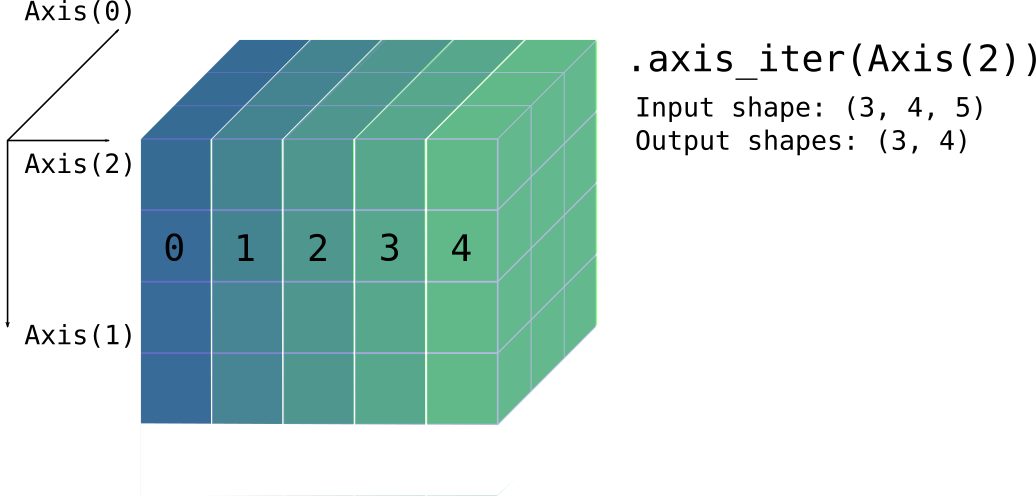
Return an iterator that traverses over axis
and yields each subview along it.
For example, in a 3 × 4 × 5 array, with axis equal to Axis(2),
the iterator element
is a 3 × 4 subview (and there are 5 in total), as shown
in the picture below.
Iterator element is ArrayView<A, D::Smaller> (read-only array view).
See Subviews for full documentation.
Panics if axis is out of bounds.
Source
Return an iterator that traverses over axis
and yields each mutable subview along it.
Iterator element is ArrayViewMut<A, D::Smaller>
(read-write array view).
Panics if axis is out of bounds.
Source
Return an iterator that traverses over axis by chunks of size,
yielding non-overlapping views along that axis.
Iterator element is ArrayView<A, D>
The last view may have less elements if size does not divide
the axis’ dimension.
Panics if axis is out of bounds or if size is zero.
use ndarray::Array;
use ndarray::{arr3, Axis};

let a = Array::from_iter(0..28).into_shape_with_order((2, 7, 2)).unwrap();
let mut iter = a.axis_chunks_iter(Axis(1), 2);

// first iteration yields a 2 × 2 × 2 view
assert_eq!(iter.next().unwrap(),
           arr3(&[[[ 0,  1], [ 2, 3]],
                  [[14, 15], [16, 17]]]));

// however the last element is a 2 × 1 × 2 view since 7 % 2 == 1
assert_eq!(iter.next_back().unwrap(), arr3(&[[[12, 13]],
                                             [[26, 27]]]));
Source
Return an iterator that traverses over axis by chunks of size,
yielding non-overlapping read-write views along that axis.
Iterator element is ArrayViewMut<A, D>
Panics if axis is out of bounds or if size is zero.
Source
Return an exact chunks producer (and iterable).
It produces the whole chunks of a given n-dimensional chunk size, skipping the remainder along each dimension that doesn’t fit evenly.
The produced element is a ArrayView<A, D> with exactly the dimension
chunk_size.
Panics if any dimension of chunk_size is zero
(Panics if D is IxDyn and chunk_size does not match the
number of array axes.)
Source
Return an exact chunks producer (and iterable).
It produces the whole chunks of a given n-dimensional chunk size, skipping the remainder along each dimension that doesn’t fit evenly.
The produced element is a ArrayViewMut<A, D> with exactly
the dimension chunk_size.
Panics if any dimension of chunk_size is zero
(Panics if D is IxDyn and chunk_size does not match the
number of array axes.)
use ndarray::Array;
use ndarray::arr2;
let mut a = Array::zeros((6, 7));

// Fill each 2 × 2 chunk with the index of where it appeared in iteration
for (i, mut chunk) in a.exact_chunks_mut((2, 2)).into_iter().enumerate() {
    chunk.fill(i);
}

// The resulting array is:
assert_eq!(
  a,
  arr2(&[[0, 0, 1, 1, 2, 2, 0],
         [0, 0, 1, 1, 2, 2, 0],
         [3, 3, 4, 4, 5, 5, 0],
         [3, 3, 4, 4, 5, 5, 0],
         [6, 6, 7, 7, 8, 8, 0],
         [6, 6, 7, 7, 8, 8, 0]]));
Source
Return a window producer and iterable.
The windows are all distinct overlapping views of size window_size
that fit into the array’s shape.
This is essentially equivalent to ArrayRef::windows_with_stride() with unit stride.
Source
Return a window producer and iterable.
The windows are all distinct views of size window_size
that fit into the array’s shape.
The stride is ordered by the outermost axis.
Hence, a (x₀, x₁, …, xₙ) stride will be applied to
(A₀, A₁, …, Aₙ) where Aₓ stands for Axis(x).
This produces all windows that fit within the array for the given stride, assuming the window size is not larger than the array size.
The produced element is an ArrayView<A, D> with exactly the dimension
window_size.
Note that passing a stride of only ones is similar to
calling ArrayRef::windows().
Panics if any dimension of window_size or stride is zero.
(Panics if D is IxDyn and window_size or stride does not match the
number of array axes.)
This is the same illustration found in ArrayRef::windows(),
2×2 windows in a 3×4 array, but now with a (1, 2) stride:
         ──▶ Axis(1)

     │   ┏━━━━━┳━━━━━┱─────┬─────┐   ┌─────┬─────┲━━━━━┳━━━━━┓
     ▼   ┃ a₀₀ ┃ a₀₁ ┃     │     │   │     │     ┃ a₀₂ ┃ a₀₃ ┃
Axis(0)  ┣━━━━━╋━━━━━╉─────┼─────┤   ├─────┼─────╊━━━━━╋━━━━━┫
         ┃ a₁₀ ┃ a₁₁ ┃     │     │   │     │     ┃ a₁₂ ┃ a₁₃ ┃
         ┡━━━━━╇━━━━━╃─────┼─────┤   ├─────┼─────╄━━━━━╇━━━━━┩
         │     │     │     │     │   │     │     │     │     │
         └─────┴─────┴─────┴─────┘   └─────┴─────┴─────┴─────┘

         ┌─────┬─────┬─────┬─────┐   ┌─────┬─────┬─────┬─────┐
         │     │     │     │     │   │     │     │     │     │
         ┢━━━━━╈━━━━━╅─────┼─────┤   ├─────┼─────╆━━━━━╈━━━━━┪
         ┃ a₁₀ ┃ a₁₁ ┃     │     │   │     │     ┃ a₁₂ ┃ a₁₃ ┃
         ┣━━━━━╋━━━━━╉─────┼─────┤   ├─────┼─────╊━━━━━╋━━━━━┫
         ┃ a₂₀ ┃ a₂₁ ┃     │     │   │     │     ┃ a₂₂ ┃ a₂₃ ┃
         ┗━━━━━┻━━━━━┹─────┴─────┘   └─────┴─────┺━━━━━┻━━━━━┛
Source
Returns a producer which traverses over all windows of a given length along an axis.
The windows are all distinct, possibly-overlapping views. The shape of each window
is the shape of self, with the length of axis replaced with window_size.
Panics if axis is out-of-bounds or if window_size is zero.
use ndarray::{Array3, Axis, s};

let arr = Array3::from_shape_fn([4, 5, 2], |(i, j, k)| i * 100 + j * 10 + k);
let correct = vec![
    arr.slice(s![.., 0..3, ..]),
    arr.slice(s![.., 1..4, ..]),
    arr.slice(s![.., 2..5, ..]),
];
for (window, correct) in arr.axis_windows(Axis(1), 3).into_iter().zip(&correct) {
    assert_eq!(window, correct);
    assert_eq!(window.shape(), &[4, 3, 2]);
}
Source
Returns a producer which traverses over windows of a given length and stride along an axis.
Note that a calling this method with a stride of 1 is equivalent to
calling ArrayRef::axis_windows().
Source
Return a view of the diagonal elements of the array.
The diagonal is simply the sequence indexed by (0, 0, .., 0), (1, 1, …, 1) etc as long as all axes have elements.
Source
Return a read-write view over the diagonal elements of the array.
Source§
Source
Return a standard-layout array containing the data, cloning if necessary.
If self is in standard layout, a COW view of the data is returned
without cloning. Otherwise, the data is cloned, and the returned array
owns the cloned data.
use ndarray::Array2;

let standard = Array2::<f64>::zeros((3, 4));
assert!(standard.is_standard_layout());
let cow_view = standard.as_standard_layout();
assert!(cow_view.is_view());
assert!(cow_view.is_standard_layout());

let fortran = standard.reversed_axes();
assert!(!fortran.is_standard_layout());
let cow_owned = fortran.as_standard_layout();
assert!(cow_owned.is_owned());
assert!(cow_owned.is_standard_layout());Source§
Source
Return the array’s data as a slice, if it is contiguous and in standard order.
Return None otherwise.
If this function returns Some(_), then the element order in the slice
corresponds to the logical order of the array’s elements.
Source
Return the array’s data as a slice, if it is contiguous and in standard order.
Return None otherwise.
Source
Return the array’s data as a slice if it is contiguous,
return None otherwise.
If this function returns Some(_), then the elements in the slice
have whatever order the elements have in memory.
Source
Return the array’s data as a slice if it is contiguous,
return None otherwise.
In the contiguous case, in order to return a unique reference, this method unshares the data if necessary, but it preserves the existing strides.
Source
Transform the array into new_shape; any shape with the same number of elements is
accepted.
order specifies the logical order in which the array is to be read and reshaped.
The array is returned as a CowArray; a view if possible, otherwise an owned array.
For example, when starting from the one-dimensional sequence 1 2 3 4 5 6, it would be understood as a 2 x 3 array in row major (“C”) order this way:
and as 2 x 3 in column major (“F”) order this way:
This example should show that any time we “reflow” the elements in the array to a different
number of rows and columns (or more axes if applicable), it is important to pick an index
ordering, and that’s the reason for the function parameter for order.
The new_shape parameter should be a dimension and an optional order like these examples:
(3, 4)                          // Shape 3 x 4 with default order (RowMajor)
((3, 4), Order::RowMajor))      // use specific order
((3, 4), Order::ColumnMajor))   // use specific order
((3, 4), Order::C))             // use shorthand for order - shorthands C and F
Errors if the new shape doesn’t have the same number of elements as the array’s current shape.
§Example
use ndarray::array;
use ndarray::Order;

assert!(
    array![1., 2., 3., 4., 5., 6.].to_shape(((2, 3), Order::RowMajor)).unwrap()
    == array![[1., 2., 3.],
              [4., 5., 6.]]
);

assert!(
    array![1., 2., 3., 4., 5., 6.].to_shape(((2, 3), Order::ColumnMajor)).unwrap()
    == array![[1., 3., 5.],
              [2., 4., 6.]]
);Source§
Source
Flatten the array to a one-dimensional array.
The array is returned as a CowArray; a view if possible, otherwise an owned array.
use ndarray::{arr1, arr3};

let array = arr3(&[[[1, 2], [3, 4]], [[5, 6], [7, 8]]]);
let flattened = array.flatten();
assert_eq!(flattened, arr1(&[1, 2, 3, 4, 5, 6, 7, 8]));
Source
Flatten the array to a one-dimensional array.
order specifies the logical order in which the array is to be read and reshaped.
The array is returned as a CowArray; a view if possible, otherwise an owned array.
use ndarray::{arr1, arr2};
use ndarray::Order;

let array = arr2(&[[1, 2], [3, 4], [5, 6], [7, 8]]);
let flattened = array.flatten_with_order(Order::RowMajor);
assert_eq!(flattened, arr1(&[1, 2, 3, 4, 5, 6, 7, 8]));
let flattened = array.flatten_with_order(Order::ColumnMajor);
assert_eq!(flattened, arr1(&[1, 3, 5, 7, 2, 4, 6, 8]));Source§
Source
Act like a larger size and/or shape array by broadcasting into a larger shape, if possible.
Return None if shapes can not be broadcast together.
Background
- Two axes are compatible if they are equal, or one of them is 1.
- In this instance, only the axes of the smaller side (self) can be 1.
Compare axes beginning with the last axis of each shape.
For example (1, 2, 4) can be broadcast into (7, 6, 2, 4) because its axes are either equal or 1 (or missing); while (2, 2) can not be broadcast into (2, 4).
The implementation creates a view with strides set to zero for the axes that are to be repeated.
The broadcasting documentation for NumPy has more information.
use ndarray::{aview1, aview2};

assert!(
    aview1(&[1., 0.]).broadcast((10, 2)).unwrap()
    == aview2(&[[1., 0.]; 10])
);Source§
Source
Return a transposed view of the array.
This is a shorthand for self.view().reversed_axes().
See also the more general methods .reversed_axes() and .swap_axes().
Source§
Source
Perform an elementwise assignment to self from rhs.
If their shapes disagree, rhs is broadcast to the shape of self.
Panics if broadcasting isn’t possible.
Source
Perform an elementwise assignment of values cloned from self into array or producer to.
The destination to can be another array or a producer of assignable elements.
AssignElem determines how elements are assigned.
Panics if shapes disagree.
Source
Perform an elementwise assignment to self from element x.
Source
Traverse two arrays in unspecified order, in lock step,
calling the closure f on each element pair.
If their shapes disagree, rhs is broadcast to the shape of self.
Panics if broadcasting isn’t possible.
Source
Traverse the array elements and apply a fold, returning the resulting value.
Elements are visited in arbitrary order.
Source
Call f by reference on each element and create a new array
with the new values.
Elements are visited in arbitrary order.
Return an array with the same shape as self.
use ndarray::arr2;

let a = arr2(&[[ 0., 1.],
               [-1., 2.]]);
assert!(
    a.map(|x| *x >= 1.0)
    == arr2(&[[false, true],
              [false, true]])
);
Source
Call f on a mutable reference of each element and create a new array
with the new values.
Elements are visited in arbitrary order.
Return an array with the same shape as self.
Source
Call f by value on each element and create a new array
with the new values.
Elements are visited in arbitrary order.
Return an array with the same shape as self.
use ndarray::arr2;

let a = arr2(&[[ 0., 1.],
               [-1., 2.]]);
assert!(
    a.mapv(f32::abs) == arr2(&[[0., 1.],
                               [1., 2.]])
);Source§
Source
Modify the array in place by calling f by mutable reference on each element.
Elements are visited in arbitrary order.
Source
Modify the array in place by calling f by value on each element.
The array is updated with the new values.
Elements are visited in arbitrary order.
use approx::assert_abs_diff_eq;
use ndarray::arr2;

let mut a = arr2(&[[ 0., 1.],
                   [-1., 2.]]);
a.mapv_inplace(f32::exp);
assert_abs_diff_eq!(
    a,
    arr2(&[[1.00000, 2.71828],
           [0.36788, 7.38906]]),
    epsilon = 1e-5,
);
Source
Call f for each element in the array.
Elements are visited in arbitrary order.
Source
Fold along an axis.
Combine the elements of each subview with the previous using the fold
function and initial value init.
Return the result as an Array.
Panics if axis is out of bounds.
Source
Reduce the values along an axis into just one value, producing a new array with one less dimension.
Elements are visited in arbitrary order.
Return the result as an Array.
Panics if axis is out of bounds.
Source
Reduce the values along an axis into just one value, producing a new array with one less dimension. 1-dimensional lanes are passed as mutable references to the reducer, allowing for side-effects.
Elements are visited in arbitrary order.
Return the result as an Array.
Panics if axis is out of bounds.
Source
Remove the indexth elements along axis and shift down elements from higher indexes.
Note that this “removes” the elements by swapping them around to the end of the axis and shortening the length of the axis; the elements are not deinitialized or dropped by this, just moved out of view (this only matters for elements with ownership semantics). It’s similar to slicing an owned array in place.
Decreases the length of axis by one.
Panics if axis is out of bounds
Panics if not index < self.len_of(axis).
Source§
Source
Iterates over pairs of consecutive elements along the axis.
The first argument to the closure is an element, and the second argument is the next element along the axis. Iteration is guaranteed to proceed in order along the specified axis, but in all other respects the iteration order is unspecified.
§Example
For example, this can be used to compute the cumulative sum along an axis:
use ndarray::{array, Axis};

let mut arr = array![
    [[1, 2], [3, 4], [5, 6]],
    [[7, 8], [9, 10], [11, 12]],
];
arr.accumulate_axis_inplace(Axis(1), |&prev, curr| *curr += prev);
assert_eq!(
    arr,
    array![
        [[1, 2], [4, 6], [9, 12]],
        [[7, 8], [16, 18], [27, 30]],
    ],
);
Source
Return a partitioned copy of the array.
Creates a copy of the array and partially sorts it around the k-th element along the given axis. The k-th element will be in its sorted position, with:
- All elements smaller than the k-th element to its left
- All elements equal or greater than the k-th element to its right
- The ordering within each partition is undefined
Empty arrays (i.e., those with any zero-length axes) are considered partitioned already, and will be returned unchanged.
Panics if k is out of bounds for a non-zero axis length.
§Parameters
kth- Index to partition by. The k-th element will be in its sorted position.axis- Axis along which to partition.
§Examples
use ndarray::prelude::*;

let a = array![7, 1, 5, 2, 6, 0, 3, 4];
let p = a.partition(3, Axis(0));

// The element at position 3 is now 3, with smaller elements to the left
// and greater elements to the right
assert_eq!(p[3], 3);
assert!(p.slice(s![..3]).iter().all(|&x| x <= 3));
assert!(p.slice(s![4..]).iter().all(|&x| x >= 3));Source§§Parallel methods
§Parallel methods
Source Available on crate feature rayon only.
rayon only.Parallel version of map_inplace.
Modify the array in place by calling f by mutable reference on each element.
Elements are visited in arbitrary order.
Source Available on crate feature rayon only.
rayon only.Parallel version of mapv_inplace.
Modify the array in place by calling f by value on each element.
The array is updated with the new values.
Elements are visited in arbitrary order.
Source§§Methods For 1-D Arrays
§Methods For 1-D Arrays
Source
Return an vector with the elements of the one-dimensional array.
Source§§Methods For 2-D Arrays
§Methods For 2-D Arrays
Source
Return an array view of row index.
Panics if index is out of bounds.
use ndarray::array;
let array = array![[1., 2.], [3., 4.]];
assert_eq!(array.row(0), array![1., 2.]);
Source
Return a mutable array view of row index.
Panics if index is out of bounds.
use ndarray::array;
let mut array = array![[1., 2.], [3., 4.]];
array.row_mut(0)[1] = 5.;
assert_eq!(array, array![[1., 5.], [3., 4.]]);Source§
Source
Return an array view of column index.
Panics if index is out of bounds.
use ndarray::array;
let array = array![[1., 2.], [3., 4.]];
assert_eq!(array.column(0), array![1., 3.]);
Source
Return a mutable array view of column index.
Panics if index is out of bounds.
use ndarray::array;
let mut array = array![[1., 2.], [3., 4.]];
array.column_mut(0)[1] = 5.;
assert_eq!(array, array![[1., 2.], [5., 4.]]);Source§§Numerical Methods for Arrays
§Numerical Methods for Arrays
Source
Return the sum of all elements in the array.
use ndarray::arr2;

let a = arr2(&[[1., 2.],
               [3., 4.]]);
assert_eq!(a.sum(), 10.);
Source
Returns the arithmetic mean x̅ of all elements in the array:
If the array is empty, None is returned.
Panics if A::from_usize() fails to convert the number of elements in the array.
Source
Return the product of all elements in the array.
use ndarray::arr2;

let a = arr2(&[[1., 2.],
               [3., 4.]]);
assert_eq!(a.product(), 24.);
Source
Return the cumulative product of elements along a given axis.
use ndarray::{arr2, Axis};

let a = arr2(&[[1., 2., 3.],
               [4., 5., 6.]]);

// Cumulative product along rows (axis 0)
assert_eq!(
    a.cumprod(Axis(0)),
    arr2(&[[1., 2., 3.],
          [4., 10., 18.]])
);

// Cumulative product along columns (axis 1)
assert_eq!(
    a.cumprod(Axis(1)),
    arr2(&[[1., 2., 6.],
          [4., 20., 120.]])
);
Panics if axis is out of bounds.
Source Available on crate feature std only.
std only.Return variance of elements in the array.
The variance is computed using the Welford one-pass algorithm.
The parameter ddof specifies the “delta degrees of freedom”. For
example, to calculate the population variance, use ddof = 0, or to
calculate the sample variance, use ddof = 1.
The variance is defined as:
              1       n
variance = ――――――――   ∑ (xᵢ - x̅)²
           n - ddof  i=1
where
and n is the length of the array.
Panics if ddof is less than zero or greater than n
§Example
use ndarray::array;
use approx::assert_abs_diff_eq;

let a = array![1., -4.32, 1.14, 0.32];
let var = a.var(1.);
assert_abs_diff_eq!(var, 6.7331, epsilon = 1e-4);
Source Available on crate feature std only.
std only.Return standard deviation of elements in the array.
The standard deviation is computed from the variance using the Welford one-pass algorithm.
The parameter ddof specifies the “delta degrees of freedom”. For
example, to calculate the population standard deviation, use ddof = 0,
or to calculate the sample standard deviation, use ddof = 1.
The standard deviation is defined as:
              ⎛    1       n          ⎞
stddev = sqrt ⎜ ――――――――   ∑ (xᵢ - x̅)²⎟
              ⎝ n - ddof  i=1         ⎠
where
and n is the length of the array.
Panics if ddof is less than zero or greater than n
§Example
use ndarray::array;
use approx::assert_abs_diff_eq;

let a = array![1., -4.32, 1.14, 0.32];
let stddev = a.std(1.);
assert_abs_diff_eq!(stddev, 2.59483, epsilon = 1e-4);
Source
Return sum along axis.
use ndarray::{aview0, aview1, arr2, Axis};

let a = arr2(&[[1., 2., 3.],
               [4., 5., 6.]]);
assert!(
    a.sum_axis(Axis(0)) == aview1(&[5., 7., 9.]) &&
    a.sum_axis(Axis(1)) == aview1(&[6., 15.]) &&

    a.sum_axis(Axis(0)).sum_axis(Axis(0)) == aview0(&21.)
);
Panics if axis is out of bounds.
Source
Return product along axis.
The product of an empty array is 1.
use ndarray::{aview0, aview1, arr2, Axis};

let a = arr2(&[[1., 2., 3.],
               [4., 5., 6.]]);

assert!(
    a.product_axis(Axis(0)) == aview1(&[4., 10., 18.]) &&
    a.product_axis(Axis(1)) == aview1(&[6., 120.]) &&

    a.product_axis(Axis(0)).product_axis(Axis(0)) == aview0(&720.)
);
Panics if axis is out of bounds.
Source
Return mean along axis.
Return None if the length of the axis is zero.
Panics if axis is out of bounds or if A::from_usize()
fails for the axis length.
use ndarray::{aview0, aview1, arr2, Axis};

let a = arr2(&[[1., 2., 3.],
               [4., 5., 6.]]);
assert!(
    a.mean_axis(Axis(0)).unwrap() == aview1(&[2.5, 3.5, 4.5]) &&
    a.mean_axis(Axis(1)).unwrap() == aview1(&[2., 5.]) &&

    a.mean_axis(Axis(0)).unwrap().mean_axis(Axis(0)).unwrap() == aview0(&3.5)
);
Source Available on crate feature std only.
std only.Return variance along axis.
The variance is computed using the Welford one-pass algorithm.
The parameter ddof specifies the “delta degrees of freedom”. For
example, to calculate the population variance, use ddof = 0, or to
calculate the sample variance, use ddof = 1.
The variance is defined as:
              1       n
variance = ――――――――   ∑ (xᵢ - x̅)²
           n - ddof  i=1
where
and n is the length of the axis.
Panics if ddof is less than zero or greater than n, if axis
is out of bounds, or if A::from_usize() fails for any any of the
numbers in the range 0..=n.
§Example
use ndarray::{aview1, arr2, Axis};

let a = arr2(&[[1., 2.],
               [3., 4.],
               [5., 6.]]);
let var = a.var_axis(Axis(0), 1.);
assert_eq!(var, aview1(&[4., 4.]));
Source Available on crate feature std only.
std only.Return standard deviation along axis.
The standard deviation is computed from the variance using the Welford one-pass algorithm.
The parameter ddof specifies the “delta degrees of freedom”. For
example, to calculate the population standard deviation, use ddof = 0,
or to calculate the sample standard deviation, use ddof = 1.
The standard deviation is defined as:
              ⎛    1       n          ⎞
stddev = sqrt ⎜ ――――――――   ∑ (xᵢ - x̅)²⎟
              ⎝ n - ddof  i=1         ⎠
where
and n is the length of the axis.
Panics if ddof is less than zero or greater than n, if axis
is out of bounds, or if A::from_usize() fails for any any of the
numbers in the range 0..=n.
§Example
use ndarray::{aview1, arr2, Axis};

let a = arr2(&[[1., 2.],
               [3., 4.],
               [5., 6.]]);
let stddev = a.std_axis(Axis(0), 1.);
assert_eq!(stddev, aview1(&[2., 2.]));
Source
Calculates the (forward) finite differences of order n, along the axis.
For the 1D-case, n==1, this means: diff[i] == arr[i+1] - arr[i]
For n>=2, the process is iterated:
use ndarray::{array, Axis};
let arr = array![1.0, 2.0, 5.0];
assert_eq!(arr.diff(2, Axis(0)), arr.diff(1, Axis(0)).diff(1, Axis(0)))
Panics if axis is out of bounds
Panics if n is too big / the array is to short:
use ndarray::{array, Axis};
array![1.0, 2.0, 3.0].diff(10, Axis(0));Source§§Element-wise methods for float arrays
Element-wise math functions for any array type that contains float number.
§Element-wise methods for float arrays
Element-wise math functions for any array type that contains float number.
Source Available on crate feature std only.
std only.If the number is NaN (not a number), then true is returned for each element.
Source Available on crate feature std only.
std only.Return true if all elements are NaN (not a number).
Source Available on crate feature std only.
std only.Return true if any element is NaN (not a number).
Source Available on crate feature std only.
std only.If the number is infinity, then true is returned for each element.
Source Available on crate feature std only.
std only.Return true if all elements are infinity.
Source Available on crate feature std only.
std only.Return true if any element is infinity.
Source Available on crate feature std only.
std only.The largest integer less than or equal to each element.
Source Available on crate feature std only.
std only.The smallest integer less than or equal to each element.
Source Available on crate feature std only.
std only.The nearest integer of each element.
Source Available on crate feature std only.
std only.The integer part of each element.
Source Available on crate feature std only.
std only.The fractional part of each element.
Source Available on crate feature std only.
std only.Absolute of each element.
Source Available on crate feature std only.
std only.Sign number of each element.
1.0for all positive numbers.-1.0for all negative numbers.NaNfor allNaN(not a number).
Source Available on crate feature std only.
std only.The reciprocal (inverse) of each element, 1/x.
Source Available on crate feature std only.
std only.Square root of each element.
Source Available on crate feature std only.
std only.e^x of each element (exponential function).
Source Available on crate feature std only.
std only.2^x of each element.
Source Available on crate feature std only.
std only.e^x - 1 of each element.
Source Available on crate feature std only.
std only.Natural logarithm of each element.
Source Available on crate feature std only.
std only.Base 2 logarithm of each element.
Source Available on crate feature std only.
std only.Base 10 logarithm of each element.
Source Available on crate feature std only.
std only.ln(1 + x) of each element.
Source Available on crate feature std only.
std only.Cubic root of each element.
Source Available on crate feature std only.
std only.Sine of each element (in radians).
Source Available on crate feature std only.
std only.Cosine of each element (in radians).
Source Available on crate feature std only.
std only.Tangent of each element (in radians).
Source Available on crate feature std only.
std only.Arcsine of each element (return in radians).
Source Available on crate feature std only.
std only.Arccosine of each element (return in radians).
Source Available on crate feature std only.
std only.Arctangent of each element (return in radians).
Source Available on crate feature std only.
std only.Hyperbolic sine of each element.
Source Available on crate feature std only.
std only.Hyperbolic cosine of each element.
Source Available on crate feature std only.
std only.Hyperbolic tangent of each element.
Source Available on crate feature std only.
std only.Inverse hyperbolic sine of each element.
Source Available on crate feature std only.
std only.Inverse hyperbolic cosine of each element.
Source Available on crate feature std only.
std only.Inverse hyperbolic tangent of each element.
Source Available on crate feature std only.
std only.Converts radians to degrees for each element.
Source Available on crate feature std only.
std only.Converts degrees to radians for each element.
Source Available on crate feature std only.
std only.Integer power of each element.
This function is generally faster than using float power.
Source Available on crate feature std only.
std only.Float power of each element.
Source Available on crate feature std only.
std only.Logarithm of each element with respect to an arbitrary base.
Source Available on crate feature std only.
std only.The positive difference between given number and each element.
Source Available on crate feature std only.
std only.Length of the hypotenuse of a right-angle triangle of each element
Source Available on crate feature std only.
std only.Square (two powers) of each element.
Source§
Source
Limit the values for each element, similar to NumPy’s clip function.
use ndarray::array;

let a = array![0., 1., 2., 3., 4., 5., 6., 7., 8., 9.];
assert_eq!(a.clamp(1., 8.), array![1., 1., 2., 3., 4., 5., 6., 7., 8., 8.]);
assert_eq!(a.clamp(3., 6.), array![3., 3., 3., 3., 4., 5., 6., 6., 6., 6.]);§Panics
Panics if !(min <= max).
Source§
Source
Perform dot product or matrix multiplication of arrays self and rhs.
Rhs may be either a one-dimensional or a two-dimensional array.
If Rhs is one-dimensional, then the operation is a vector dot
product, which is the sum of the elementwise products (no conjugation
of complex operands, and thus not their inner product). In this case,
self and rhs must be the same length.
If Rhs is two-dimensional, then the operation is matrix
multiplication, where self is treated as a row vector. In this case,
if self is shape M, then rhs is shape M × N and the result is
shape N.
Panics if the array shapes are incompatible.
Note: If enabled, uses blas dot for elements of f32, f64 when memory
layout allows.
Source§
Source
Perform matrix multiplication of rectangular arrays self and rhs.
Rhs may be either a one-dimensional or a two-dimensional array.
If Rhs is two-dimensional, they array shapes must agree in the way that
if self is M × N, then rhs is N × K.
Return a result array with shape M × K.
Panics if shapes are incompatible or the number of elements in the
result would overflow isize.
Note: If enabled, uses blas gemv/gemm for elements of f32, f64
when memory layout allows. The default matrixmultiply backend
is otherwise used for f32, f64 for all memory layouts.
use ndarray::arr2;

let a = arr2(&[[1., 2.],
               [0., 1.]]);
let b = arr2(&[[1., 2.],
               [2., 3.]]);

assert!(
    a.dot(&b) == arr2(&[[5., 8.],
                        [2., 3.]])
);Source§
Source
Perform the operation self += alpha * rhs efficiently, where
alpha is a scalar and rhs is another array. This operation is
also known as axpy in BLAS.
If their shapes disagree, rhs is broadcast to the shape of self.
Panics if broadcasting isn’t possible.
Source§
Source Available on crate feature approx only.
approx only.A test for equality that uses the elementwise absolute difference to compute the approximate equality of two arrays.
Source Available on crate feature approx only.
approx only.A test for equality that uses an elementwise relative comparison if the values are far apart; and the absolute difference otherwise.
Source§
Source
Upper triangular of an array.
Return a copy of the array with elements below the k-th diagonal zeroed.
For arrays with ndim exceeding 2, triu will apply to the final two axes.
For 0D and 1D arrays, triu will return an unchanged clone.
See also ArrayRef::tril
use ndarray::array;

let arr = array![
    [1, 2, 3],
    [4, 5, 6],
    [7, 8, 9]
];
assert_eq!(
    arr.triu(0),
    array![
        [1, 2, 3],
        [0, 5, 6],
        [0, 0, 9]
    ]
);
Source
Lower triangular of an array.
Return a copy of the array with elements above the k-th diagonal zeroed.
For arrays with ndim exceeding 2, tril will apply to the final two axes.
For 0D and 1D arrays, tril will return an unchanged clone.
See also ArrayRef::triu
use ndarray::array;

let arr = array![
    [1, 2, 3],
    [4, 5, 6],
    [7, 8, 9]
];
assert_eq!(
    arr.tril(0),
    array![
        [1, 0, 0],
        [4, 5, 0],
        [7, 8, 9]
    ]
);
Source
Return a raw pointer to the element at index, or return None
if the index is out of bounds.
use ndarray::arr2;

let a = arr2(&[[1., 2.], [3., 4.]]);

let v = a.raw_view();
let p = a.get_ptr((0, 1)).unwrap();

assert_eq!(unsafe { *p }, 2.);
Source
Return a raw pointer to the element at index, or return None
if the index is out of bounds.
use ndarray::arr2;

let mut a = arr2(&[[1., 2.], [3., 4.]]);

let v = a.raw_view_mut();
let p = a.get_mut_ptr((0, 1)).unwrap();

unsafe {
    *p = 5.;
}

assert_eq!(a.get((0, 1)), Some(&5.));
Source
Return a pointer to the first element in the array.
Raw access to array elements needs to follow the strided indexing scheme: an element at multi-index I in an array with strides S is located at offset
Σ0 ≤ k < d Ik × Sk
where d is self.ndim().
Source
Return a mutable pointer to the first element in the array reference.
Source
Return a raw view of the array.
Source
Return a raw mutable view of the array.
Source
Return the total number of elements in the array.
Source
Return the length of axis.
The axis should be in the range Axis( 0 .. n ) where n is the
number of dimensions (axes) of the array.
Panics if the axis is out of bounds.
Source
Return whether the array has any elements
Source
Return the number of dimensions (axes) in the array
Source
Return the shape of the array in its “pattern” form, an integer in the one-dimensional case, tuple in the n-dimensional cases and so on.
Source
Return the shape of the array as it’s stored in the array.
This is primarily useful for passing to other ArrayBase
functions, such as when creating another array of the same
shape and dimensionality.
use ndarray::Array;

let a = Array::from_elem((2, 3), 5.);

// Create an array of zeros that's the same shape and dimensionality as `a`.
let b = Array::<f64, _>::zeros(a.raw_dim());
Source
Return the shape of the array as a slice.
Note that you probably don’t want to use this to create an array of the
same shape as another array because creating an array with e.g.
Array::zeros() using a shape of type &[usize]
results in a dynamic-dimensional array. If you want to create an array
that has the same shape and dimensionality as another array, use
.raw_dim() instead:
use ndarray::{Array, Array2};

let a = Array2::<i32>::zeros((3, 4));
let shape = a.shape();
assert_eq!(shape, &[3, 4]);

// Since `a.shape()` returned `&[usize]`, we get an `ArrayD` instance:
let b = Array::zeros(shape);
assert_eq!(a.clone().into_dyn(), b);

// To get the same dimension type, use `.raw_dim()` instead:
let c = Array::zeros(a.raw_dim());
assert_eq!(a, c);
Source
Return the strides of the array as a slice.
Source
Return the stride of axis.
The axis should be in the range Axis( 0 .. n ) where n is the
number of dimensions (axes) of the array.
Panics if the axis is out of bounds.
Source
Slice the array in place without changing the number of dimensions.
In particular, if an axis is sliced with an index, the axis is
collapsed, as in .collapse_axis(), rather than removed, as in
.slice_move() or .index_axis_move().
See Slicing for full documentation.
See also s!, SliceArg, and SliceInfo.
Panics in the following cases:
- if an index is out of bounds
- if a step size is zero
- if
SliceInfoElem::NewAxisis ininfo, e.g. ifNewAxiswas used in thes!macro - if
DisIxDynandinfodoes not match the number of array axes
Source
Slice the array in place along the specified axis.
Panics if an index is out of bounds or step size is zero.
Panics if axis is out of bounds.
Source
Slice the array in place, with a closure specifying the slice for each axis.
This is especially useful for code which is generic over the dimensionality of the array.
Panics if an index is out of bounds or step size is zero.
Source
Selects index along the axis, collapsing the axis into length one.
Panics if axis or index is out of bounds.
Source
Return true if the array data is laid out in contiguous “C order” in
memory (where the last index is the most rapidly varying).
Return false otherwise, i.e. the array is possibly not
contiguous in memory, it has custom strides, etc.
Source
Swap axes ax and bx.
This does not move any data, it just adjusts the array’s dimensions and strides.
Panics if the axes are out of bounds.
use ndarray::arr2;

let mut a = arr2(&[[1., 2., 3.]]);
a.swap_axes(0, 1);
assert!(
    a == arr2(&[[1.], [2.], [3.]])
);
Source
Return an iterator over the length and stride of each axis.
Source
Return the axis with the greatest stride (by absolute value), preferring axes with len > 1.
Source
Reverse the stride of axis.
Panics if the axis is out of bounds.
Source
If possible, merge in the axis take to into.
Returns true iff the axes are now merged.
This method merges the axes if movement along the two original axes
(moving fastest along the into axis) can be equivalently represented
as movement along one (merged) axis. Merging the axes preserves this
order in the merged axis. If take and into are the same axis, then
the axis is “merged” if its length is ≤ 1.
If the return value is true, then the following hold:
-
The new length of the
intoaxis is the product of the original lengths of the two axes. -
The new length of the
takeaxis is 0 if the product of the original lengths of the two axes is 0, and 1 otherwise.
If the return value is false, then merging is not possible, and the
original shape and strides have been preserved.
Note that the ordering constraint means that if it’s possible to merge
take into into, it’s usually not possible to merge into into
take, and vice versa.
use ndarray::Array3;
use ndarray::Axis;

let mut a = Array3::<f64>::zeros((2, 3, 4));
assert!(a.merge_axes(Axis(1), Axis(2)));
assert_eq!(a.shape(), &[2, 1, 12]);
Panics if an axis is out of bounds.
Source
Return the number of rows (length of Axis(0)) in the two-dimensional array.
use ndarray::{array, Axis};

let array = array![[1., 2.],
                   [3., 4.],
                   [5., 6.]];
assert_eq!(array.nrows(), 3);

// equivalent ways of getting the dimensions
// get nrows, ncols by using dim:
let (m, n) = array.dim();
assert_eq!(m, array.nrows());
// get length of any particular axis with .len_of()
assert_eq!(m, array.len_of(Axis(0)));
Source
Return the number of columns (length of Axis(1)) in the two-dimensional array.
use ndarray::{array, Axis};

let array = array![[1., 2.],
                   [3., 4.],
                   [5., 6.]];
assert_eq!(array.ncols(), 2);

// equivalent ways of getting the dimensions
// get nrows, ncols by using dim:
let (m, n) = array.dim();
assert_eq!(n, array.ncols());
// get length of any particular axis with .len_of()
assert_eq!(n, array.len_of(Axis(1)));
Source
Return true if the array is square, false otherwise.
§Examples
Square:
use ndarray::array;
let array = array![[1., 2.], [3., 4.]];
assert!(array.is_square());
Not square:
use ndarray::array;
let array = array![[1., 2., 5.], [3., 4., 6.]];
assert!(!array.is_square());
Source
Insert new array axis of length 1 at axis, modifying the shape and
strides in-place.
Panics if the axis is out of bounds.
use ndarray::{Axis, arr2, arr3};

let mut a = arr2(&[[1, 2, 3], [4, 5, 6]]).into_dyn();
assert_eq!(a.shape(), &[2, 3]);

a.insert_axis_inplace(Axis(1));
assert_eq!(a, arr3(&[[[1, 2, 3]], [[4, 5, 6]]]).into_dyn());
assert_eq!(a.shape(), &[2, 1, 3]);
Source
Collapses the array to index along the axis and removes the axis,
modifying the shape and strides in-place.
Panics if axis or index is out of bounds.
use ndarray::{Axis, arr1, arr2};

let mut a = arr2(&[[1, 2, 3], [4, 5, 6]]).into_dyn();
assert_eq!(a.shape(), &[2, 3]);

a.index_axis_inplace(Axis(1), 1);
assert_eq!(a, arr1(&[2, 5]).into_dyn());
assert_eq!(a.shape(), &[2]);Source§Perform elementwise
addition
between references self and rhs,
and return the result as a new Array.
Perform elementwise
addition
between references self and rhs,
and return the result as a new Array.
If their shapes disagree, self and rhs is broadcast to their broadcast shape,
cloning the data if needed.
Panics if broadcasting isn’t possible.
Source§Perform elementwise
addition
between self and reference rhs,
and return the result.
Perform elementwise
addition
between self and reference rhs,
and return the result.
rhs must be an Array or ArcArray.
If their shapes disagree, self is broadcast to their broadcast shape,
cloning the data if needed.
Panics if broadcasting isn’t possible.
Source§Perform elementwise
addition
between reference self and rhs,
and return the result.
Perform elementwise
addition
between reference self and rhs,
and return the result.
rhs must be an Array or ArcArray.
If their shapes disagree, self is broadcast to their broadcast shape,
cloning the data if needed.
Panics if broadcasting isn’t possible.
Source§Perform elementwise
addition
between the reference self and the scalar x,
and return the result as a new Array.
Perform elementwise
addition
between the reference self and the scalar x,
and return the result as a new Array.
Source§Perform self += rhs as elementwise addition (in place).
If their shapes disagree, rhs is broadcast to the shape of self.
Perform self += rhs as elementwise addition (in place).
If their shapes disagree, rhs is broadcast to the shape of self.
Panics if broadcasting isn’t possible.
Source§Format the array using Binary and apply the formatting parameters used
to each element.
Format the array using Binary and apply the formatting parameters used
to each element.
The array is shown in multiline style.
Source§Perform elementwise
bit and
between references self and rhs,
and return the result as a new Array.
Perform elementwise
bit and
between references self and rhs,
and return the result as a new Array.
If their shapes disagree, self and rhs is broadcast to their broadcast shape,
cloning the data if needed.
Panics if broadcasting isn’t possible.
Source§Perform elementwise
bit and
between self and reference rhs,
and return the result.
Perform elementwise
bit and
between self and reference rhs,
and return the result.
rhs must be an Array or ArcArray.
If their shapes disagree, self is broadcast to their broadcast shape,
cloning the data if needed.
Panics if broadcasting isn’t possible.
Source§Perform elementwise
bit and
between reference self and rhs,
and return the result.
Perform elementwise
bit and
between reference self and rhs,
and return the result.
rhs must be an Array or ArcArray.
If their shapes disagree, self is broadcast to their broadcast shape,
cloning the data if needed.
Panics if broadcasting isn’t possible.
Source§Perform elementwise
bit and
between the reference self and the scalar x,
and return the result as a new Array.
Perform elementwise
bit and
between the reference self and the scalar x,
and return the result as a new Array.
Source§Perform self &= rhs as elementwise bit and (in place).
If their shapes disagree, rhs is broadcast to the shape of self.
Perform self &= rhs as elementwise bit and (in place).
If their shapes disagree, rhs is broadcast to the shape of self.
Panics if broadcasting isn’t possible.
Source§Perform elementwise
bit or
between references self and rhs,
and return the result as a new Array.
Perform elementwise
bit or
between references self and rhs,
and return the result as a new Array.
If their shapes disagree, self and rhs is broadcast to their broadcast shape,
cloning the data if needed.
Panics if broadcasting isn’t possible.
Source§Perform elementwise
bit or
between self and reference rhs,
and return the result.
Perform elementwise
bit or
between self and reference rhs,
and return the result.
rhs must be an Array or ArcArray.
If their shapes disagree, self is broadcast to their broadcast shape,
cloning the data if needed.
Panics if broadcasting isn’t possible.
Source§Perform elementwise
bit or
between reference self and rhs,
and return the result.
Perform elementwise
bit or
between reference self and rhs,
and return the result.
rhs must be an Array or ArcArray.
If their shapes disagree, self is broadcast to their broadcast shape,
cloning the data if needed.
Panics if broadcasting isn’t possible.
Source§Perform elementwise
bit or
between the reference self and the scalar x,
and return the result as a new Array.
Perform elementwise
bit or
between the reference self and the scalar x,
and return the result as a new Array.
Source§Perform self |= rhs as elementwise bit or (in place).
If their shapes disagree, rhs is broadcast to the shape of self.
Perform self |= rhs as elementwise bit or (in place).
If their shapes disagree, rhs is broadcast to the shape of self.
Panics if broadcasting isn’t possible.
Source§Perform elementwise
bit xor
between references self and rhs,
and return the result as a new Array.
Perform elementwise
bit xor
between references self and rhs,
and return the result as a new Array.
If their shapes disagree, self and rhs is broadcast to their broadcast shape,
cloning the data if needed.
Panics if broadcasting isn’t possible.
Source§Perform elementwise
bit xor
between self and reference rhs,
and return the result.
Perform elementwise
bit xor
between self and reference rhs,
and return the result.
rhs must be an Array or ArcArray.
If their shapes disagree, self is broadcast to their broadcast shape,
cloning the data if needed.
Panics if broadcasting isn’t possible.
Source§Perform elementwise
bit xor
between reference self and rhs,
and return the result.
Perform elementwise
bit xor
between reference self and rhs,
and return the result.
rhs must be an Array or ArcArray.
If their shapes disagree, self is broadcast to their broadcast shape,
cloning the data if needed.
Panics if broadcasting isn’t possible.
Source§Perform elementwise
bit xor
between the reference self and the scalar x,
and return the result as a new Array.
Perform elementwise
bit xor
between the reference self and the scalar x,
and return the result as a new Array.
Source§Perform self ^= rhs as elementwise bit xor (in place).
If their shapes disagree, rhs is broadcast to the shape of self.
Perform self ^= rhs as elementwise bit xor (in place).
If their shapes disagree, rhs is broadcast to the shape of self.
Panics if broadcasting isn’t possible.
Source§Format the array reference using Debug and apply the formatting parameters used
to each element.
Format the array reference using Debug and apply the formatting parameters used
to each element.
The array is shown in multiline style.
Source§Format the array reference using Display and apply the formatting parameters
used to each element.
Format the array reference using Display and apply the formatting parameters
used to each element.
The array is shown in multiline style.
Source§Perform elementwise
division
between references self and rhs,
and return the result as a new Array.
Perform elementwise
division
between references self and rhs,
and return the result as a new Array.
If their shapes disagree, self and rhs is broadcast to their broadcast shape,
cloning the data if needed.
Panics if broadcasting isn’t possible.
Source§Perform elementwise
division
between self and reference rhs,
and return the result.
Perform elementwise
division
between self and reference rhs,
and return the result.
rhs must be an Array or ArcArray.
If their shapes disagree, self is broadcast to their broadcast shape,
cloning the data if needed.
Panics if broadcasting isn’t possible.
Source§Perform elementwise
division
between reference self and rhs,
and return the result.
Perform elementwise
division
between reference self and rhs,
and return the result.
rhs must be an Array or ArcArray.
If their shapes disagree, self is broadcast to their broadcast shape,
cloning the data if needed.
Panics if broadcasting isn’t possible.
Source§Perform elementwise
division
between the reference self and the scalar x,
and return the result as a new Array.
Perform elementwise
division
between the reference self and the scalar x,
and return the result as a new Array.
Source§Perform self /= rhs as elementwise division (in place).
If their shapes disagree, rhs is broadcast to the shape of self.
Perform self /= rhs as elementwise division (in place).
If their shapes disagree, rhs is broadcast to the shape of self.
Panics if broadcasting isn’t possible.
Source§
Source§
Compute the dot product of one-dimensional arrays.
The dot product is a sum of the elementwise products (no conjugation of complex operands, and thus not their inner product).
Panics if the arrays are not of the same length.
Note: If enabled, uses blas dot for elements of f32, f64 when memory
layout allows.
Source§Perform the matrix multiplication of the rectangular array self and
column vector rhs.
Perform the matrix multiplication of the rectangular array self and
column vector rhs.
The array shapes must agree in the way that
if self is M × N, then rhs is N.
Return a result array with shape M.
Panics if shapes are incompatible.
Source§Dot product for dynamic-dimensional arrays (ArrayD).
Dot product for dynamic-dimensional arrays (ArrayD).
For one-dimensional arrays, computes the vector dot product, which is the sum of the elementwise products (no conjugation of complex operands). Both arrays must have the same length.
For two-dimensional arrays, performs matrix multiplication. The array shapes must be compatible in the following ways:
- If
selfis M × N, thenrhsmust be N × K for matrix-matrix multiplication - If
selfis M × N andrhsis N, returns a vector of length M - If
selfis M andrhsis M × N, returns a vector of length N - If both arrays are one-dimensional of length N, returns a scalar
Panics if:
- The arrays have dimensions other than 1 or 2
- The array shapes are incompatible for the operation
- For vector dot product: the vectors have different lengths
Source§A mutable array reference is an n-dimensional producer of mutable element
references (like ArrayViewMut).
A mutable array reference is an n-dimensional producer of mutable element references (like ArrayViewMut).
Source§Format the array reference using LowerExp and apply the formatting parameters used
to each element.
Format the array reference using LowerExp and apply the formatting parameters used
to each element.
The array is shown in multiline style.
Source§Format the array using LowerHex and apply the formatting parameters used
to each element.
Format the array using LowerHex and apply the formatting parameters used
to each element.
The array is shown in multiline style.
Source§Perform elementwise
multiplication
between references self and rhs,
and return the result as a new Array.
Perform elementwise
multiplication
between references self and rhs,
and return the result as a new Array.
If their shapes disagree, self and rhs is broadcast to their broadcast shape,
cloning the data if needed.
Panics if broadcasting isn’t possible.
Source§Perform elementwise
multiplication
between self and reference rhs,
and return the result.
Perform elementwise
multiplication
between self and reference rhs,
and return the result.
rhs must be an Array or ArcArray.
If their shapes disagree, self is broadcast to their broadcast shape,
cloning the data if needed.
Panics if broadcasting isn’t possible.
Source§Perform elementwise
multiplication
between reference self and rhs,
and return the result.
Perform elementwise
multiplication
between reference self and rhs,
and return the result.
rhs must be an Array or ArcArray.
If their shapes disagree, self is broadcast to their broadcast shape,
cloning the data if needed.
Panics if broadcasting isn’t possible.
Source§Perform elementwise
multiplication
between the reference self and the scalar x,
and return the result as a new Array.
Perform elementwise
multiplication
between the reference self and the scalar x,
and return the result as a new Array.
Source§Perform self *= rhs as elementwise multiplication (in place).
If their shapes disagree, rhs is broadcast to the shape of self.
Perform self *= rhs as elementwise multiplication (in place).
If their shapes disagree, rhs is broadcast to the shape of self.
Panics if broadcasting isn’t possible.
Source§Return true if the array shapes and all elements of self and
rhs are equal. Return false otherwise.
Return true if the array shapes and all elements of self and
rhs are equal. Return false otherwise.
Source§Return true if the array shapes and all elements of self and
rhs are equal. Return false otherwise.
Return true if the array shapes and all elements of self and
rhs are equal. Return false otherwise.
Source§Return true if the array shapes and all elements of self and
rhs are equal. Return false otherwise.
Return true if the array shapes and all elements of self and
rhs are equal. Return false otherwise.
Source§Perform elementwise
remainder
between references self and rhs,
and return the result as a new Array.
Perform elementwise
remainder
between references self and rhs,
and return the result as a new Array.
If their shapes disagree, self and rhs is broadcast to their broadcast shape,
cloning the data if needed.
Panics if broadcasting isn’t possible.
Source§Perform elementwise
remainder
between self and reference rhs,
and return the result.
Perform elementwise
remainder
between self and reference rhs,
and return the result.
rhs must be an Array or ArcArray.
If their shapes disagree, self is broadcast to their broadcast shape,
cloning the data if needed.
Panics if broadcasting isn’t possible.
Source§Perform elementwise
remainder
between reference self and rhs,
and return the result.
Perform elementwise
remainder
between reference self and rhs,
and return the result.
rhs must be an Array or ArcArray.
If their shapes disagree, self is broadcast to their broadcast shape,
cloning the data if needed.
Panics if broadcasting isn’t possible.
Source§Perform elementwise
remainder
between the reference self and the scalar x,
and return the result as a new Array.
Perform elementwise
remainder
between the reference self and the scalar x,
and return the result as a new Array.
Source§Perform self %= rhs as elementwise remainder (in place).
If their shapes disagree, rhs is broadcast to the shape of self.
Perform self %= rhs as elementwise remainder (in place).
If their shapes disagree, rhs is broadcast to the shape of self.
Panics if broadcasting isn’t possible.
Source§Perform elementwise
left shift
between references self and rhs,
and return the result as a new Array.
Perform elementwise
left shift
between references self and rhs,
and return the result as a new Array.
If their shapes disagree, self and rhs is broadcast to their broadcast shape,
cloning the data if needed.
Panics if broadcasting isn’t possible.
Source§Perform elementwise
left shift
between self and reference rhs,
and return the result.
Perform elementwise
left shift
between self and reference rhs,
and return the result.
rhs must be an Array or ArcArray.
If their shapes disagree, self is broadcast to their broadcast shape,
cloning the data if needed.
Panics if broadcasting isn’t possible.
Source§Perform elementwise
left shift
between reference self and rhs,
and return the result.
Perform elementwise
left shift
between reference self and rhs,
and return the result.
rhs must be an Array or ArcArray.
If their shapes disagree, self is broadcast to their broadcast shape,
cloning the data if needed.
Panics if broadcasting isn’t possible.
Source§Perform elementwise
left shift
between the reference self and the scalar x,
and return the result as a new Array.
Perform elementwise
left shift
between the reference self and the scalar x,
and return the result as a new Array.
Source§Perform self <<= rhs as elementwise left shift (in place).
If their shapes disagree, rhs is broadcast to the shape of self.
Perform self <<= rhs as elementwise left shift (in place).
If their shapes disagree, rhs is broadcast to the shape of self.
Panics if broadcasting isn’t possible.
Source§Perform elementwise
right shift
between references self and rhs,
and return the result as a new Array.
Perform elementwise
right shift
between references self and rhs,
and return the result as a new Array.
If their shapes disagree, self and rhs is broadcast to their broadcast shape,
cloning the data if needed.
Panics if broadcasting isn’t possible.
Source§Perform elementwise
right shift
between self and reference rhs,
and return the result.
Perform elementwise
right shift
between self and reference rhs,
and return the result.
rhs must be an Array or ArcArray.
If their shapes disagree, self is broadcast to their broadcast shape,
cloning the data if needed.
Panics if broadcasting isn’t possible.
Source§Perform elementwise
right shift
between reference self and rhs,
and return the result.
Perform elementwise
right shift
between reference self and rhs,
and return the result.
rhs must be an Array or ArcArray.
If their shapes disagree, self is broadcast to their broadcast shape,
cloning the data if needed.
Panics if broadcasting isn’t possible.
Source§Perform elementwise
right shift
between the reference self and the scalar x,
and return the result as a new Array.
Perform elementwise
right shift
between the reference self and the scalar x,
and return the result as a new Array.
Source§Perform self >>= rhs as elementwise right shift (in place).
If their shapes disagree, rhs is broadcast to the shape of self.
Perform self >>= rhs as elementwise right shift (in place).
If their shapes disagree, rhs is broadcast to the shape of self.
Panics if broadcasting isn’t possible.
Source§Perform elementwise
subtraction
between references self and rhs,
and return the result as a new Array.
Perform elementwise
subtraction
between references self and rhs,
and return the result as a new Array.
If their shapes disagree, self and rhs is broadcast to their broadcast shape,
cloning the data if needed.
Panics if broadcasting isn’t possible.
Source§Perform elementwise
subtraction
between self and reference rhs,
and return the result.
Perform elementwise
subtraction
between self and reference rhs,
and return the result.
rhs must be an Array or ArcArray.
If their shapes disagree, self is broadcast to their broadcast shape,
cloning the data if needed.
Panics if broadcasting isn’t possible.
Source§Perform elementwise
subtraction
between reference self and rhs,
and return the result.
Perform elementwise
subtraction
between reference self and rhs,
and return the result.
rhs must be an Array or ArcArray.
If their shapes disagree, self is broadcast to their broadcast shape,
cloning the data if needed.
Panics if broadcasting isn’t possible.
Source§Perform elementwise
subtraction
between the reference self and the scalar x,
and return the result as a new Array.
Perform elementwise
subtraction
between the reference self and the scalar x,
and return the result as a new Array.
Source§Perform self -= rhs as elementwise subtraction (in place).
If their shapes disagree, rhs is broadcast to the shape of self.
Perform self -= rhs as elementwise subtraction (in place).
If their shapes disagree, rhs is broadcast to the shape of self.
Panics if broadcasting isn’t possible.
Source§Format the array using UpperExp and apply the formatting parameters used
to each element.
Format the array using UpperExp and apply the formatting parameters used
to each element.
The array is shown in multiline style.