Unity - Scripting API: EditorGUILayout.MinMaxSlider
Success!
Thank you for helping us improve the quality of Unity Documentation. Although we cannot accept all submissions, we do read each suggested change from our users and will make updates where applicable.
Submission failed
For some reason your suggested change could not be submitted. Please <a>try again</a> in a few minutes. And thank you for taking the time to help us improve the quality of Unity Documentation.
Declaration
public static void MinMaxSlider(ref float minValue, ref float maxValue, float minLimit, float maxLimit, params GUILayoutOption[] options);
Declaration
public static void MinMaxSlider(string label, ref float minValue, ref float maxValue, float minLimit, float maxLimit, params GUILayoutOption[] options);
Declaration
public static void MinMaxSlider(GUIContent label, ref float minValue, ref float maxValue, float minLimit, float maxLimit, params GUILayoutOption[] options);
Description
Make a special slider the user can use to specify a range between a min and a max.
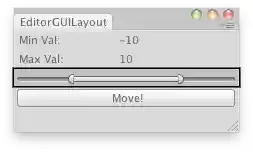
Moves the selected object randomly betweeen the interval.
// Place the selected object randomly between the interval of the Min Max Slider // in the X,Y,Z coordsusing UnityEditor; using UnityEngine;
public class ExampleClass : EditorWindow { float minVal = -10; float minLimit = -20; float maxVal = 10; float maxLimit = 20;
[MenuItem("Examples/Place Object Randomly")] static void Init() { ExampleClass window = (ExampleClass)GetWindow(typeof(ExampleClass)); window.Show(); }
void OnGUI() { EditorGUILayout.LabelField("Min Val:", minVal.ToString()); EditorGUILayout.LabelField("Max Val:", maxVal.ToString()); EditorGUILayout.MinMaxSlider(ref minVal, ref maxVal, minLimit, maxLimit); if (GUILayout.Button("Move!")) PlaceRandomly(); }
void PlaceRandomly() { if (Selection.activeTransform) Selection.activeTransform.position = new Vector3(Random.Range(minVal, maxVal), Random.Range(minVal, maxVal), Random.Range(minVal, maxVal)); else Debug.LogError("Select a GameObject to randomize its position."); } }