Sending Messages from a Session Bean to an MDB
This section explains how to write, compile, package, deploy, and run an application that uses the JMS API in conjunction with a session bean. The application contains the following components:
-
An application client that invokes a session bean
-
A session bean that publishes several messages to a topic
-
A message-driven bean that receives and processes the messages using a durable topic subscription and a message selector
You will find the source files for this section in the tut-install`/examples/jms/clientsessionmdb/` directory. Path names in this section are relative to this directory.
The following topics are addressed here:
Writing the Application Components for the clientsessionmdb Example
Figure 49-4 An Enterprise Bean Application: Client to Session Bean to Message-Driven Bean
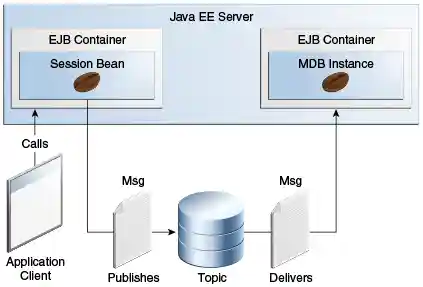
The Publisher enterprise bean in this example is the enterprise-application equivalent of a wire-service news feed that categorizes news events into six news categories. The message-driven bean could represent a newsroom, where the sports desk, for example, would set up a subscription for all news events pertaining to sports.
The application client in the example injects the Publisher enterprise
bean’s remote home interface and then calls the bean’s business method.
The enterprise bean creates 18 text messages. For each message, it sets
a String property randomly to one of six values representing the news
categories and then publishes the message to a topic. The message-driven
bean uses a message selector for the property to limit which of the
published messages will be delivered to it.
Coding the Application Client: MyAppClient.java
The application client, MyAppClient.java, found under
clientsessionmdb-app-client, performs no JMS API operations and so is
simpler than the client in Receiving
Messages Asynchronously Using a Message-Driven Bean. The client uses
dependency injection to obtain the Publisher enterprise bean’s business
interface:
@EJB(name="PublisherRemote")
private static PublisherRemote publisher;
The client then calls the bean’s business method twice.
Coding the Publisher Session Bean
The Publisher bean is a stateless session bean that has one business method. The Publisher bean uses a remote interface rather than a local interface because it is accessed from the application client.
The remote interface, PublisherRemote.java, found under
clientsessionmdb-ejb, declares a single business method,
publishNews.
The bean class, PublisherBean.java, also found under
clientsessionmdb-ejb, implements the publishNews method and its
helper method chooseType. The bean class injects SessionContext and
Topic resources (the topic is defined in the message-driven bean). It
then injects a JMSContext, which uses the preconfigured default
connection factory unless you specify otherwise. The bean class begins
as follows:
@Stateless
@Remote({
    PublisherRemote.class
})
public class PublisherBean implements PublisherRemote {

    @Resource
    private SessionContext sc;
    @Resource(lookup = "java:module/jms/newsTopic")
    private Topic topic;
    @Inject
    private JMSContext context;
    ...
The business method publishNews creates a JMSProducer and publishes
the messages.
Coding the Message-Driven Bean: MessageBean.java
The message-driven bean class, MessageBean.java, found under
clientsessionmdb-ejb, is almost identical to the one in
Receiving Messages Asynchronously Using a
Message-Driven Bean. However, the @MessageDriven annotation is
different, because instead of a queue, the bean is using a topic, a
durable subscription, and a message selector. The bean defines a topic
for the use of the application; the definition uses the java:module
scope because both the session bean and the message-driven bean are in
the same module. Because the destination is defined in the
message-driven bean, the @MessageDriven annotation uses the
destinationLookup activation config property. (See
Creating Resources for Java EE
Applications for more information.) The annotation also sets the
activation config properties messageSelector,
subscriptionDurability, clientId, and subscriptionName, as
follows:
@JMSDestinationDefinition(
        name = "java:module/jms/newsTopic",
        interfaceName = "javax.jms.Topic",
        destinationName = "PhysicalNewsTopic")
@MessageDriven(activationConfig = {
    @ActivationConfigProperty(propertyName = "destinationLookup",
            propertyValue = "java:module/jms/newsTopic"),
    @ActivationConfigProperty(propertyName = "destinationType",
            propertyValue = "javax.jms.Topic"),
    @ActivationConfigProperty(propertyName = "messageSelector",
            propertyValue = "NewsType = 'Sports' OR NewsType = 'Opinion'"),
    @ActivationConfigProperty(propertyName = "subscriptionDurability",
            propertyValue = "Durable"),
    @ActivationConfigProperty(propertyName = "clientId",
            propertyValue = "MyID"),
    @ActivationConfigProperty(propertyName = "subscriptionName",
            propertyValue = "MySub")
})
The topic is the one defined in the PublisherBean. The message
selector in this case represents both the sports and opinion desks, just
to demonstrate the syntax of message selectors.
The JMS resource adapter uses these properties to create a connection factory for the message-driven bean that allows the bean to use a durable subscription.
Running the clientsessionmdb Example
You can use either NetBeans IDE or Maven to build, deploy, and run the
simplemessage example.
This example uses an annotation-defined topic and the preconfigured
default connection factory java:comp/DefaultJMSConnectionFactory, so
you do not have to create resources for it.
The following topics are addressed here:
To Run clientsessionmdb Using NetBeans IDE
-
Make sure that GlassFish Server has been started (see Starting and Stopping GlassFish Server).
-
From the File menu, choose Open Project.
-
In the Open Project dialog box, navigate to:
tut-install/examples/jms/clientsessionmdb -
Select the
clientsessionmdbfolder. -
Make sure that the Open Required Projects check box is selected, then click Open Project.
-
In the Projects tab, right-click the
clientsessionmdbproject and select Build. (If NetBeans IDE suggests that you run a priming build, click the box to do so.)This command creates the following:
-
An application client JAR file that contains the client class file and the session bean’s remote interface, along with a manifest file that specifies the main class and places the EJB JAR file in its classpath
-
An EJB JAR file that contains both the session bean and the message-driven bean
-
An application EAR file that contains the two JAR files
The
clientsessionmdb.earfile is created in theclientsessionmdb-ear/target/directory.The command then deploys the EAR file, retrieves the client stubs, and runs the client.
The client displays these lines:
To view the bean output,
 check <install_dir>/domains/domain1/logs/server.log.
The output from the enterprise beans appears in the server log file. The Publisher session bean sends two sets of 18 messages numbered 0 through
-
-
Because of the message selector, the message-driven bean receives only the messages whose
NewsTypeproperty isSportsorOpinion. -
Use the Services tab to undeploy the application after you have finished running it.
To Run clientsessionmdb Using Maven
-
Make sure that GlassFish Server has been started (see Starting and Stopping GlassFish Server).
-
Go to the following directory:
tut-install/examples/jms/clientsessionmdb/ -
To compile the source files and package, deploy, and run the application, enter the following command:
This command creates the following:
-
An application client JAR file that contains the client class file and the session bean’s remote interface, along with a manifest file that specifies the main class and places the EJB JAR file in its classpath
-
An EJB JAR file that contains both the session bean and the message-driven bean
-
An application EAR file that contains the two JAR files
The
clientsessionmdb.earfile is created in theclientsessionmdb-ear/target/directory.The command then deploys the EAR file, retrieves the client stubs, and runs the client.
The client displays these lines:
To view the bean output,
 check <install_dir>/domains/domain1/logs/server.log.
The output from the enterprise beans appears in the server log file. The Publisher session bean sends two sets of 18 messages numbered 0 through
-
-
Because of the message selector, the message-driven bean receives only the messages whose
NewsTypeproperty isSportsorOpinion. -
Undeploy the application after you have finished running it: