Download PeaZip Portable free RAR ZIP files archiver utility
PeaZip
Portable, WinRar WinZip
alternative file archiver
What is PeaZip Portable
file archiver
PeaZip Portable
is
a standalone totally self-contained
software file
archiver utility: compress files, open and extract 200+ archive
types, convert
existing archives, encrypt files,
secure delete, file
spanning (split and join volumes),
etc...
file
archiver utility: compress files, open and extract 200+ archive
types, convert
existing archives, encrypt files,
secure delete, file
spanning (split and join volumes),
etc...
This software provieds a complete portable alternative for
WinZip, WinRar and similar tools, with additional advantage of no
installation being required to use the application.
Portable packages are also available on Linux paltform, while DMG packages for macOS can be either installed or used as portable apps.
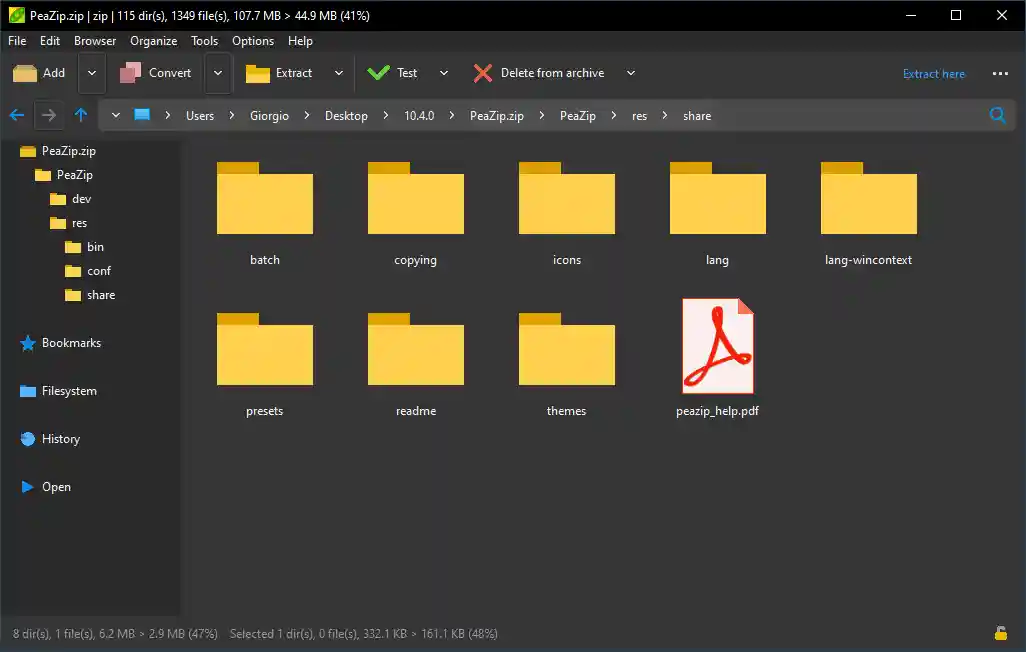
PeaZip Portable running in dark mode on
Windows 10+ system.
Dark mode is also supported on pre-W10 systems using dark system themes.
Fearurs provided by the Portable packages
The portable
version provides same
set of features and
supports same file formats - 7Z, ACE(*), BR, CAB, ISO, RAR / RAR5(**),
sfx
self
extracting archives, TAR, ZIP,
ZIPX, ZST... -
as PeaZip but, as it does not
need to be
installed, it does not modify the
host system.
Advantages in running a Portable package
Portable
pakages are
the
best solution
to bring a complete free zip / rar software with you (i.e. on
an USB drive), make it available
from network (a single copy on a shared disk for multiple clients), or
simply to try the application's features.
For same
reason
this standalone package is
the best choice whenever it is not allowed or desired to
modify the host machine's operating system:
no installation is
required to run the program.
How to use PeaZip free, portable RAR ZIP files utility
"Install" PeaZip Portable
To use this portable file
archiver utility
is very easy, as no installation is needed: just extract the
software package (i.e.
with
integrated Microsoft's Windows Compressed Folders utility) to the
desired directory, and simply start
peazip.exe executable - file extension may be hidden on your device.
Use PeaZip Portable
Once the program folder is unzipped, PeaZip Portable can
replace
file archivers utilities like WinRar and WinZip for file compression,
extraction, and archive
management functions, working with 200+ archive formats including
popular 7Z, ACE, BR, CAB, ISO,
RAR, TAR, WIM,
ZIP, ZIPX, ZST... and provides
its
usual set of advanced security features (encrypt / decrypt files,
secure
delete, file hashing,
encrypted password manager).
Remove PeaZip Portable
To
remove the program, after use or when it is no longer needed,
simply delete it i.e. moving PeaZip Portable application folder to
Recycle
Bin.
It is possible to use PeaZip from
command line and scripts, example scripts for supported platforms
are provided in (peazip)/res/share/batch folder, being (peazip) the
folder where PeaZip Portable is saved.
If desired, those scripts also allows to manually integrate PeaZip
Portable in the host system's context menu and SendTo menu as
effectively as the installable versions.
PeaZip Portable
for Windows downloads notes
PeaZip Portable file archiver 64 bit version requires a 64 bit MS Windows operating system (WIN64), this property can be easily verified rightclicking on Computer icon and selecting Properties, or from System entry in Control Panel, which displays detailed device's properties.
WIN64 version is faster than the 32 bit version, the latter should be used only for legacy Windows 32 bit systems.
Linux and macOS sections provides PeaZip Portable downloads for non-Windows systems.
See complete change log and release notes for list of updates and new features of PeaZip Portable.
PeaZip Portable file archiver is freeware software and it is released under Open Source license LGPLv3, that means this program is free of charge for any use (personal and professional, business and government, etc...), modification, and distribution.This application is intended as alternative to proprietary file archivers like WinZip and WinRar, and their respective portable versions. It open and extract RAR, ACE, ZIPX and other proprietary file archive formats and can convert them to alternative archiving / compression open formats like 7Z, TAR, or ZIP, non encumbered by i.p. patents or licensing limitations.Download PeaZip Portable from PortableApps
As alternative to downloads form main software repository, this application is also available as PortableApps PeaZip Portable PAF package, which automatically decompress needed files and integrates the program in PortableApps' utilities suite.
(*) ACE files extraction requires separate Portable UNACE opener plugin
(separate download is required as unace
code licensing is incompatible with LGPLv3), downloadable from add-ons page.
(**) RAR files creation with PeaZip
is possible if WinRar (installed or
portable) is available in the system - alternatively the user can copy
Rar.exe to PeaZip Portable path. Autonomous support for rar compression
is not possible due to constrains of rar licensing.
To open and extract RAR files (and new
RAR5
format) is supported out of the box without need of extra software
components..
Alternative Portable
UNRAR5 opener plugin, based on (WinRar) RarLab's unrar code
(incompatible with
LGPLv3), can be downloaded from add-ons page as alternative for 7-Zip /
p7zip
open source unrar implementation, if desired by the user.
Synopsis: Download page
of PeaZip Portable file archiver utility packages. Portable free rar
zip files utility, no installation needed. Portable WinRar WinZip
alternative file archiver software not requiring installation.
Topics: PeaZip Portable
packages for Windows, no installation required, portable winrar winzip
alternative
PeaZip > Downloads
> Download PeaZip Portable free RAR ZIP files archiver utility
| RECOMMENDED PAGES | LINUX WINRAR WINZIP ALTERNATIVE |
DOWNLOAD WINDOWS FILE ARCHIVER |
PORTABLE ZIP FILES UTILITY |
| FREE RAR PORTABLE |
MACOS WINRAR WINZIP ALTERNATIVE APP |
PORTABLE TAR SOFTWARE | PORTABLE 7Z ARCHIVER UTILITY |