Note
Go to the end to download the full example code.
Created On: Mar 24, 2017 | Last Updated: Oct 21, 2024 | Last Verified: Nov 05, 2024
Author: Sean Robertson
This tutorials is part of a three-part series:
NLP From Scratch: Classifying Names with a Character-Level RNN
NLP From Scratch: Generating Names with a Character-Level RNN
NLP From Scratch: Translation with a Sequence to Sequence Network and Attention
This is our second of three tutorials on “NLP From Scratch”. In the first tutorial we used a RNN to classify names into their language of origin. This time we’ll turn around and generate names from languages.
> python sample.py Russian RUS
Rovakov
Uantov
Shavakov

> python sample.py German GER
Gerren
Ereng
Rosher

> python sample.py Spanish SPA
Salla
Parer
Allan

> python sample.py Chinese CHI
Chan
Hang
Iun
We are still hand-crafting a small RNN with a few linear layers. The big difference is instead of predicting a category after reading in all the letters of a name, we input a category and output one letter at a time. Recurrently predicting characters to form language (this could also be done with words or other higher order constructs) is often referred to as a “language model”.
Recommended Reading:
I assume you have at least installed PyTorch, know Python, and understand Tensors:
https://pytorch.org/ For installation instructions
Deep Learning with PyTorch: A 60 Minute Blitz to get started with PyTorch in general
Learning PyTorch with Examples for a wide and deep overview
PyTorch for Former Torch Users if you are former Lua Torch user
It would also be useful to know about RNNs and how they work:
The Unreasonable Effectiveness of Recurrent Neural Networks shows a bunch of real life examples
Understanding LSTM Networks is about LSTMs specifically but also informative about RNNs in general
I also suggest the previous tutorial, NLP From Scratch: Classifying Names with a Character-Level RNN
Preparing the Data#
Note
Download the data from here and extract it to the current directory.
See the last tutorial for more detail of this process. In short, there
are a bunch of plain text files data/names/[Language].txt with a
name per line. We split lines into an array, convert Unicode to ASCII,
and end up with a dictionary {language: [names ...]}.
from io import open
import glob
import os
import unicodedata
import string

all_letters = string.ascii_letters + " .,;'-"
n_letters = len(all_letters) + 1 # Plus EOS marker

def findFiles(path): return glob.glob(path)

# Turn a Unicode string to plain ASCII, thanks to https://stackoverflow.com/a/518232/2809427
def unicodeToAscii(s):
    return ''.join(
        c for c in unicodedata.normalize('NFD', s)
        if unicodedata.category(c) != 'Mn'
        and c in all_letters
    )

# Read a file and split into lines
def readLines(filename):
    with open(filename, encoding='utf-8') as some_file:
        return [unicodeToAscii(line.strip()) for line in some_file]

# Build the category_lines dictionary, a list of lines per category
category_lines = {}
all_categories = []
for filename in findFiles('data/names/*.txt'):
    category = os.path.splitext(os.path.basename(filename))[0]
    all_categories.append(category)
    lines = readLines(filename)
    category_lines[category] = lines

n_categories = len(all_categories)

if n_categories == 0:
    raise RuntimeError('Data not found. Make sure that you downloaded data '
        'from https://download.pytorch.org/tutorial/data.zip and extract it to '
        'the current directory.')

print('# categories:', n_categories, all_categories)
print(unicodeToAscii("O'Néàl"))
# categories: 18 ['Arabic', 'Chinese', 'Czech', 'Dutch', 'English', 'French', 'German', 'Greek', 'Irish', 'Italian', 'Japanese', 'Korean', 'Polish', 'Portuguese', 'Russian', 'Scottish', 'Spanish', 'Vietnamese']
O'Neal
Creating the Network#
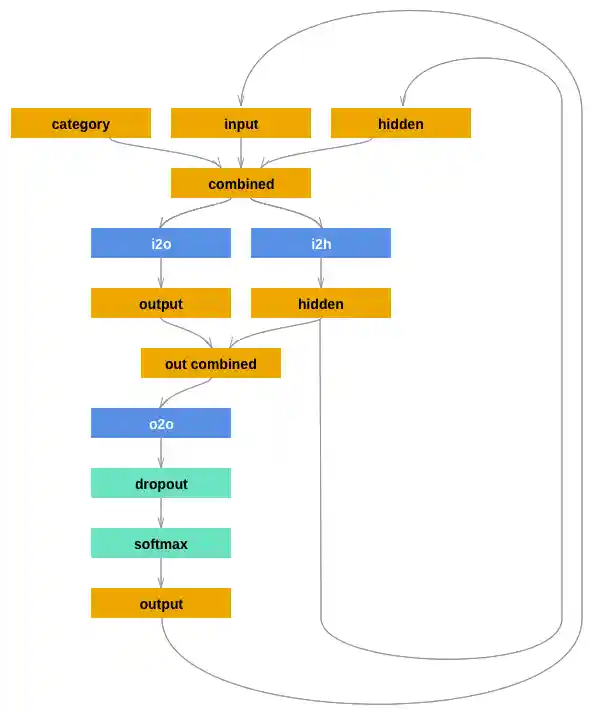
This network extends the last tutorial’s RNN with an extra argument for the category tensor, which is concatenated along with the others. The category tensor is a one-hot vector just like the letter input.
We will interpret the output as the probability of the next letter. When sampling, the most likely output letter is used as the next input letter.
I added a second linear layer o2o (after combining hidden and
output) to give it more muscle to work with. There’s also a dropout
layer, which randomly zeros parts of its
input with a given probability
(here 0.1) and is usually used to fuzz inputs to prevent overfitting.
Here we’re using it towards the end of the network to purposely add some
chaos and increase sampling variety.
import torch
import torch.nn as nn

class RNN(nn.Module):
    def __init__(self, input_size, hidden_size, output_size):
        super(RNN, self).__init__()
        self.hidden_size = hidden_size

        self.i2h = nn.Linear(n_categories + input_size + hidden_size, hidden_size)
        self.i2o = nn.Linear(n_categories + input_size + hidden_size, output_size)
        self.o2o = nn.Linear(hidden_size + output_size, output_size)
        self.dropout = nn.Dropout(0.1)
        self.softmax = nn.LogSoftmax(dim=1)

    def forward(self, category, input, hidden):
        input_combined = torch.cat((category, input, hidden), 1)
        hidden = self.i2h(input_combined)
        output = self.i2o(input_combined)
        output_combined = torch.cat((hidden, output), 1)
        output = self.o2o(output_combined)
        output = self.dropout(output)
        output = self.softmax(output)
        return output, hidden

    def initHidden(self):
        return torch.zeros(1, self.hidden_size)
Training#
Preparing for Training#
First of all, helper functions to get random pairs of (category, line):
import random

# Random item from a list
def randomChoice(l):
    return l[random.randint(0, len(l) - 1)]

# Get a random category and random line from that category
def randomTrainingPair():
    category = randomChoice(all_categories)
    line = randomChoice(category_lines[category])
    return category, line
For each timestep (that is, for each letter in a training word) the
inputs of the network will be
(category, current letter, hidden state) and the outputs will be
(next letter, next hidden state). So for each training set, we’ll
need the category, a set of input letters, and a set of output/target
letters.
Since we are predicting the next letter from the current letter for each
timestep, the letter pairs are groups of consecutive letters from the
line - e.g. for "ABCD<EOS>" we would create (“A”, “B”), (“B”, “C”),
(“C”, “D”), (“D”, “EOS”).

The category tensor is a one-hot
tensor of size
<1 x n_categories>. When training we feed it to the network at every
timestep - this is a design choice, it could have been included as part
of initial hidden state or some other strategy.
# One-hot vector for category
def categoryTensor(category):
    li = all_categories.index(category)
    tensor = torch.zeros(1, n_categories)
    tensor[0][li] = 1
    return tensor

# One-hot matrix of first to last letters (not including EOS) for input
def inputTensor(line):
    tensor = torch.zeros(len(line), 1, n_letters)
    for li in range(len(line)):
        letter = line[li]
        tensor[li][0][all_letters.find(letter)] = 1
    return tensor

# ``LongTensor`` of second letter to end (EOS) for target
def targetTensor(line):
    letter_indexes = [all_letters.find(line[li]) for li in range(1, len(line))]
    letter_indexes.append(n_letters - 1) # EOS
    return torch.LongTensor(letter_indexes)
For convenience during training we’ll make a randomTrainingExample
function that fetches a random (category, line) pair and turns them into
the required (category, input, target) tensors.
# Make category, input, and target tensors from a random category, line pair
def randomTrainingExample():
    category, line = randomTrainingPair()
    category_tensor = categoryTensor(category)
    input_line_tensor = inputTensor(line)
    target_line_tensor = targetTensor(line)
    return category_tensor, input_line_tensor, target_line_tensor
Training the Network#
In contrast to classification, where only the last output is used, we are making a prediction at every step, so we are calculating loss at every step.
The magic of autograd allows you to simply sum these losses at each step and call backward at the end.
criterion = nn.NLLLoss()

learning_rate = 0.0005

def train(category_tensor, input_line_tensor, target_line_tensor):
    target_line_tensor.unsqueeze_(-1)
    hidden = rnn.initHidden()

    rnn.zero_grad()

    loss = torch.Tensor([0]) # you can also just simply use ``loss = 0``

    for i in range(input_line_tensor.size(0)):
        output, hidden = rnn(category_tensor, input_line_tensor[i], hidden)
        l = criterion(output, target_line_tensor[i])
        loss += l

    loss.backward()

    for p in rnn.parameters():
        p.data.add_(p.grad.data, alpha=-learning_rate)

    return output, loss.item() / input_line_tensor.size(0)
To keep track of how long training takes I am adding a
timeSince(timestamp) function which returns a human readable string:
import time
import math

def timeSince(since):
    now = time.time()
    s = now - since
    m = math.floor(s / 60)
    s -= m * 60
    return '%dm %ds' % (m, s)
Training is business as usual - call train a bunch of times and wait a
few minutes, printing the current time and loss every print_every
examples, and keeping store of an average loss per plot_every examples
in all_losses for plotting later.
rnn = RNN(n_letters, 128, n_letters)

n_iters = 100000
print_every = 5000
plot_every = 500
all_losses = []
total_loss = 0 # Reset every ``plot_every`` ``iters``

start = time.time()

for iter in range(1, n_iters + 1):
    output, loss = train(*randomTrainingExample())
    total_loss += loss

    if iter % print_every == 0:
        print('%s (%d %d%%) %.4f' % (timeSince(start), iter, iter / n_iters * 100, loss))

    if iter % plot_every == 0:
        all_losses.append(total_loss / plot_every)
        total_loss = 0
0m 10s (5000 5%) 2.9304
0m 21s (10000 10%) 2.7690
0m 32s (15000 15%) 2.1270
0m 42s (20000 20%) 2.7439
0m 52s (25000 25%) 2.1752
1m 2s (30000 30%) 3.1180
1m 12s (35000 35%) 2.0575
1m 22s (40000 40%) 1.8594
1m 33s (45000 45%) 2.9141
1m 43s (50000 50%) 3.1445
1m 53s (55000 55%) 3.2892
2m 3s (60000 60%) 1.5951
2m 13s (65000 65%) 2.8344
2m 24s (70000 70%) 2.7704
2m 34s (75000 75%) 2.1214
2m 44s (80000 80%) 2.6153
2m 54s (85000 85%) 2.1778
3m 4s (90000 90%) 2.4872
3m 14s (95000 95%) 2.8194
3m 25s (100000 100%) 2.7668
Plotting the Losses#
Plotting the historical loss from all_losses shows the network learning:
import matplotlib.pyplot as plt

plt.figure()
plt.plot(all_losses)

[<matplotlib.lines.Line2D object at 0x7ff5c11b7b20>]
Sampling the Network#
To sample we give the network a letter and ask what the next one is, feed that in as the next letter, and repeat until the EOS token.
Create tensors for input category, starting letter, and empty hidden state
Create a string
output_namewith the starting letterUp to a maximum output length,
Feed the current letter to the network
Get the next letter from highest output, and next hidden state
If the letter is EOS, stop here
If a regular letter, add to
output_nameand continue
Return the final name
Note
Rather than having to give it a starting letter, another strategy would have been to include a “start of string” token in training and have the network choose its own starting letter.
max_length = 20

# Sample from a category and starting letter
def sample(category, start_letter='A'):
    with torch.no_grad():  # no need to track history in sampling
        category_tensor = categoryTensor(category)
        input = inputTensor(start_letter)
        hidden = rnn.initHidden()

        output_name = start_letter

        for i in range(max_length):
            output, hidden = rnn(category_tensor, input[0], hidden)
            topv, topi = output.topk(1)
            topi = topi[0][0]
            if topi == n_letters - 1:
                break
            else:
                letter = all_letters[topi]
                output_name += letter
            input = inputTensor(letter)

        return output_name

# Get multiple samples from one category and multiple starting letters
def samples(category, start_letters='ABC'):
    for start_letter in start_letters:
        print(sample(category, start_letter))

samples('Russian', 'RUS')

samples('German', 'GER')

samples('Spanish', 'SPA')

samples('Chinese', 'CHI')
Rovako
Uarino
Santanov
Gerre
Eren
Rong
Salla
Pare
Aller
Cha
Han
Iuo
Exercises#
Try with a different dataset of category -> line, for example:
Fictional series -> Character name
Part of speech -> Word
Country -> City
Use a “start of sentence” token so that sampling can be done without choosing a start letter
Get better results with a bigger and/or better shaped network
Try the
nn.LSTMandnn.GRUlayersCombine multiple of these RNNs as a higher level network
Total running time of the script: (3 minutes 25.199 seconds)