CSS Tutorial
Last Updated : 26 Dec 2025
This CSS tutorial (CSS3 tutorial) covers both basic and advanced CSS concepts, including layout techniques and responsive design. It is suitable for beginners learning web design and for professionals who want to strengthen their front-end development skills.
Relationship Between HTML and CSS
HTML is a markup language used to create the basic structure of a web page, such as headings, paragraphs, images, and links. However, HTML alone cannot control the appearance of these elements. Pages created only with HTML look plain and lack proper layout, colors, and formatting.
CSS works together with HTML to style web content. It allows developers to separate content from design, resulting in cleaner code and better maintainability.
What CSS Is Used For?
CSS is used to control the layout, colors, fonts, spacing, and alignment of web pages. It helps in creating responsive designs that adapt to different screen sizes like mobile, tablet, and desktop. CSS is also used to add transitions, animations, and visual effects that improve user experience.

What is CSS?
The major points of CSS are given below:
- CSS stands for Cascading Style Sheet.
- CSS is a widely used language on the web.
- CSS helps web designers to apply style to HTML tags.
- CSS is utilized to make a responsive website.
How does CSS help to improve a website?
We will comprehend this with the help of an example.
Let us write the HTML code:
Example
Output:
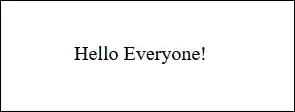
The text looks plain without CSS. Now, we will use CSS to enhance the look of the text.
Let us write the CSS code inside the <style> tag:
Example
Output:
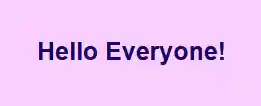
Now we can clearly see that after writing the CSS code, the text appears colourful and larger. The background is also colorful. That's how CSS improves a website and makes it look better. That is the magic of CSS.
Why learn CSS?
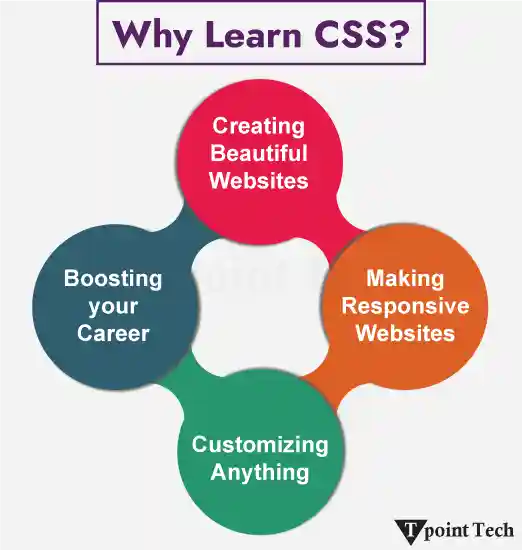
- Creating Beautiful Websites: The structure of the web page is created using HTML but if you want to make a colourful website then CSS is used. It controls the visual style of the page. It adds colors, fonts, animations and more to HTML tags.
- Making Responsive Websites: CSS is used to make responsive websites which means it makes mobile-friendly design that adapts to all sizes of screens such as phones, laptops, tablets, etc.
- Customizing Anything: It is utilized to customize web pages like creating a dark theme, stylish menus, animated text and more.
- Boosting your Career: If you want to be a web developer or UI/UX designer then you must learn CSS because it is a must-have skill in the tech world.
Applications of CSS
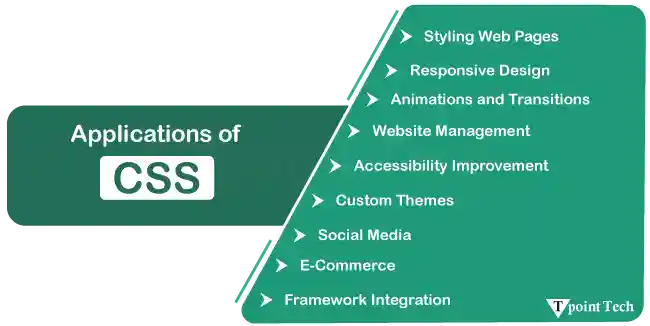
Styling Web Pages: CSS is used to style the HTML elements on the web pages such as text color, background color, fonts, layouts, spacing, borders, animation, etc. The CSS controls and enhances the look of the web page to make it interactive and engaging.
Responsive Design: CSS is utilized to make web pages fit different sizes of screens such as mobile, laptop, tablet, etc. We can use CSS media queries to make responsive web pages for a better user experience for different devices.
Animations and Transitions: CSS is utilized to create smooth effects on a web page to make it more interactive, even without the help of JavaScript. It is used to create the impact like hover effects, button click animations, fade-ins, etc.
Website Management: CSS helps to manage and maintain the style of the website efficiently. A separate file of CSS can be generated other than an HTML file. If, in the future, you want to update the designs of a website then you can change the designs such as updating font style, background color, etc., in the CSS file which helps in saving time and effort.
Accessibility Improvement: CSS helps in creating accessible web pages by giving permission to alter the style without affecting the underlying HTML. CSS makes content readable, font scaling, etc. CSS helps in making websites usable for people with disabilities such as giving alt text for images, color contrast modes, etc.
Custom Themes: CSS allows to create the custom themes such as light or dark modes. This design gives control to users so that they can adjust the site's appearance.
Social Media: CSS is utilized in making social media design. It can create a share button and feed previews to make the appealing page. Many social media have already used it such as Twitter, Facebook, Instagram, etc.
E-Commerce: CSS is utilized to make visually attractive product pages, shopping carts, checkout forms, etc. It creates a clean interface which gains the trust of users. It is utilized to create designs such as highlighted discounts, buy buttons, etc., to attract users.
Framework Integration: CSS works with frameworks such as Tailwind CSS, Bootstrap, Materialize, etc. These frameworks contain predefined classes and utilities that help speed up the creation of responsive websites.
CSS Versions
There are several versions of CSS. They are as follows:

- CSS1: It is the first version, which was introduced on December 17, 1996. The features it brought were basic styling properties for font, texts and the concepts of selectors.
- CSS2: It is the second version, which was introduced on May 12, 1998. The features it brought were display property, pseudo-classes, pseudo-elements, etc.
- 2.1: It is the third version, which was introduced on June 7, 2011. The features it brought were colour properties, e.g., rgba(), hsl(). This version standardized box model properties and improved cross-browser compatibility.
- CSS3: The fourth version, which was introduced at the start of 1999. It is the latest version. It brought the collection of modules, such as Selector, Box-Model, Backgrounds and Borders, 2DTransformations, Grid Layout, etc.
- CSS4 (Upcoming): CSS4 is an upcoming version. The particular modules and features are in development. It may add some improvement to the existing modules and new features.
- CSS5 (Planned): It is not officially announced but represents the future development of CSS. It will include further enhancements and capabilities.
Types of CSS
There are basically three types of CSS. They are as follows:
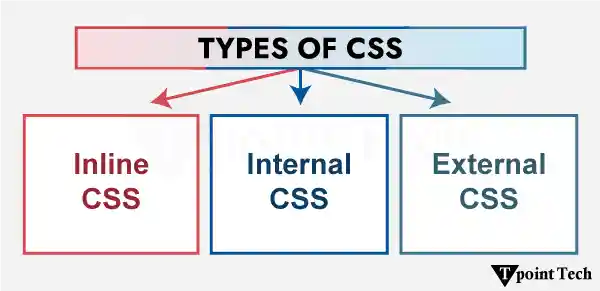
1. Inline CSS: It is defined straight to an HTML element in the HTML file. The style attribute is used to apply it. The inline CSS has the highest priority.
Example:
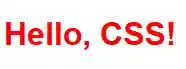
In the example below, we will give color to the text utilizing inline CSS.
Code:
Example
Output:
2. Internal CSS: The code of internal CSS is written in the HTML file by the developers. The <style> tag is utilized by the developer to define it. In the <head> tag, the <style> tag is defined, and within that, we write CSS code.
Example:
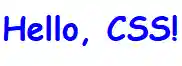
In the example below, we will give color and font-family to the text utilizing Internal CSS.
Code:
Example
Output:
3. External CSS: A separate file is created to define the external CSS using .CSS extension. The <link> tag is utilized by the developer to link this file to the HTML document. External CSS is the recommended method to define CSS for large projects because it makes it easy to maintain and update the style across several pages.
Example:
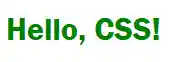
In the below example, we will give color and font-family to the text utilizing External CSS. We will define the relationship between HTML and CSS utilizing the <link> tag.
HTML Code File:
Example
styles.css File:
Output:
Note: The style of inline CSS has a higher priority among the three. The internal CSS has more priority than the external CSS.
CSS Properties
The CSS properties are the backbone of web design. It is used to define the structure or layout of the web page, and it controls the behavior of HTML elements.
The list of some basic properties is given below:
Text Properties
| Property | Descriptions |
|---|---|
| color | It sets the text color. |
| text-align | It horizontally aligns the text. e.g., left, right, center, justify. |
| line-height | It is utilized by the developer to give the gap between lines. |
| letter-spacing | It is utilized by the developer to give the spaces between characters. |
| text-decoration | It is utilized by the developer to decorate the text e.g., none, underline, etc. |
| text-transform | It is utilized by the developer to define the uppercase and lowercase letters in a text. |
Font Properties:
| Property | Descriptions |
|---|---|
| font | It is a shorthand property which is utilized by the developer to give all the font-properties in one declaration. |
| font-family | It is utilized by the developer to give the font family. |
| font-size | It is utilized by the developer to give the size to text. |
| font-style | It is utilized by the developer to style the text. |
| font-weight | It is utilized by the developer to specify the weight of a font such as thickness and boldness. |
List Properties:
| Property | Descriptions |
|---|---|
| list-style | It is a shorthand property which is utilized to set all properties in one declaration. |
| list-style-type | It is utilized by the developer to define the type of list-item, e.g., none, disc, square, circle, etc. |
| list-style-position | It is utilized to define the position of the list-item markers. |
| list-style-image | It is utilized by the developer to define an image as the list-item marker. |
Border Properties:
| Property | Descriptions |
|---|---|
| border | It is a shorthand property for border width, style and color. It is utilized by the developer to set the border properties in one declaration. |
| border-width | It is utilized to give width to all borders. |
| border-color | It is utilized by the developer to give the color to all the borders of a box. |
| border-style | It is utilized by the developer to style all borders of the box. |
| border-bottom | It is a shorthand property for bottom border width, style and color utilized by the developer to set the bottom border properties in one declaration. |
| border-bottom-width | It is utilized to give width to bottom border. |
| border-bottom-color | The developer makes use of it to give the color to the bottom border. |
| border-bottom-style | The developer makes use of it to style the bottom border. |
| border-left | It is a shorthand property left border width, style and color utilized by the developer to set all the properties of the left-border in one declaration. |
| border-left-width | It is utilized to give width to left border. |
| border-left-color | It is utilized by the developer to give the color to the left border. |
| border-left-style | It is utilized by the developer to style the left border. |
| border-right | It is a shorthand property for right border width, style and color utilized by the developer to set all the right border properties in one declaration. |
| border-right-width | It is utilized to give width to right border. |
| border-right-color | The developer makes use of it to give the color to the right-border. |
| border-right-style | It is utilized by the developer to style the right border. |
| border-top | It is a shorthand property for top border width, style and color utilized by the developer to set all the top border properties in one declaration. |
| border-top-width | It is utilized to give width to top border. |
| border-top-color | The developer makes use of it to give the color to the top border. |
| border-top-style | It is utilized by the developer to style the top border. |
Career Opportunity of learning CSS
After learning CSS, there are multiple career opportunities in Web development and design. CSS is a foundation skill for front-end development. If you want to build your career in the field of front-end development, web design, UX/ UI design, email development/ Design, etc., then you must learn this important skill.
CSS is used in frameworks and libraries like React.js, Vue.js, etc. These days, the demand for user-friendly digital experiences has arisen. Therefore, the companies are expecting that a candidate can style and optimize interfaces so CSS plays a vital role in web development.
Conclusion:
In this article, we have learnt CSS. We have covered various topics like all the versions of CSS, three types of CSS, its properties and career opportunities. CSS is one of the important skills for developing a front-end website.
FAQs:
Some of the frequently asked questions are given below:
1. What distinguishes between id and class?
The difference between id and class is that the id is the unique identity of an element whereas the same class can be given to multiple elements which means we can group all the same class elements and apply the same style.
2. What are CSS Selectors?
It is used to select elements based on their name, ID, attributes, class, tags, etc.
3. What is the Box model?
Every element in HTML is wrapped around a box model. A box model consists of the following:
- Content: It is the content, g., text, images etc.
- Padding: It is a whitespace around the content.
- Border: It is around the padding.
- Margin: It is around the border.
4. How can you integrate CSS into an HTML Page?
There are three methods to integrate CSS into an HTML page. They are as follows:
- Inline CSS
- Internal CSS
- External CSS
5. How can you make a website responsive?
CSS Media query is utilized to make a website responsive. The syntax is:
CSS Basics
- Introduction to CSS
- What is CSS
- CSS Syntax
- CSS Selector
- How to Add CSS
- Inline CSS
- Internal CSS
- External CSS
- CSS Comments
CSS Properties
- CSS Background
- CSS Border
- CSS border-radius
- CSS border-collapse
- CSS border-spacing
- CSS Display
- CSS Cursor Property with Example
- CSS Buttons
- CSS Float
- CSS Font
- CSS Font-size
- CSS font-family
- CSS font-weight
- CSS font-stretch
- CSS Colors
- CSS Hover
- CSS Important
- CSS Background-color
- background-attachment
- background-size
- CSS Line Height
- CSS Margin
- CSS Opacity
- CSS filter
- CSS Images
- CSS Overflow
- CSS Padding
- CSS Position
- CSS Vertical Align
- CSS White Space
- CSS Width
- CSS height
- CSS Word Wrap
- Box-shadow CSS
- CSS Text-shadow
- CSS text-transform
- CSS Outline
- CSS Visibility
- CSS Counter
CSS Advance
- CSS Animation
- CSS @keyframes rule
- CSS pseudo-classes
- CSS Pseudo-elements
- CSS radial-gradient
- CSS translate
- CSS Gradient
- CSS z-index
- CSS minify
- CSS Loader
- CSS units
- CSS Combinators
- CSS masking
- CSS Transition
- CSS Tooltips
- CSS Tooltip Animation
- CSS Arrow
- CSS FlexBox
- CSS flex property
- flex-basis property
- flex-grow property
- flex-shrink property
- flex-flow property
- CSS @Media Query
- CSS 2D Transforms
- CSS 3D Transforms
- CSS Aural Media
- CSS User Interface
- CSS Pagination
CSS Design
Interview Questions
CSS3 Tutorial
In this tutorial, we will learn CSS3 properties to design box model, apply opacity, radius, etc.
All CSS Properties
In this tutorial, you will get details of all CSS properties such as background, border, font, float, display, margin, opacity, padding, text-align, vertical-align, position, color, etc.
Prerequisite
Before learning CSS, you must have a basic knowledge of HTML.
Audience
Our CSS tutorial is designed to help beginners and professionals both.
Problem
If you find any problem or mistake in our CSS tutorial, you can report it to us. We assure that you will not find any problem in the CSS tutorial.
Next TopicWhat is CSS