MySQL Tutorial | A Complete Guide for Beginners
Last Updated : 17 Mar 2025

MySQL tutorial provides basic and advanced concepts of MySQL. Our MySQL tutorial is designed for beginners and professionals.
MySQL is a relational database management system based on the Structured Query Language, which is the popular language for accessing and managing the records in the database. MySQL is open-source and free software under the GNU license. It is supported by Oracle Company.
Our MySQL tutorial includes all topics of MySQL database that provides for how to manage database and to manipulate data with the help of various SQL queries. These queries are: insert records, update records, delete records, select records, create tables, drop tables, etc. There are also given MySQL interview questions to help you better understand the MySQL database.
What is Database?
It is very important to understand the database before learning MySQL. A database is an application that stores the organized collection of records. It can be accessed and manage by the user very easily. It allows us to organize data into tables, rows, columns, and indexes to find the relevant information very quickly. Each database contains distinct API for performing database operations such as creating, managing, accessing, and searching the data it stores. Today, many databases available like MySQL, Sybase, Oracle, MongoDB, PostgreSQL, SQL Server, etc. In this section, we are going to focus on MySQL mainly.
What is MySQL?
MySQL is currently the most popular database management system software used for managing the relational database. It is open-source database software, which is supported by Oracle Company. It is fast, scalable, and easy to use database management system in comparison with Microsoft SQL Server and Oracle Database. It is commonly used in conjunction with PHP scripts for creating powerful and dynamic server-side or web-based enterprise applications.
It is developed, marketed, and supported by MySQL AB, a Swedish company, and written in C programming language and C++ programming language. The official pronunciation of MySQL is not the My Sequel; it is My Ess Que Ell. However, you can pronounce it in your way. Many small and big companies use MySQL. MySQL supports many Operating Systems like Windows, Linux, MacOS, etc. with C, C++, and Java languages.
MySQL is a Relational Database Management System (RDBMS) software that provides many things, which are as follows:
- It allows us to implement database operations on tables, rows, columns, and indexes.
- It defines the database relationship in the form of tables (collection of rows and columns), also known as relations.
- It provides the Referential Integrity between rows or columns of various tables.
- It allows us to updates the table indexes automatically.
- It uses many SQL queries and combines useful information from multiple tables for the end-users.
How MySQL Works?
MySQL follows the working of Client-Server Architecture. This model is designed for the end-users called clients to access the resources from a central computer known as a server using network services. Here, the clients make requests through a graphical user interface (GUI), and the server will give the desired output as soon as the instructions are matched. The process of MySQL environment is the same as the client-server model.
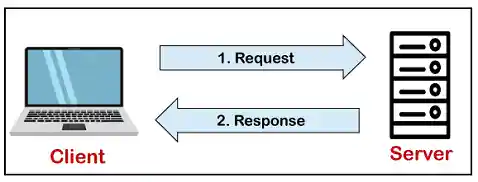
The core of the MySQL database is the MySQL Server. This server is available as a separate program and responsible for handling all the database instructions, statements, or commands. The working of MySQL database with MySQL Server are as follows:
- MySQL creates a database that allows you to build many tables to store and manipulate data and defining the relationship between each table.
- Clients make requests through the GUI screen or command prompt by using specific SQL expressions on MySQL.
- Finally, the server application will respond with the requested expressions and produce the desired result on the client-side.
A client can use any MySQL GUI. But, it is making sure that your GUI should be lighter and user-friendly to make your data management activities faster and easier. Some of the most widely used MySQL GUIs are MySQL Workbench, SequelPro, DBVisualizer, and the Navicat DB Admin Tool. Some GUIs are commercial, while some are free with limited functionality, and some are only compatible with MacOS. Thus, you can choose the GUI according to your needs.
Reasons for popularity
MySQL is becoming so popular because of these following reasons:
- MySQL is an open-source database, so you don't have to pay a single penny to use it.
- MySQL is a very powerful program that can handle a large set of functionality of the most expensive and powerful database packages.
- MySQL is customizable because it is an open-source database, and the open-source GPL license facilitates programmers to modify the SQL software according to their own specific environment.
- MySQL is quicker than other databases, so it can work well even with the large data set.
- MySQL supports many operating systems with many languages like PHP, PERL, C, C++, JAVA, etc.
- MySQL uses a standard form of the well-known SQL data language.
- MySQL is very friendly with PHP, the most popular language for web development.
- MySQL supports large databases, up to 50 million rows or more in a table. The default file size limit for a table is 4GB, but you can increase this (if your operating system can handle it) to a theoretical limit of 8 million terabytes (TB).
MySQL Basics
MySQL Database
MySQL Table & Views
MySQL Queries
MySQL Clauses
MySQL Conditions
MySQL Join
Aggregate Functions
Differences
Interview Questions
MySQL Date/Time Functions
- MySQL Date/Time
- DATE() function
- ADDDATE() function
- CURDATE() function
- CURRENT_DATE() function
- DATE_ADD() function
- DATE_FORMAT() function
- DATEDIFF() function
- DAY() function
- DAYNAME() function
- DAYOFMONTH() function
- DAYOFWEEK() function
- DAYOFYEAR() function
- From_days() function
- Hour() function
- ADDTIME() function
- CURRENT_TIME() function
- CURRENT_TIMESTAMP() function
- CURTIME() function
- last_day() function
- localtime() function
- localtimestamp() function
- makedate() function
- maketime() function
- microsecond() function
- minute() function
- month() function
- monthname() function
- now() function
- period_add() function
- period_diff() function
- quarter() function
- sec_to_time() function
- second() function
- str_to_date() function
- Subdate() function
- Subtime() function
- Sysdate() function
- time() function
- time_format() function
- time_to_sec() function
- timediff() function
- timestamp() function
- to_day() function
- weekday() function
- week() function
- weekofyear() function
MySQL Math Functions
- MySQL Math
- Math ABS() function
- Math ACOS() function
- Math SIGN() function
- Math SIN() function
- Math SQRT() function
- Math SUM() function
- Math TAN() function
- Math TRUNCATE() function
- Math ASIN() function
- Math ATAN2() function
- Math ATAN() function
- Math AVG() function
- Math CEIL() function
- Math CEILING() function
- Math COS() function
- Math COT() function
- Math COUNT() function
- Math DEGREES() function
- Math DIV() function
- Math EXP() function
- Math FLOOR() function
- Math GREATEST() function
- Math LEAST() function
- Math LN() function
- Math LOG10() function
- Math LOG() function
- Math LOG2() function
- Math MAX() function
- Math MIN() function
- Math MOD() function
- Math PI() function
- Math POWER() function
- Math POW() function
- Math RADIANS() function
- Math RAND() function
- Math ROUND() function
MSQL String Functions
- MySQL String
- String CONCAT_WS() function
- String CONCAT() function
- String CHARACTER_LENGTH() function
- String ELT() function
- String EXPORT_SET() function
- String FIELD() function
- String FIND_IN_SET() function
- String FORMAT() function
- String FROM_BASE64() function
- String HEX() function
- String INSERT() function
- String INSTR() function
- String LCASE() function
- String LEFT() function
- String LENGTH() function
- String like() function
- String LOAD_FILE() function
- String LOCATE() function
- String LOWER() function
- String LPAD() function
- String LTRIM() function
- String MAKE_SET() function
- String MID() function
- String OCTET_LENGTH() function
- String OCT() function
- String ORD() function
- String POSITION() function
- String QUOTE() function
- String REPEAT() function
- String REPLACE() function
- String REVERSE() function
- String RIGHT() function
- String RPAD() function
- String RTRIM() function
- String SOUNDEX() function
- String SPACE() function
- String STRCMP() function
- String SUBSTR() function
- String SUBSTRING_INDEX() function
- String SUBSTRING() function
- String Trim() function
- String UCASE() function
- String UNHEX() function
- String UPPER() function
Prerequisite
Before learning MySQL, you must have the basic knowledge of computer fundamentals.
Audience
Our MySQL tutorial is designed to help beginners and professionals.
Problem
We assure that you will not find any problem in this MySQL tutorial. But if there is any mistake, please post the problem in contact form.